Get Started with Creo+
All the resources you need to get started with Creo+
Destination or Printer: select Save as PDF
More Settings: In the Options, be sure the boxes Headers and footers and Background graphics are selected.
Steps on this page
Measure Business Metrics
01. Gather metrics
Review your measurement strategy after Creo+ is live and accessible to all end users.
Give end users time to get acquainted with Creo+ to ensure successful results. At a minimum, we recommend waiting 30 to 90 days to review how it is going with the main end users. This review period allows for adequate time to capture data and let the new processes take hold. This time can be extended based on the schedule you established in your measurement plan.
Consider the following:
-
How has Creo+ improved the design process?
-
Are engineers creating high-quality designs more efficiently and with fewer errors?
-
Is the number of requests for analysis decreasing?
-
What is the end user feedback on Creo+?
02. Evaluate metrics
Compare the baseline metrics to your current data to determine how much value Creo+ has provided so far. If you’re not achieving value, there are two potential reasons:
-
The set of metrics you chose may not be accurate
-
There may be another factor affecting the current outcome, such as end users not consistently using Creo+.
Investigate what the issue might be, reassess, and make adjustments.
At this point, confirm your goals have not changed from your initial measurement plan. Then, consider if they are still relevant, and adjust accordingly. If you do adjust your goals, give your stakeholders a clear explanation.
At the end of the project, we recommend summarizing the work in a post-upgrade review to help improve or jumpstart future upgrades. We recommend you note:
-
Who was part of the executing team and their responsibilities
-
What testing activities were completed for this project and the testing results
-
What errors or challenges occurred in the process and how they were resolved
-
What errors were reported to your technical support or product management teams
Revisit your original goals and measure the business impact of the project. For example, after training, how has the design process or time changed?
03. Review usage metrics
As your team continues to learn and use Creo+, we advise that CAD admins keep track of usage metrics from end users, as well as bugs or errors. To help your CAD admins, PTC provides Creo Performance Advisor, our product telemetry tool powered by PTC ThingWorx, to our customers.
With Creo Performance Advisor, a CAD admin can get aggregated views of usage and diagnostic data from Creo+ and other PTC products. Reports may include:
-
System stability
-
Engineer usage (session counts)
-
Unexpected crashes or errors
Making use of these reports and dashboards can help your team improve operational productivity by detecting performance issues early, predicting usage, and managing users accordingly.
Learn more about the Performance Advisor and how to access it in the PTC Creo Dashboard Environment.
- Performance Advisor Help Center
- PTC Creo Dashboard Environment eSupport PTC login required
04. Share results with stakeholders
Share the results and adjustments to your value propositions with the project sponsor, project team, organizational leaders, end users, and other stakeholders. It is important to share these results to inform stakeholders of Creo+ value. Reviewing these results can also help you strategize the next steps.
You can provide a clearer picture of value if you continue to measure and report your findings over time. In addition, continuing to communicate to the end users helps make the value of Creo+ real to them and reinforces the tool's usage.
Did you find this helpful?
Provide Support
Explore Next Steps
Steps on this page
Table of Contents
Overview: Get Started with Creo+
Use this guide as you plan, implement, and learn to use Creo+. Follow the step-by-step instructions and get resources to help you capture and share expert knowledge and meet your business goals.
This information is useful for:
-
CAD Administrators
-
Engineering Managers
-
Project Managers
-
Stakeholders
-
Technical staff
-
Engineers
What is a Success Path?
A Success Path is an online guide to help you implement a specific PTC product at your organization. Each path provides step-by-step instructions from the early planning stages all the way through to deployment. Use a Success Path to help your organization get the most out of a product and achieve your business goals.
Did you find this helpful?
Get Familiar with Creo+
PTC believes you deserve the best-in-class computer-aided design (CAD) software for your engineering team, and we make significant investments in improving every Creo release. Learn the basics of Creo+ and our new top-shelf features.
Before you begin, complete these steps:
01. Learn the basics
PTC created the first parametric and feature-based solid modeling CAD software in 3D CAD solutions on the market. Back then, it was called Pro/Engineer. Now, our industry-leading software is called Creo. Creo has continued its evolution and now takes advantage of SaaS as Creo+.
Creo+ is a full suite of solutions that integrates 3D CAD, computer-aided manufacturing (CAM), and computer- aided engineering (CAE) into one software. The variety of functionality, capabilities, and tools help engineers imagine, design, and create your products better.
02. Explore features and functionality
PTC's Creo+ is a global leader in Product Design 3D CAD software. Read how Creo+ helps re-invent how to design, create, and innovate better products with our broad range of functionalities:
-
Modeling and design: Build better products faster by accelerating product innovation, reusing the best of your design, and replacing assumptions with facts. Go from the earliest phases of product design to a smart, connected product with Creo+.
-
Simulation and analysis: With simulation, analyze and validate the performance of your 3D virtual prototypes, allowing you to iterate more quickly and design with greater confidence while saving money and time.
-
Augmented reality: Creo+ Augmented Reality (AR) Design Share is included in every seat of Creo+. Companies are changing their product design process to take advantage of this cloud-based technology. Turn a 3D model into an AR experience that everyone can access and use.
-
Smart connected design: When the power of CAD and IoT come together, you can access a feedback loop of how products are performing in the field, and see how they performed historically, enabling you to design more reliable products.
-
Additive manufacturing: With additive manufacturing, develop innovative designs, optimize, and print to a variety of printers with ease, all within Creo+.
-
Model-based definition: A model-based definition is an approach to creating 3D models so that they effectively contain all the data needed to define a product.
-
Collaboration: Atlas enables Creo users to work together in real time during the development process, leveraging the benefits of the cloud, and enabling richer communication across the organization in order to design more efficiently while ensuring a faster time to market.
Every year Creo+ makes it easier to do your job and helps make you more productive. We recommend reviewing the features available with each version of Creo+.
-
Read about what’s new in the latest release of Creo+ on the What’s New page.
-
Read technical details on Creo+ core features and functionality on the Help Center.
-
Explore PTC’s case studies to learn how our customers are improving their design with Creo.
Add-ons and extensions will expand your functionality once Creo+ is installed and adopted at your organization.
03. Explore Atlas environment
Atlas is the single, common platform powering PTC’s SaaS future. Driven by real-time collaboration across business functions with cloud-based applications of PTC technology that enables your teams to be more agile, innovate together, and scale faster.
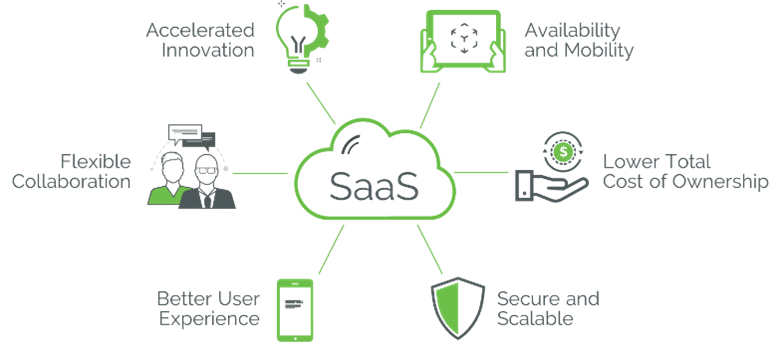
Atlas plays a critical role in PTC's SaaS future as the shared foundation underpinning our product portfolio. In the coming years, PTC's technologies will be made available via SaaS in a nearly seamless transition to you. Along the way, you will be able to take advantage of the benefits of SaaS through real time collaboration, incremental product and future deployments, and a lower cost of ownership.
Recommended Resources
- Latest Training Options for Creo+ PTC University PTC login required
- Creo Capabilities PTC University PTC login required
Assemble Your Team
Establish the project team that will be involved with getting end users set up and using Creo+. Consider hiring outside resources to fill in gaps and get expert guidance.
Before you begin, complete these steps:
01. Identify roles and responsibilities
You will need help from a variety of people to pursue your use case and persuade others to use Creo+. Your team is one of the most critical components of a successful deployment of Creo+.
One person may fill more than one of these roles, or you may have several contributors assigned to each role. Depending on the size of your organization and your use case, you may include people from various locations across the business or around the world to build your team.
Though their titles may differ, identify who can fulfill these roles on your team:
Project sponsor
-
Serves as the project champion and is accountable for its success
-
Defines the scope, timeline, use case(s), goals, and key performance indicators
-
Is responsible for generating support across the organization and realizing the value of Creo+
Project manager
-
Ensures alignment across teams and is responsible for meeting deadlines, following strategy, and achieving goals throughout the project's life
Organizational change manager
-
Cultivates support for Creo+ across all levels of the organization
-
Communicates broadly and consistently about how Creo+ will be beneficial for the organization
-
Listens to employee feedback and concerns about migrating to a new system
-
Should be passionate about computer-aided design (CAD) and Creo+, and all the advantages your organization will gain from Creo+
Technical lead
-
Is responsible for leading a technical team, and responsible for the quality of its technical deliverables
Systems administrator
-
Understands and defines user assignments of licenses
-
Is responsible for the entitlement, distribution, upkeep, configuration, and reliable operation of Creo+
-
Will help define and demarcate license entitlements
Process lead
-
Is responsible for ensuring the technology is thriving across the project
-
Works with IT and compliance, coordinates training, and more
Adoption lead
-
Is responsible for creating a user adoption strategy to help end users reach their goals
-
Will be vital to get end users to use the new functionality and keep usage up
Execution lead
-
Manages the execution of the project and is responsible for driving implementation and championing adoption across the organization
-
Organizes subject matter experts and related workshops
Current system expert
-
Understands the organization’s current (and former) system(s)
-
Will help create an enhanced design process with Creo+
-
Will champion Creo+ across the organization
Current data expert
-
Understands CAD data and your organization's current data
-
Will lead the data management to Creo+
-
Potentially helped move data to the current system or has participated in CAD system migrations previously
- It would help to have experience in previous data migrations at the organization, as they would be aware of lessons learned from previous migrations
Subject matter experts
-
Share their expertise.
-
Create existing and future design process documentation to support Creo+ end-user training
-
Their ongoing commitment is vital to move the project forward
Additional support
-
Members of IT at your organization can help implement and maintain the technology needed for Creo+
-
Members of IT will ensure Creo+ meets your organization's security and compliance policies
As you build your Creo+ team, engage any employees who are interested in and will use Creo+ in their jobs. This will create early engagement and excitement, which will help maintain your momentum.
Regardless of how you structure your team, make sure there is a leader in place to coordinate across teams and ensure you are achieving your goals.
02. Identify project stakeholders
Your project will benefit tremendously from leadership support. Cultivate support at various levels of your organization, from high-level business leaders to end users. Ensure leaders communicate the importance of Creo+ to their teams in regular forums and feedback sessions, while empowering the leaders in the project to work effectively. Identify and engage various people across your organization to support your project. The right leaders may vary from business to business.
Leadership support also cultivates collaboration among the teams who use Creo+ across your organization. The more your teams interact, share best practices, and work together, the more engagement and support you'll generate. You will want to identify:
Corporate executives
- Your most important stakeholder will be at the executive level
- Identify an executive who understands the value of robust design methodologies and CAD strategy and who will advocate for adopting Creo+ on an ongoing basis
- Engage executives in parts of the organization that benefits from the associated digital thread and your project
Long-term support team
-
Identify the IT support staff, help desk staff, power users, and business stakeholders who will manage and support Creo+ in the long term
-
Will fix bugs, perform upgrades, and provide end users with support
-
Will be important to the success of the software and your return on investment. Involve them early and plan for training, documentation, and a smooth handoff
Involve representatives of important end-user groups throughout the project. Their insights will improve experience design, documentation, training, and change management.
03. Identify internal partners
Engage the people who will make decisions and take action on your Creo+ deployment. Their support and know-how will be critical assets throughout the deployment process. In your organization, identify who is responsible for:
-
Security: Who will confirm the software meets security standards?
-
Infrastructure: Who will ensure your organization's infrastructure (including network connectivity, security, etc.) is equipped to handle the software?
-
Hardware management: Who will purchase and maintain additional hardware if needed?
-
Compliance: Who will verify Creo + meets safety, regulatory, and compliance standards?
-
Licenses: Who will know and manage which licenses your organization needs? Who will track how many seats are available or are in use?
Contact the appropriate partners and decide what their involvement will be in the program. You will need their help on important tasks.
04. Identify and engage your end users
The key to successfully using Creo+ is to engage with the end users of the tool early on so they understand the changes to their workflow and how Creo+ will improve what they can accomplish in their role.
With Creo+, engineers can design faster and more accurately. Make sure you include:
-
Engineers
-
Designers
-
Analysts
-
CAD Admin(s)
-
Engineering team managers
05. Identify training resources
Create a core team of Creo+ end users who will learn and train others about how Creo+ functions. They will serve as a resource for end users.
Also, determine who can create training resources for the organization. Depending on the size of your organization, consult a partner or work with PTC to create those references for you.
06. Determine outside resources needed
Evaluate and Acquire Hardware
Before you begin, complete these steps:
01. Analyze hardware
When installing Creo+, refer to our guidance on hardware and software requirements (access to this link requires logging into eSupport). Also, refer to the “Read This First” for the latest version of Creo. This document is included in the Creo+ software download package and can also be found by searching the Knowledge Base.
Evaluate what your needs may be:
- Hardware Considerations: What type of hardware do you have? (For example, RAM, Monitors, Network, Graphics Cards, Servers, etc.)
- Software Considerations: What type of software do you have? (For example, Windows System, Internet Browser, OpenGL, etc.)
Depending on your needs and the extensions you choose, there are different hardware requirements. The Creo Parametric Hardware Checker can analyze your system to see if you have the appropriate hardware needed to support Creo+.
If you need to upgrade your hardware, consider your future use cases and if you’ll need additional hardware for them. For example, Creo Simulation Live (CSL) has different hardware requirements than Creo+. If your organization wants to use CSL, use this opportunity to evaluate and acquire hardware or software CSL requires and install it now.
Refer to the recommended resources below for links to resources about hardware and software requirements.
Recommended Resources
- Creo Hardware Checker
- Creo View: What are the client system and graphics hardware requirements eSupport PTC login required
- Creo View Adapters: Graphics Card and Worker Display Requirements eSupport PTC login required
- Platform Support Strategy eSupport PTC login required
02. Consider PTC product compatibility
Creo+ and PLM software
Consider any PLM system connections you had with your current CAD tool as you prepare to install Creo+. Creo+ connects to Windchill, our industry-leading PLM software.
If you use other PTC products:
-
Evaluate each product's roadmap release dates, end of support, and end of life information. You can find this type of information on our PTC Product Calendar.
-
Use the Release Advisor to see if your chosen Creo Parametric version is compatible with PTC Products, including Windchill, and other third-party products.
If you want to connect Creo+ with a non-PTC PLM System, refer to the documentation provided by the PLM company.
Working with earlier versions of Creo Parametric
We know that product design in Creo+ is a highly collaborative process. You may design with multiple internal teams or third-party partners.
If your collaborators use Creo Parametric, align on any version requirements between your teams and partners. Creo+ models are fully forward compatible. For example, models from an older Creo Parametric version can be opened in Creo+. You cannot open files from Creo+ in an on-premise version of Creo.
Analyze any potential compatibility differences you may encounter between your Creo+ and the version other collaborators use.
Creo+ and other CAD systems
When working with other CAD systems, such as CATIA and NX, review Creo+ system compatibility and version support information, as well as applications that support the connection.
Recommended Resources
03. Consider security implications
Check your organization’s policies and identify your security requirements. Your IT department will likely have specific rules governing software and data security.
Early in the project, contact the people at your organization who are responsible for vetting new technology. Addressing security concerns early will prevent delays later.
04. Consider compliance and regulatory requirements
Depending on your industry, compliance and regulatory guidelines may impact your project. These may include:
- Restrictions on what you are able to do
- Mandates on things you have to do
Meet with regulatory or quality assurance teams to understand any restrictions or mandates. Document and share those requirements with the team members who will implement Creo+.
05. Get approval on hardware budget
Recommended Resources
License Entitlement and User Assignment
Creo+ is only available as a SaaS solution and all Creo+ services and functionality will be delivered through our SaaS platform.
After you accept the invitation and log in to the Creo+ portal, an administrator assigns you a "License to Run" and adds you as a member of a profile group to allow you to run Creo+ and extensions.
Before you begin, complete these steps:
01. Creo+ licenses
The following types of Creo+ licenses are available:
-
License to Run—This is a basic license that is required in order to launch and run Creo+. An organization purchases a fixed number of License to Run licenses for Creo+, and a user can only be assigned one License to Run license.
PTC offers the following two types of Creo+ License to Run:
- Named License— The administrator assigns a named license to a specific user. Only the assigned user can use the named license. The number of assigned named licenses cannot exceed the number of purchased licenses for an organization.
- Shared License— The administrator can assign shared licenses to multiple named users. Assigned users can use the shared license concurrently. The number of concurrent licenses of a shared license cannot exceed the number of purchased shared licenses.
-
Named Extension—Advanced features for an application are available with a named extension license. Similar to a named License to Run, the administrator assigns named extension licenses to users based on their role in the organization.
-
Floating License—Floating licenses allow Creo+ applications to run on any machine on your network that can communicate with the PTC Portal. The PTC Portal keeps track of how many licenses are checked out and will grant or deny licenses to users based on license availability.
02. License overview
Creo+ eliminates the need for you to install and manage your own license server. Licenses and users are managed through the Creo+ admin portal.
The PTC Control Center will be installed on the user's system and will be used to install and run Creo+. Once an update is released, by default every user will be automatically updated. However, administrators have the flexibility to delay pushing that iteration of Creo+ to their user base by up to 24 hours.
Creo+ does not require end users to have administrator privileges. Users have access to functionality based on license entitlements they are assigned by the administrator. Creo+ supports groups in which users can be added or removed. Shared user extensions can be assigned to the entire group.
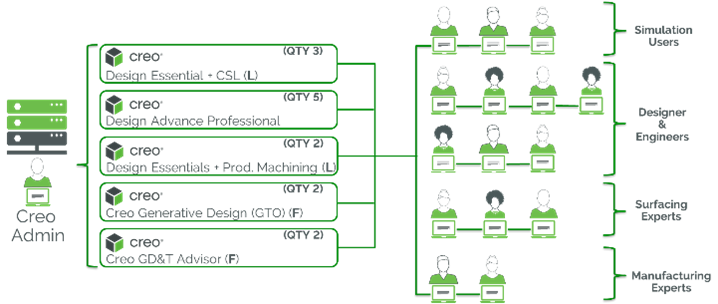
Current Floating License Model

New Named User Entitlements
-
Users are invited into the organization and granted access to run Creo+
-
Users are assigned Named User License Entitlements based on their given role and responsibility
-
Groups are created with a defined setup option, dedicated extension licenses, and assigned users
-
Creo+ will automatically be installed on user machines based on group specifications
-
Updates are automatically pushed and installed to all users
Recommended Resources
- Creo+ Help Center Help Center
03. Creo+ named user packages
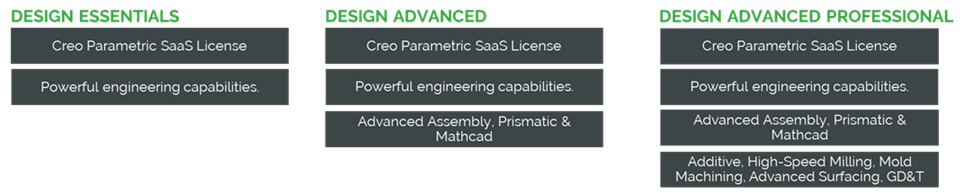
04. Get approval on software budget
The new named user assignment will require investigation of what software and extensions your users will be using. This information is required by the CAD admin to set up the user entitlements.
- Determine the groups involved in the installation of Creo+. Demarcating by groups can help divide the work between different admins as well as allow them to assign functions more easily
- If users are currently using Creo Parametric, map their current packages and extensions to the newly defined packages and extensions in Creo+. Your sales representative can assist in the mapping
- For new users, determine their capabilities and map the packages and extensions accordingly
- Ensure to include those users that maybe included in shared licenses and view only
- Compile the list of names and functions across the organization and review it with your representative
- Compile the budget from the list and update your project budget
Assess Changes to Design Processes
Using a current start to future state methodology, identify the current design of the manufacturing process, and then modify the existing process – considering Creo+ functionality – to define the future state of your design processes.
To get started, review and document your existing design process. As you uncover gaps and opportunities in the existing process, determine how Creo+ will drive improvements to that process. This objective can also be great for people who have IT experience to become more familiar with how design works in Creo+.
Before you begin, complete these steps:
01. Document existing design processes
Creo+ will improve your design processes. Evaluate how your current design processes will change and how those changes can be implemented as standard practice. Gather your team, specifically the organizational change manager, subject matter experts, and users, and look at all aspects of the current design process. Start by looking at the four core steps of computer-aided design (CAD):
- Understand design requirements:Identify what exactly needs to be designed. This includes a list of requirements related to size, shape, weight, a factor of safety, durability, etc.
- Geometric modeling: Using CAD to create a mathematical description of an object using geometry.
- Engineering analysis: Checks dynamics and strength of objects to determine how they perform in the real world.
- Design review and evaluation: The design is reviewed and evaluated with the help of CAD software. The feasibility of the design is also checked.
Go step-by-step to evaluate the design journey from new product introduction to service. Understand who interacts at each stage and how they complete their work.
Tools such as Microsoft Visio and Miro can be used to map out these processes. You’ll want a digital copy for your company’s records and training events, as well as to communicate to end users as part of a full adoption program.
02. Document new design processes
When making significant process changes, the value of a full adoption plan cannot be understated. This includes a communication plan, a training plan, and a support strategy plan. These pieces make up your organization’s adoption plan for Creo+.
When defining your new process, clearly articulate the timing of each step. Create a new set of process documents once you have completed this activity. Use these new process documents when you communicate the upcoming change to your end users and in end-user training.
Using the current state map as a foundation, analyze it for pain points that could be addressed with opportunities to improve the process based on the use of Creo+ and extensions. Gather insights from the team members defined earlier as well as others that are involved in the journey to minimize uncertainty. Lastly, add and remove steps based on your analysis to create the new future state of the design process, including a description of jobs or tasks to be done by the team members in the process.
Examine Modeling Methods
Every organization has its approach to design, and no two organizations use the same design methodology in the same way. Creo+ supports how you design, no matter how you do it. Below we highlight a few design methodologies and provide resources to learn more about how Creo+ can help.
Before you begin, complete these steps:
01. Learn more about model-based definition
The single source of truth in 2D design was the (physical) drawing. When using model-based definition, the 3D model contains all data needed to define a product without 2D drawings. Engineers can spend more time analyzing and problem-solving, and less time creating design documentation.
Benefits of using the model-based definition:
- More flexibility for colleagues across the organization to view and spin the model to understand design intent
- Reduce documentation-related errors during design and in the production process
- Faster engineering and development design to support better manufacturing, quality assurance, procurement, and service needs
Visit the resources listed below to learn more about how to use Creo+ with model-based definition.
Recommended Resources
- Model-Based Definition
- The Benefits of Model-Based Definition Initiatives
- Realizing Value from MBD Initiatives
- Creating Annotations Using Model-Based Definition PTC University
- Modifying and Publishing Annotations Using Model-Based Definitions PTC University
02. Learn more about top-down design
When using top-down design, the high-level, overall design is completed first without designing the individual parts of the assemblies at the same time. Then, sub-assemblies or parts can be assigned to different groups or users to design with the overall assembly already defined.
Benefits of using top-down design:
-
A change in your overall design will have fewer downstream fixes or work to be done
-
Design intent is completed first and stays in one place
Visit the resources below to learn more about how to use Creo+ with top-down design.
Recommended Resources
- Intro to Top-Down Design Skeleton Models PTC University PTC login required
- Creo: Using Assembly Skeletons
- How to use skeleton models for top-down design in Creo Parametric eSupport PTC login required
- Suggested Technique for Using Skeleton Models to Achieve Top-Down Assembly Design eSupport PTC login required
03. Learn more about multi-body design
Multi-body design is available in Creo+.
Instead of a single part having one type of geometry with the same material and same properties, a multi-body design allows for a single part to have multiple bodies with different characteristics in each body.
Benefits of using multi-body design:
-
Different geometry can be embedded in a single part, giving part design more flexibility.
-
Different bodies can be assigned with different material definitions.
-
Interdependencies between parts, especially in assemblies with a low number of components, without having to use skeletons and data-sharing features.
Visit the resources below to learn more about how to use Creo+ with multi-body design.
Recommended Resources
Plan and Measure KPI
Plan how you will measure success. To prove the value of adopting Creo+, create a plan to measure key performance indicators (KPI): determine your goals, define your plan, and establish your metrics and a clear baseline.
Before you begin, complete these steps:
01. Determine goals and metrics
Your goals and metrics will vary, depending on the size of your organization. With clear goals and metrics, you can:
-
Get support from leadership
-
Ensure the planned ROI is captured
-
Persuade other teams to buy in and adopt Creo+
-
Get budget and resources
-
Expand your project in the future
-
Keep your project on track
-
Gain momentum
Depending on your industry, there are a variety of goals to consider. Common goals include:
-
Improve product quality
-
Increase product reliability
-
Optimized design
-
Faster time to market
-
Decrease product cost
-
Decrease product rework costs
-
Decrease quantity of prototypes
-
Optimize sustainability
Do not forget to also document "soft" metrics such as customer satisfaction and employee confidence.
After identifying your goals, determine which metrics or KPIs you will use to measure success.
02. Define your measurement plan
After you identify the goal and metrics, your organization will track, document, and share the measurement plan. Include in your measurement plan:
-
Short-term and long-term project goals
-
Key metrics
-
How you will measure key metrics
-
Baseline metrics
-
The timeline for your measurement plan
-
Who will gather and record the metrics
-
When to share progress and outcomes with stakeholders
03. Establish baseline metrics
Before you start using Creo+, document your organization's "as-is" state. If you do not establish baseline metrics, it will not be easy to measure whether using Creo+ had a meaningful effect on your organization.
For example, if you are trying to reduce design time on a specific product, quantify how long it takes to design using your current method. Consider the time it takes to design and optimize the product and the time required by the end user. Once Creo+ has been deployed, track specific parts or assemblies through their lifecycle to create the "to be" measurement. Once you have both numbers, you can compare them to calculate change.
Establishing your baseline metrics will help prove the value of your project. Create a spreadsheet or a similar document to record your baseline metrics and track any updated metrics throughout the project timeline.
Plan CAD Data Migration
Your project team, along with your current system current data experts, should plan what data to migrate to Creo+. You may want to migrate everything, but often customers find there is little to no need to migrate all of it. Learn more below.
Before you begin, complete these steps:
01. Set realistic expectations
Having realistic expectations is the biggest challenge when planning computer-aided design (CAD) data migration. Customers often want to migrate all their CAD data and expect Creo+ to have identical features available. This is an incorrect expectation. The technology to have a an automatic full-feature migration does not exist.
A full data and feature migration will result in wasted resources. End users can open and view third-party CAD data in Creo+ without migrating it. For example, you can open and view a retired product from your current system in Creo+. Imagine how much time and money you’ll save by not migrating all your CAD data.
Also, your migrated CAD data will not have the same feature content as your current system, which is okay. You'll build better features going forward with Creo+, and end users can modify the geometry using the Creo+ Flexible Modeling functionality.
Recommended Resources
02. Evaluate data needs
Prioritize what data your organization needs to migrate and avoid migrating data that won’t change in the future.
For each of your products, consider the following:
-
Does your industry or business require a record of all retired products?
-
How complex is the CAD data?
-
How long are your product development cycles?
- For example, do your projects last months, quarters, or years?
-
What stage of the design or product lifecycle are they in?
- If early in the design or product stage, migrating early would be beneficial to use Creo+ to build a more robust design.
- If late in the design or product stage, it may be easier to finish the design in the current CAD software.
-
Will there be minimal or dramatic changes to product designs in the future?
-
Are there products that are retired or will have no changes made in the future?
03. Choose a migration method
Consider how you will migrate the CAD data you prioritized in the previous step. There are three main methods to migrate your data to Creo+.
Remodel all parts and assemblies
Start from the beginning and remodel all your parts and assemblies in Creo+.
Advantages
-
Creo+ will model your parts and assemblies better than your current CAD software.
-
Works well if your projects are small, so the re-modeling cost is minimal.
-
Re-modeling can be viewed as a training opportunity.
Disadvantages
-
Large and complex models take time to remodel.
-
May use resources to convert designs that won't change in the future.
-
It is expensive.
-
Delays in the deployment process.
Conduct a feature-by-feature translation
Use third-party software to transform the models or use a service partner to determine how to model parts and assemblies by comparing your current CAD software features with Creo+ features.
Advantages
-
Reasonably good feature-based models at a lower cost than remastering
-
Could be used for products that are medium or larger in size
Disadvantages
-
Feature translation is not a perfect process
-
May use resources to convert designs that won’t change in the future
-
It is expensive
-
Delays the deployment process
Open files in Creo Parametric and modify them as needed
Open non-PTC data in Creo Parametric and view it with our Unite technology. You can easily reuse and incorporate current CAD data with Unite.
Advantages
-
Convert data as needed, when needed.
-
Can use Creo+ multi-CAD tools.
-
Import a single part of an assembly and make a change without importing the entire assembly.
-
Easily reuse current 2D and 3D data with minimal product data management effort.
-
Increase engineering productivity and IT efficiency.
-
Enable a "design anywhere, build anywhere" strategy.
For any 3D drawings you migrate, the 2D drawings will not migrate with the 3D models. However, the Legacy Migration Extension provides tools to re-associate the 3D models and the 2D drawings.
Recommended Resources
- Unite Technology Data Sheet
- What is the difference between Open and Import in Creo Parametric when retrieving 3rd Party CAD Models in session eSupport PTC login required
- Unite Technology - PTC Creo Showcase (Youtube.com)
- About the Creo Unite Technology Help Center
04. Plan when to retire the current CAD system
Determine how you want to transition from your current CAD system to Creo+. Some organizations won’t retire their current CAD system immediately. They may use their current CAD system and Creo+ in parallel. On the other hand, your organization may want to only use Creo+ going forward to get the most out of Creo+ functionality.
Consider these questions and their impact on your business as you plan when to retire your current CAD system:
- Will you choose a specific date for your end users to only use Creo+ to complete their work?
- If you keep your current CAD software, how will you determine what type of work will be done in it versus in Creo+?
- Will current products be finished and left in the current CAD software?
- Will new products only start in Creo+?
05. Verify product lifecycle management system
Many customers use a product lifecycle management (PLM) or enterprise data management software to manage their CAD data.
Consider how your organization maintains CAD data today and how that may change with Creo+:
- Is your current data management strategy compatible with Creo+?
- Will you need to update your data management strategy?
- Would you consider upgrading your PLM system and using PTC’s PLM solution, Windchill?
Plan Deployment
Before you begin, complete these steps:
01. Determine product or project scope
Depending on the size of your organization, all end users may not adopt Creo+ at the same time. To determine which sites, teams, or products will start using Creo+ first, you can use similar criteria to License Entitlement and User Assignments.
-
How long are your product development cycles?
-
For example, do your projects last months, quarters, or years?
-
-
In what stage of the design or product lifecycle are you?
- If early in the design or product stage, you could assign these products or teams to adopt Creo+ to build a robust design.
- If late in the design or product stage, you could finish the product in the legacy CAD software before having those teams adopt Creo+.
-
Will there be minimal or dramatic changes to product designs in the future?
02. Create an implementation plan
Once you have determined who will adopt Creo+ first, plan out how Creo+ will be set up across your organization.
Install any additional hardware or software
If you purchased additional hardware or software to meet technical requirements, install those items before installing Creo+.
If there is a delay in buying, receiving, or installing the hardware or software, also delay when those affected teams will adopt Creo+.
Plan your software installation
Plan how Creo+ will be downloaded and installed across your organization. Your plan may be more or less complex depending on the size of your organization and the number of end users who will be adopting Creo+.
Consider these questions as you make your installation plan:
-
Who will download the software installer?
- Will the same person or group install Creo+ throughout the organization, or will it be different for different sites or groups?
- Will you use a silent installation or will someone individually install Creo+ Parametric on users’ computers?
-
Who will be the key/support admins to manage the license files and user assignments?
Plan integration testing with other systems
Make a list of all software that connects to your current CAD software and which groups currently use them.
PTC forms relationships with our partners to provide our customers with software and hardware compatibility. Visit our Platform Support page to search by product name or by partner name to see if your integrated software is compatible with your Creo+ version.
Once you identify your integrated software and user groups, select a representative from each group to test those software connections once Creo+ is installed. If multiple departments are affected, include representatives from each department.
Create a test script to help your team get the most out of testing. Your test scripts should include:
-
Clear, concise, and brief steps that the tester will execute
- Make your actions brief to make sure testers do not skip steps.
- Having a well-written test script ensures that testers stay focused.
-
Expected result(s) in each step
- Do not assume that testers will know the expected result on their own.
- You will get more meaningful results and save time if the testers know the expected outcomes in advance.
- Without the expected outcomes, testers may be confused and report false issues
Recommended Resources
- Platform Support eSupport
- Platform Support Policy eSupport
03. Plan how to retire current CAD system
After you have determined when to retire your current CAD system, plan the steps you will take to retire it. Your plan will vary depending on your organization’s size and the speed in which your end users will adopt Creo+.
Consider these questions and their impact to your business as you plan how to retire your current CAD system:
-
Have you finished data migration?
-
Who will uninstall your current CAD system from end users’ computers?
- Will individual end users uninstall your current CAD system or will the system administrator or IT do a silent uninstallation?
-
What steps need to happen and when?
-
If your current CAD system is subscription-based, who will contact the CAD company to reduce or cancel your subscriptions?
04. Plan user acceptance testing
User acceptance testing (UAT) verifies whether Creo+ meets user requirements. UAT can also be another opportunity to build excitement by providing an opportunity for some users to try Creo+ before it goes live. The testers can act as ambassadors and help get other end users excited for adopting Creo+.
UAT should answer questions such as:
- Can users use Creo+ and complete the test cases easily?
- Is there any data or functionality missing?
- Does Creo+ function correctly?
- Does data flow from all integrated systems?
Document what to test in UAT and who is involved at each step. Be as thorough as possible. No task is too small to include. Make one overall testing plan that includes:
- Data sources and data flow
- Design specification/technical design
- Acceptance criteria
- Test procedures
- Test cases
- Environments and who has access to which ones
- Security requirements
- Results of quality assurance tests
- Include within your testing plan the cadence in which testers will report errors, including how or where to report errors. Reporting errors quickly will save time.
Plan Communications
A crucial step in introducing change to your organization is informing and educating users about Creo+ in advance. Plan how to communicate with your organization about Creo+ and take steps to engage contributors, collect feedback, and ease the transition.
Before you begin, complete these steps:
01. Create a communication plan
People are more open to change when they know what is happening in advance. So plan how you will communicate with the appropriate audiences to help manage change.
The end users are your most important audience. They need to know that change is coming, why it’s important, how Creo+ will make their work easier, and how they will learn to use it.
Use these questions to guide your communications plan:
- Who are your audiences?
- What does each audience care about the most?
- What do they need to know to be successful?
- When do they need to know it?
- What is your schedule for communicating with your audience?
- What are the existing or best channels for communication?
- Who should deliver the message(s) for the information to be effective?
- How often should you communicate with each audience?
- When will you communicate information to different groups?
- How can your audiences communicate their concerns with you?
Start these plans as soon as possible with the appropriate audiences. Announcing changes early and often helps generate support throughout the organization and will make the transition easier.
02. Build excitement and address concerns
Change can be uncomfortable—but it's inevitable for businesses to stay competitive. Implementing new technology like Creo+ is no different. However, there are ways to smooth the transition and build excitement for Creo+.
Consider how you’ll facilitate changes that Creo+ will bring. Your workforce will need to adopt a new mindset, develop new skills, and learn new technology and processes. Prevent inaccurate assumptions by clearly communicating the value this new technology will bring to your organization.
03. Engage Leadership
Engage leadership and ask them to help you spread the news. You need buy-in from all levels of the organization, especially from end users. Consider sharing updates with executive leaders, managers, trainees, and other end users as appropriate.
Involve end users’ direct managers, if possible. If end users know their managers are excited about the change, they will be too.
Whenever you communicate about adopting Creo+, clearly articulate why you're adopting Creo+. Know how to explain:
-
Why your organization is making this change (and why it's beneficial to end users)
-
How it will affect the business
-
Your end goal and timeline
Be transparent about new technology because end users may fear the new change could eliminate their jobs or create more work for them without explanation. Be sensitive to possible fears.
Introduce Creo+ to employees
One way to introduce Creo+ to employees is to show them its capabilities. Then, early in the project, recruit employees to help test it. By involving end users early and listening to their ideas, you encourage them to advocate for the project on your behalf.
Communicate in multiple ways
Use multiple methods of communication to reach your audiences. Consider communicating with your audiences using the following methods:
-
Email
-
Newsletters
-
Posters, banners, flyers
-
Internal social media
-
All-access website
-
Podcasts
-
Videos
-
Surveys
-
Demonstrations
Emails alone are not enough when communicating an upcoming change. Make sure your plan contains various communication methods to maximize the reach of the message. The more your audiences see information about Creo+, the more open they’ll be to adopting it.
Establish a mechanism for listening to concerns
While it’s important to communicate, it’s also imperative to listen. Listening to your employees’ concerns should be a top priority. If stakeholder communication is only coming from one direction, you risk overlooking valuable feedback, inventive ideas, or important concerns from people in your organization.
Give your employees different methods to express their concerns or ideas empowering them to choose what works best for them. To help facilitate and elicit feedback, use one or more of the following methods:
-
An open forum or team website: Provide a forum where stakeholders can ask questions and make comments. Project leaders can help answer common questions across the organization
-
Group email: Some employees may be hesitant to post on a public forum. To engage them, consider creating a dedicated project email inbox
-
Anonymous survey: Send anonymous surveys throughout the process to gather honest feedback without the fear of repercussions
Whichever method you choose, be sure frontline workers, managers, new trainees, project participants, and other stakeholders know how to express concerns, share ideas, and ask questions.
Plan Adoption and Training Activities
Before you begin, complete these steps:
01. Create a rollout plan
Plan how to support employees as they learn about Creo+ and how to use it. Typically, a rollout plan outlines:
- Who, specifically, will use Creo+
- What their roles are
- How you will communicate with them as they get started and beyond
- When and how training should be provided
- Who will conduct the training
- How they will get support
This plan will communicate many of the decisions you made through execution planning. Document your rollout plan and share it accordingly.
02. Create your organizational change management plan
Your organizational change manager (whom you identified in Assemble Your Team) will help create your organizational change management (OCM) plan. An OCM plan’s main goal is to help prepare your employees for change. The key to a successful software deployment is a seamless transition for your end users.
An OCM plan will:
- Define a compelling vision and clear objectives
- Ensure strong leadership and significant sponsorship
- Build and maintains ownership and accountability
- Align processes, organization, and culture
- Involve employees
- Provide adequate enablement, training, and support
- Ensure stakeholder-specific communication
- Measure and monitor benefits realization continuously
Document your OCM plan and share it accordingly.
Start these activities as soon as possible with the appropriate audiences. Announcing changes early and often helps generate support throughout the organization and will make the transition easier.
03. Plan role-based training
Training is another opportunity to build excitement for Creo+, providing your employees with an opportunity to try the system before you retire the current CAD system. Role-based training focuses training on the skills the end users need to perform their job.
Role-based training plans are the best way to minimize the amount of time your users are in training and maximize their time doing their job. In addition, your organization will save resources by focusing the training on what each role needs to know to do its job.
First, identify what each role does in your current CAD system and list everything each role needs to do in Creo+. Next, include what you learned when you compared your current design process to how Creo+ will help improve it. Then, build a training plan for each role and focus on what they need to know to perform their job responsibilities. Quick and thorough training will give your users the confidence to use Creo+.
End-user training should cover:
- What will be different in Creo+ compared to your current CAD software How to use Creo+
- How to get technical support
- How to troubleshoot and report errors
- How to access user documentation
Consider how you will deliver training for different learning styles. You could:
- Host a workshop led by an expert
- Create "how-to" videos, podcasts, or tutorials
- Supply a job aid or cheat sheet
- Create an instructional guide
04. Plan how to deliver the training
Determine who will deliver the training, and where and when it will be delivered. Training delivery services are offered by PTC LEARN Online and by PTC's partners. These training services are a great option for organizations that cannot dedicate subject matter experts (SMEs) to training.
If you have SMEs available, consider using a train-the-trainer approach. Remember that your SMEs need time to create the training content. Plan enough time for the SMEs to create training content, lead training, and mentor the trainers.
A hybrid approach is also an option. Third-party, off-the-shelf training can be used for general training, and the SME-created content can address specific business concerns and can be used in additional training workshops.
When planning how to deliver the training, review the locations and geographies where your end users are located. Create a delivery schedule to coordinate training across locations. If your end users work across different locations and geographies, determine how to coordinate training across sites. If paid instructor-led training is not possible for you, the PTC Learning Connector offers a variety of free tutorials.
Review the PTC University Creo Training Catalog to learn more about the courses PTC offers for Creo+.
Recommended Resources
- PTC Learning Connector PTC University
- PTC Partner Network
05. Update documentation
Create instructions that guide end users in using Creo+ successfully. User documentation should include:
- How to perform tasks from the current CAD software in Creo+
- How to use the new functionality How to navigate Creo+
- How to get help from your support team
- How to troubleshoot and report errors
Access to updated documentation will help ease the transition for end users.
06. Create administration documentation
To help with managing users and maintaining Creo+, there should be administration documentation that includes:
- How to use Creo+ to manage licenses
- Your user groups, such as administrators, developers, and end-users
- How to ensure each user has the correct license(s)
- Procedures for modifying license access for end users who change jobs
- How to get help from your organization’s IT team
Ensure your Creo+ administrator knows how to access the documentation.
Documentation is something many customers forget to do or fail to do well, however, it is effective in providing answers to important questions. Update your documentation each step of the way as changes are made to Creo+ to help your organization answer questions that may arise as a result.
07. Consider localization and translation
Plan Creo+ Support Strategy
Before you begin, complete these steps:
01. Plan short-term support strategy
For the first few weeks after Creo+ is deployed, the short-term support team will provide go-live support for end users. Short-term support should be as easy as possible for end users. When end users can access quick support for their Creo+ concerns, they'll grow more confident in the new tool.
Consider the following options to add to your short-term support strategy:
-
Reserve a room at your organization or provide a link to a virtual meeting room where end users can find immediate support in the short term.
- Determine which project team members should be available in these rooms (for example, a few high-level decision makers, IT representatives, Creo Parametric subject matter experts [SME], etc.).
- Communicate widely with your end user base as to how and where to find quick support.
-
Have a dedicated phone number or email address for end users to find immediate help.
-
Consider having an SME roam around a department or check in with end users to ask if they have any issues. The SME could offer immediate help.
-
Offer additional training if the support rooms find end users are reporting a similar issue frequently.
02. Plan transition to long-term support
Plan how to transition to your long-term support strategy. Your timeline will depend on the size of your organization and the number of end-user issues reported. The accuracy of your timeline is less important than the support your end users need. Extend short-term support if your end users continue to need support.
Create criteria for when to transition to long-term support. For example:
- When fewer than a specific number of end users visit the support rooms for help each day.
- When the roaming SME finds no one is asking for support.
03. Plan long-term support strategy
An essential part of your long-term support strategy will rely on having in-house support available for end users. PTC recommends establishing a “help desk” within your IT department. Help desk personnel could complete Creo+ training to prepare to answer basic questions, troubleshoot problems, and manage issues in-house. With the proper documentation and training, your support team can resolve issues quickly.
In cases when the help desk is unable to resolve the issue, PTC offers multiple ways to search for support: the PTC Knowledge Base, the PTC Community, and My PTC Support. Often, these support tools will help you resolve your issue. Our next section Set Up Your Account explains these support tools in more detail.
To support your technical support team training, we recommend all members:
-
Participate in PTC University’s Creo Training Catalog classes
-
Gain access and learn how to use PTC's eSupport Portal & Knowledge Base
-
Create accounts for admins on the PTC Community
-
Review all the training materials provided to end users
If you still can’t find what you need, log a case with PTC technical support. When opening a case, include:
-
Detailed description of the issue
-
Steps to reproduce the issue
-
Any related data files or screenshots, if needed
-
Text of error messages or warnings you’ve received
Once received, a member of the technical support team will contact you.
Recommended Resources
- PTC University’s Creo Training Catalog PTC University
- Create your eSupport account eSupport
- PTC's eSupport Portal & Knowledge Base eSupport
- PTC Community PTC Communities
04. Document your support strategy
Once you've determined how your organization will provide Creo+ support, document the strategy plan.
Remember to include:
Roles and responsibilities
- Who will deliver support? The duties may span different functional areas. Determine how the teams will triage issues among the various experts in different functional areas.
Escalation
- How will your support team escalate issues that are outside their domain of expertise? How will they handle complex problems that require additional expertise?
Recommended Resources
- Creo+ Admin Portal PTC login required
Set Up Your Support Account
Before you begin, complete these steps:
01. Set up your account
You will need a PTC Support Account to access technical support but will not need one to download Creo+.
To create your account, you will need one of these numbers.
-
Your Sales Order Number
-
Your Site Number
-
Your Service Contract Number
These numbers will be in an email that PTC sends you after your purchase is complete.
If this information cannot be found, contact PTC technical support or your sales representative.
Once your organization has been created on Atlas, an administrator should invite users to the Creo+ portal. Administrators are responsible for assigning named or shared “License to Run” licenses to users. A detailed step-by-step summary of tasks that an administrator performs in the Creo+ portal can be found in the Creo+ Help Center.
Recommended Resources
- Create Your PTC Account eSupport
- Get Help Logging In eSupport
- Creo+ Help Center Help Center
02. Know how to get support
Customers often contact PTC technical support first, but PTC offers multiple ways to get help: the PTC Knowledge Base, the PTC Community, and My PTC Support, in addition to PTC Technical Support.
Creo+ administrators can open support cases with PTC eSupport.
When opening a case, include:
-
Which Creo Parametric version you have
-
Detailed description of the issue
-
Steps to reproduce the issue
-
Any related data files or screenshots, if needed
-
Text of error messages or warnings you’ve received
PTC Knowledge Base
Search the PTC Knowledge Base for information about PTC products and solutions. The Knowledge Base includes:
-
Technical articles
-
Product documentations
-
Community threads
-
Training tutorials
-
Digital services (how to interact with PTC’s services online)
-
Software problem reports (or “bugs”)
Customers can sign up for access to the Knowledge Base with a valid email address.
Visit Getting Started with PTC Knowledge Base to learn more about using the Knowledge Base.
The PTC Community
In the PTC Community site, you can browse information about using Creo+, follow other customers’ topics, or post a new topic. A knowledgeable community member will respond and help.
Anyone can explore the Community, however, if you would like to post a topic or respond to others, you must create a PTC basic account. Select the "Basic" tab on the "Create New PTC eSupport Account" page. This account is separate from your Creo Parametric account.
My PTC Assistant
My PTC Assistant is an interactive support website that filters information by topic. Click on a topic that interests you and more options related to that subject will appear. You will find resources for:
-
Academic programs
-
Cloud system
-
Consulting
-
Contracts and orders: issue with
-
Contracts and orders request
-
Customer information
-
Customer training
-
Field academy
-
General feedback
-
Invoices: issues with
-
Invoices request
-
License management
-
Marketing
-
Partner network agreement
-
PTC website and user accounts
-
Sales inquiry
-
Success management
-
Technical support
Visit My PTC Support to get started.
Recommended Resources
- Getting Started with PTC Knowledge Base eSupport
- My PTC Assistant eSupport PTC login required
- Create Your eSupport Account eSupport
- Access the Community PTC Communities
- Get Help Logging In eSupport
- Managing Your Technical Support Cases eSupport
- PTC's Creo YouTube Channel (Youtube.com)
Download and Install Software
To get technical support, you need a PTC account to enter the eSupport Portal.
Before you begin, complete these steps:
01. Download and install Creo+
Remember to evaluate if your hardware and software are compatible with Creo+ and acquire any additional resources before you install Creo+.
You will receive an email from your administrator inviting you to install the Control Center. Make sure to activate your eSupport account to get technical help.
To install Creo+, you must first download and install the PTC Control Center from the Creo+ Portal. The PTC Control Center installs Creo+ on your computer and maintains a connection between the Creo+ Portal and the local installation of Creo+.
PTC created has created an installation guide for installing Creo+ which ensures that certain prerequisites are met.
Recommended Resources
- Create Your PTC Account eSupport
- Get Help Logging In eSupport
- Creo+ Installation Guide Help Center
Configure and Customize Creo+
Before you begin, complete these steps:
01. Configure Creo+
Change the look and feel of Creo+ and the way it runs by setting options in a configuration file. The config.pro file is a text file that stores all settings for how Creo+ works as a default. Some of the settings you can choose are:
-
Tolerance display formats
-
Calculation accuracy
-
The number of digits used in sketcher dimensions
We regularly improve our configurations based on user needs and provide CSV files that document all config.pro options for our latest and earlier releases. Refer to the recommended resources for where to find documentation for all config.pro options for Creo+.
We recommend “Model Quality” as a standard configuration for all users. By default, Creo+ is set for optimum performance of speed. Depending on your needs, users may need to increase or decrease the model display quality. For example, in large assembly management, you will need to decrease display quality for smoother performance.
Recommended Resources
- Documentation of all config.pro Configuration Options list for Pro/ENGINEER and Creo Parametric eSupport
- eSupport Portal's Reference Document Search Tool eSupport PTC login required
- How to Set Configuration Options Help Center
02. Customize Creo+
You can customize the underlying code of Creo+ based on your needs. Customizations are special builds written in C-language, Java – Language, JavaScript, and VB code.
If you customize Creo+, you will need Creo+ Toolkit APIs and Creo+ Toolkit coding language applications. It is important to note that PTC does not support each unique customization build. Remember to document any customization that you add—this information is critical with each update of Creo+.
Examples of customizations PTC Technical Support will support include:
We recommend consulting with PTC or a partner if your organization will implement customizations in Creo+.
For details on Creo+ Toolkit Customizations, refer to our recommended resources below.
Recommended Resources
- Creo+ Object Toolkit C++ User's Guide Guides PTC login required
- Creo+ Object Toolkit Java User's Guide Guides PTC login required
- Creo+ Toolkit User's Guide Guides PTC login required
- Creo+ VB API User's Guide Guides PTC login required
Define Your CAD Templates
Before you begin, complete these steps:
01. Learn about templates
Templates save time in every drawing and model. Templates contain information such as datums, layers, saved views, and parameters that will be the same for every end user who accesses them. Correctly setting up templates will create standardization and brand consistency across your organization, and templates guarantee that every end-user has all the correct information to use.
02. Document your current templates
Make a list of the templates (or start parts) your organization uses in your current CAD software. Include representatives from multiple departments or different products to have a variety of perspectives.
Examine and document is the information needed in each template (such as what parameters, attributes, layering, etc.).
03. Define templates needed in Creo+
Take this opportunity to learn more about Creo+ templates and choose options that meet your organization and industry standards.
At a minimum, we recommend having the following templates:
-
Solid part
-
Assembly templates
-
Drawing templates
You may have new functionality or abilities in Creo+ than in the current CAD software, and you may need new templates. For example, if your organization starts creating 3D drawings, consider which templates you’ll need that you didn’t have in your current CAD software.
It’s better to take the time to ensure the templates are correct and available at the beginning of the project than to add information to existing models afterward.
Recommended Resources
- How to change the default template for parts, assemblies, and drawings in Creo Parametric eSupport PTC login required
- How to create and set customize start part in Creo Parametric eSupport PTC login required
- How to create a user-defined drawing template in Creo Parametric eSupport PTC login required
04. Set up your config.pro file
The config.pro file is a text file that stores all default settings for how Creo+ operates. Some of the settings you can choose are:
-
Tolerance display formats
-
Calculation accuracy
-
The number of digits used in sketcher dimensions
Different groups or locations may need different configurations. Set up a config.pro file for each group that needs the same configurations.
Recommended Resources
- Troubleshooting: How To Determine Which Specific Config.pro Option May Be Causing An Issue in Creo Parametric eSupport PTC login required
- Setting config.pro Options Help Center
Test and Validate
Confirm that your final solution meets business and technical needs and is ready for rollout.
Before you begin, complete these steps:
01. Plan and execute functional training
Functional testing is a process that verifies that Creo+ is working as designed. Create a functional testing plan with your legacy system, data experts, and other members of the team. A good testing approach involves the application programming interface, user interface, and system levels. Testing is costly, but the frequency and timing of tests can help you achieve better results. Automation can make this process more efficient.
Depending on your testing plan, testing could be done by developers, subject matter experts, or power users. Include within your testing plan the cadence in which testers will report errors, including how or where to report errors. Later in user acceptance testing (UAT), testers will further verify that Creo+ is set up correctly from a user standpoint.
Write test scripts for functional testing
Your team will get the most out of testing when they have a prepared test script to complete. Your test scripts should include:
-
Clear, concise, and brief steps the tester will execute
-
Expected result(s) in each step
Make your actions brief to make sure testers don’t skip steps. Having a well-written test script helps testers stay focused.
Verify user permissions
Create test user accounts and assign them to each one of your user groups. Use a copy of production to use in a QA environment. Then, log in as each of the test user groups.
Verify that the test user accounts can:
-
Log in as expected
-
Access the right functionality
-
Access the right data
-
Take actions in Creo+ as expected
Make any changes to the visibility and permissions of user groups as needed and update your documentation. You may need to make changes to user groups in Creo+ and/or other integrated systems, such as Windchill or other third-party PLM systems.
02. Plan and execute user acceptance testing
Prepare your user acceptance testing (UAT) plan to validate with users that Creo+ is set up correctly for their needs. Plan to complete these tests in a QA or staging environment that is as similar to your production environment as possible. Again, testing is costly. Automate the process where you can.
Consider these items as you plan UAT test scripts:
-
Verify user permissions and data: Ask users to log in to Creo+ and verify they have access to everything they need. This will make sure users have licenses and data configured correctly.
-
Verify users have the correct license: Use this opportunity to confirm that your licenses are distributed correctly. License distribution is one of the top user-reported errors when people start adopting Creo+. Make sure all your end users have the licenses they need.
-
Verify users can use Creo+: Include common tasks that end users will perform as part of their regular work in Creo+. Note where they encounter issues to get to the cause of the problem.
Write test scripts for UAT
Having a prepared test script will help your team get the most out of testing. Your test scripts should include:
-
Clear, concise, and brief steps the tester will execute
-
Expected result(s) in each step
Write real-world scenarios that users in your organization will experience when using Creo+. Make your actions brief to prevent testers from missing steps. Having a well-written test script ensures that testers stay focused.
Include the expected result in each step of the test script. Without the expected outcomes, users may be confused and report false issues. Do not assume that testers will know the expected result on their own. You will get more meaningful results and save time if the testers know the expected outcomes in advance.
Remember to document changes as you record test results. Document your test scripts and include them as part of your overall testing plan.
Train power users for UAT
For UAT, train users who:
-
Are familiar with your CAD data and whose insights will be valuable during UAT
-
Are project team members (project manager, project sponsor, stakeholders, admins, etc.)
-
Will act as Creo+ ambassadors within their department or organization
Refer to your training plan. By now, you should have training materials to provide to your end users and training methods to offer, such as:
-
An expert-led workshop
-
“How-to” videos or tutorials
-
A job aid or cheat sheet
-
An instructional guide
03. Execute UAT plan
Test the application in a QA environment with your power users to see if Creo+ is ready for the end-user community. UAT should answer questions such as:
-
Can users navigate and use Creo+ as expected?
-
Is the new functionality confusing?
-
Did Creo+ function correctly during the test?
You may get insights during testing and choose to act on them later. If Creo+ doesn’t meet all user needs, decide whether to pause deployment or launch as-is.
04. Validate test results
Document and review your findings from UAT. Compare the test results to the user needs you documented earlier.
Discuss whether Creo+ needs further configuring or if it is ready to go live as-is. You may identify potential improvements during UAT and choose to act on them after deployment. Also, determine if your test results change when or for whom Creo+ will first go live.
Prepare Your Users
Before you begin, complete these steps:
01. Train admin and support teams
End users need to know where to go for technical support to reduce future downtime and achieve their project goals. Your admin and support teams should be the first people they contact for any bugs or errors they encounter.
Training your support team should involve:
-
Training around Creo+ user interface and functionality
-
Implementation of configurations and company customizations
-
Experience submitting and getting additional support from PTC Technical Support when needed
-
Creating and managing documentation
-
Managing user licenses
-
Localizing and setting up Creo+
To support your admin and support team training, we recommend all members:
-
Gain access and learn how to use PTC's eSupport Portal & Knowledge Base
-
Create accounts for admins on the PTC Community
-
Bookmark PTC's Technical Support Case Logger and Customer Support Guide
-
Use our Creo Admin Troubleshooter from Technical Support
-
Review all the training materials provided under "Train end users" below
Recommended Resources
- PTC Customer Support Guide eSupport PTC login required
- How to 'Manage your Technical Support Cases' eSupport
- Creo Help Center Help Center
- Creo Training Catalog (Training-materials.ptcu.com)
02. Train end users
Ensure that everyone who will use Creo+ has the knowledge they need to get started. End users include anyone at your organization who will use Creo+ to do their jobs. Be clear when announcing when training is available so end users know how to access it.
Your end users need to know:
- How Creo+ changes their job
- How to use Creo+
- How it is different from your current CAD software
- How to get support or training
- Where to find documentation
- How to troubleshoot and report errors
Offer training at various times to maximize the number of end users who attend training. Providing options will improve attendance. In addition, track your end users' attendance at training sessions to effectively ensure adoption is met.
As you conduct training, monitor whether your approach is practical. For example, you may discover end users need more or less guidance or different formats (computer-based training, written documentation, etc.) for training.
Ideally, your organization has been communicating with end users about adopting Creo+ and how it will improve their jobs. End users may be more open to training if they understand why these changes are being made. The more training they receive, the fewer problems they will report when Creo+ is live, and the more comfortable they will be with Creo+.
When communicating updates with end users, always include your training documentation, go-live dates, and future follow-up for feedback details.
If more extensive product training is required for your engineers, review sample curriculum and contact PTC University for our Creo Parametric Product Service Trainings.
Recommended Resources
- Creo+ Help Center Help Center
- Learning Connector PTC University
- PTC Community PTC Communities
03. Distribute Documentation
Distribute documentation to end users and technical support. Upload the documentation to a central training resources location if your organization has one (for example, a training library).
This documentation is critical for supporting Creo+ on an ongoing basis and will explain how to use Creo+ to perform their job duties.
04. Localize Creo+ for end users
PTC supports Creo+ engineers no matter where in the world they are. Creo+ and our help centers are available in multiple languages.
You can install and start Creo Parametric in a specific language. You can localize the language you want in the Creo+ Help Center. This feature is controlled by 'PRO_LANG' and needs to be adjusted at start-up. We offer Help Centers in the following languages:
-
French
-
Chinese
-
German
-
Russian
-
Japanese
-
Korean
-
Spanish
-
Italian
As you deploy Creo+ across your organization, consider which languages to apply to the software across different sites.
Go Live
Before you begin, complete these steps:
01. Migrate your CAD data
Communicate with your end user group(s) as to when to stop making changes to the existing CAD data that will be migrated, and when to make a backup copy. Refer to your CAD data migration plan and begin to migrate your CAD data.
Remember, Creo+ offers Unite technology, which is a tool that makes it easy to view non-Creo+ data without converting the full assembly. Creo+ also allows you to save files in a non-Creo+ format if needed. Unite helps to reduce the amount of time and effort spent on data migration.
Recommended Resources
02. Verify PLM connection
If you use a PLM solution to manage your data, confirm that the integration of the PLM solution to Creo+ was successful. Before your end users start to use Creo+, make sure data is accessible from your PLM solution. Ideally, you tested this piece as you tested and validated Creo+ in a test environment.
If you use Windchill PLM, PTC can help you set up a new Windchill Workgroup Manager. Contact your customer success manager or sales representative for more information about this service.
Recommended Resources
- Setup Windchill Workgroup Manager Success Services Catalog
- Minimum Windchill license profile requirements for CAD integration with Windchill eSupport PTC login required
03. Verify licenses
Users cannot use Creo+ without a license. Verify that your end users have access to the licenses they need to get started with Creo+ to prevent unnecessary downtime. If you have a person or team responsible for managing licenses, tell end-users how to contact them if they have any questions.
04. Retire CAD system
Communicate with your end users whether your plan is to have fewer end users using the former CAD software or to stop using it completely.
If your plan is to adopt Creo+ in phases, communicate with each user group which products will be maintained in Creo+ or in the former CAD software.
If your plan is to immediately adopt Creo+, begin to retire your former CAD software and make sure all end users are using Creo+.
05. Verify templates
Templates save time in every drawing and model. They contain information such as datums, layers, saved views, and parameters that will be the same for every user who accesses them. Every time you start with a template, you build brand consistency into your work.
Make sure that your templates are set up correctly and that Creo+ is set up to access the correct templates. Verify this step before end users start to use Creo+. Prevent downtime by communicating to end users where they can find the templates.
06. Communicate with end users
The person or group responsible for communicating with end users should announce that Creo+ is ready to use. Refer to your communication plan and follow up on any remaining communication and training items.
Make sure your end users are ready to Creo+. They will need to know:
-
How to use Creo+
-
How to obtain support or training
-
Where to find documentation
Your plan may have a phased approach, and your entire end-user community may not be adopting Creo+ immediately. Regardless, communicate with each group of affected end users to let them know what to expect.
Provide Support
Before you begin, complete these steps:
01. Provide go-live support
Refer to the support strategy you created earlier and follow up on any remaining items.
Make sure that end users know:
-
Where to find documentation or other resources
-
How to find support or training
-
How to report issues
If end users are reporting similar types of issues, conduct additional training sessions to provide support to a larger audience.
Enable power users
Power users have an important role in your support strategy. They are ambassadors to your end users and can help determine whether to escalate issues or determine if additional training is needed. Often, end users report errors when the issue is that they don't know how Creo+ operates. Ideally, all end users will be trained on how to perform their job with Creo+, but that is not always the case. Power users can help determine which issues to escalate to the support team and which issues result in extra training or instruction for the end users.
02. Prepare to transition to long-term support strategy
Review the criteria you planned in your support strategy to determine when to transition to your long-term support strategy.
Remember: if your end users are seeking frequent support, extend your short-term support timeline. Provide your end users with the amount of support they need and adjust your timeline as needed.
03. Transition to long-term support
Your internal team will be responsible for long-term support after short-term support ends. Typically, there isn't a formal meeting to transition to long-term support, so make sure your team is prepared.
Ensure end users know how to contact power users, your organization's system administrator, and IT when they need help. We recommend having a Creo+ expert in IT or establishing a help desk for Creo+ within your IT department. Help desk personnel should complete Creo+ training so they're prepared to answer basic questions and troubleshoot problems.
In cases when the help desk cannot resolve the employee's issue, PTC offers technical support. With your subscription, we offer:
-
Access to PTC's eSupport Portal & Knowledge Base
-
Unlimited Technical Support Cases
-
PTC Community Support and the PTC CAD Community Support
-
Performance Advisor to monitor product usage
When opening a case, include:
-
The Creo+ version
-
Detailed description of the issue
-
Steps to reproduce the issue
-
Any related data files or screenshots, if needed
-
Text of error messages or warnings you've received
Recommended Resources
- PTC’s eSupport Portal & Knowledge Base eSupport PTC login required
- Getting Started with the Knowledge Base eSupport
- Manage your Technical Support Cases eSupport
- Case Logger eSupport PTC login required
- Customer Support Contact Page eSupport PTC login required
- PTC Community Support PTC Communities
- PTC CAD Community Support PTC Communities
- Performance Advisor Help Center
Measure Business Metrics
Before you begin, complete these steps:
01. Gather metrics
Review your measurement strategy after Creo+ is live and accessible to all end users.
Give end users time to get acquainted with Creo+ to ensure successful results. At a minimum, we recommend waiting 30 to 90 days to review how it is going with the main end users. This review period allows for adequate time to capture data and let the new processes take hold. This time can be extended based on the schedule you established in your measurement plan.
Consider the following:
-
How has Creo+ improved the design process?
-
Are engineers creating high-quality designs more efficiently and with fewer errors?
-
Is the number of requests for analysis decreasing?
-
What is the end user feedback on Creo+?
02. Evaluate metrics
Compare the baseline metrics to your current data to determine how much value Creo+ has provided so far. If you’re not achieving value, there are two potential reasons:
-
The set of metrics you chose may not be accurate
-
There may be another factor affecting the current outcome, such as end users not consistently using Creo+.
Investigate what the issue might be, reassess, and make adjustments.
At this point, confirm your goals have not changed from your initial measurement plan. Then, consider if they are still relevant, and adjust accordingly. If you do adjust your goals, give your stakeholders a clear explanation.
At the end of the project, we recommend summarizing the work in a post-upgrade review to help improve or jumpstart future upgrades. We recommend you note:
-
Who was part of the executing team and their responsibilities
-
What testing activities were completed for this project and the testing results
-
What errors or challenges occurred in the process and how they were resolved
-
What errors were reported to your technical support or product management teams
Revisit your original goals and measure the business impact of the project. For example, after training, how has the design process or time changed?
03. Review usage metrics
As your team continues to learn and use Creo+, we advise that CAD admins keep track of usage metrics from end users, as well as bugs or errors. To help your CAD admins, PTC provides Creo Performance Advisor, our product telemetry tool powered by PTC ThingWorx, to our customers.
With Creo Performance Advisor, a CAD admin can get aggregated views of usage and diagnostic data from Creo+ and other PTC products. Reports may include:
-
System stability
-
Engineer usage (session counts)
-
Unexpected crashes or errors
Making use of these reports and dashboards can help your team improve operational productivity by detecting performance issues early, predicting usage, and managing users accordingly.
Learn more about the Performance Advisor and how to access it in the PTC Creo Dashboard Environment.
Recommended Resources
- Performance Advisor Help Center
- PTC Creo Dashboard Environment eSupport PTC login required
04. Share results with stakeholders
Share the results and adjustments to your value propositions with the project sponsor, project team, organizational leaders, end users, and other stakeholders. It is important to share these results to inform stakeholders of Creo+ value. Reviewing these results can also help you strategize the next steps.
You can provide a clearer picture of value if you continue to measure and report your findings over time. In addition, continuing to communicate to the end users helps make the value of Creo+ real to them and reinforces the tool's usage.
Explore Next Steps
Creo+ is a powerful tool. Learn more below about how you can leverage Creo+ capabilities and expand your experience. Contact your sales representative or Customer Success Manager to get started with expanding your Creo+ package.
Before you begin, complete these steps:
01. Explore real-time collaboration with Creo+
Creo+ features cloud-based collaboration tools that enable multiple people, both inside and outside of your organization, real-time access to review, explore, and edit assembly design all at once.
Changes are automatically synchronized across all users, ensuring that everyone is working on the latest design. This collaboration improves communication and enhances innovation throughout the product design lifecycle.
Learn more about real-time collaboration in the PTC Help Center Overview.
02. Explore Creo Simulation Live
Creo Simulation Live (CSL) is a tool engineers and designers can use to perform 3D simulations on models throughout the design process. CSL allows users to change materials, loads, or constraints, and view instant simulation results. They can also visualize the results of the analysis without needing a detailed understanding of the design.
Analysts can reduce the number of high-fidelity simulations that are often required later in the design process, saving your organization time and money.
There is no longer a need to toggle between simulation and modeling or long-solver computations for small iterations. For example, solver calculation can be shrunk by a factor of 5000, and the computation result is obtained instantly.
Visit Creo Simulation Live to learn more.
Recommended Resources
03. Explore Creo+ Additive Manufacturing Extension
With Creo Parametric additive manufacturing extension, you can develop innovative designs, optimize, and print to a variety of printers with ease, all within Creo+. With no more time-consuming, error-ridden hassle of multiple software packages, you can reduce time-to-market and expense with rapid prototyping and enable part consolidation.
Recommended Resources
- The Creo Base Package Additive Manufacturing Tools You Didn't Know You Had
- Additive Manufacturing Capabilities in Creo
- Top 10 Advantages of Additive Manufacturing
04. Create your digital thread
A digital thread creates a "closed loop" between the digital and physical activities of an organization. It enables continuity of data across departments and collaboration across functions to improve the product and the physical processes and empowers the people who are involved at every step.
05. Plan for the future
PTC makes significant investments in improving every release of Creo+ for all end users. PTC will continue to update your version of Creo+ to best support your organization's needs.