The Navigator
Pro/ENGINEER Wildfire brings many changes to the area formerly known as the Model Tree — now called the Navigator — the center of the all-in-one engineering tool. The tabs across the top of the Navigator provide direct access to various groups of capabilities.
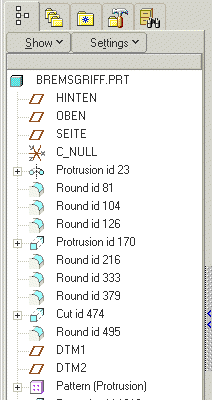 |
Manipulating The Navigator
First question: How do you open and close it? Simply use the sashes to minimize or maximize the Navigator. There's a whole new range of capabilities in the Navigator, and here's how you can access them:
Model Navigator
The first tab is the Model Tree. Notice what's changed from renaming features, accessing layers and selecting multiple items with SHIFT.
Favorites Navigator
Discover how you can add internet "favorites" directly from within Pro/ENGINEER.
Working Spaces
Learn how to browse your computer right in Pro/ENGINEER. This is where you can connect to Windchill cabinets and Pro/INTRALINK workspaces, as well as ProjectLink projects, PDMLink, Design Conference shared spaces and FTP servers.
Solutions Navigator
The Solutions tab provides a connection and subscription services to a whole range of new tools like online catalogs, project collaboration tools and links to the user area of ptc.com and PTC/USER. Each solution is managed as a separate browser thread that appears as a tab in the browser. It offers pure navigation for each solution. Threads are closed by selecting a tab and selecting 'Close' from the right mouse button shortcut menu. Learn more about process productivity.
Search Navigator
Find stored objects by using simple and advanced search tools in your default data management tool like Windchill or PDMLink. |

