Bobcat Industrial Innovation - Service
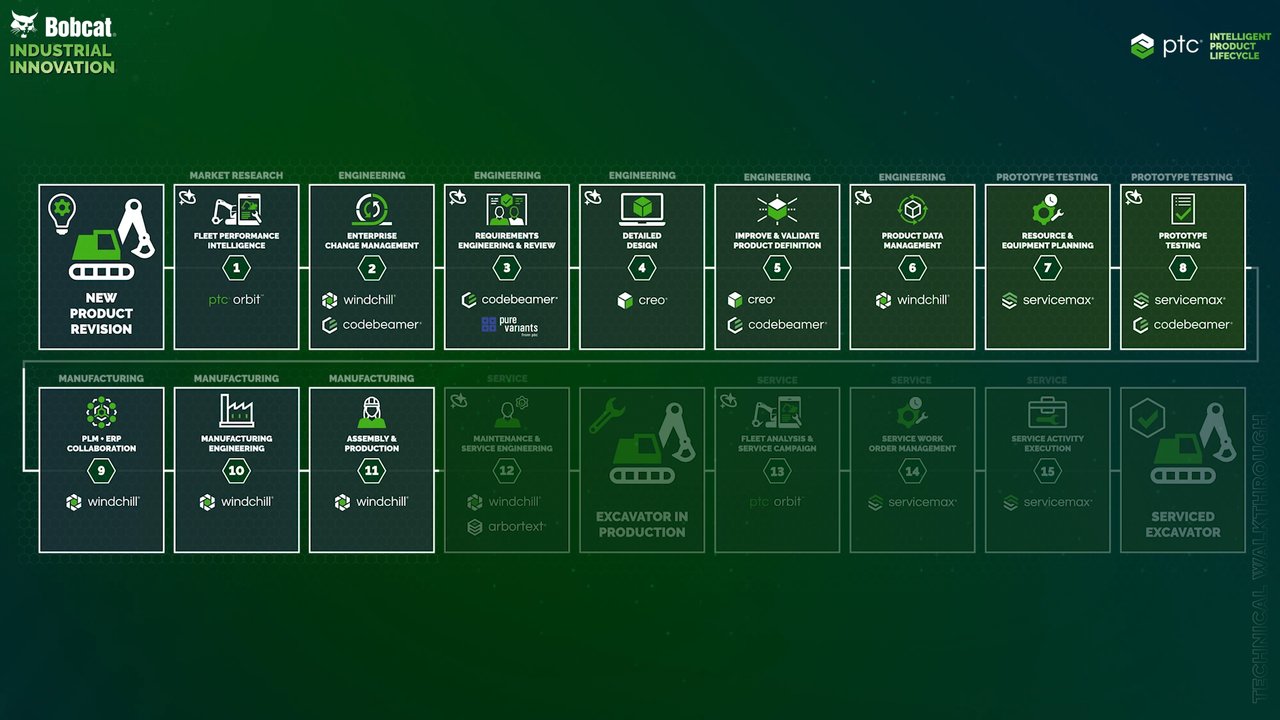
00:00 Far in the Bobcat demo, we've explored market research, engineering, prototype testing, and manufacturing, where we began by using PTC Orbit to capture and analyze product usage insights for the Bobcat E17z, concluded the engineering design and change process for the new swing frame, conducted prototype testing on the new part, then manufactured it. In service, we'll see how validated changes flow downstream from manufacturing into service content and field operations.
00:31 Taking the perspective of a service engineer, we'll see how the service engineering team updates the service BOM used to drive service parts lists, just as we saw with the downstream flow of data as the manufacturing BOM populated the process plans. In Windchill, service information structures organize parts, procedures, and illustrations into reusable configuration-aware modules, so teams can publish accurate service content for the right product variant and serial range. With that structure in place, the swing frame is quickly updated to the new part number and
01:05 associated design, keeping service information aligned with the latest released product definition. Engineering teams can also use Creo Illustrate to create 2D and 3D service illustrations based on the content in the service information structure. When the swing frame design changes, opening Creo Illustrate immediately refreshes the affected parts and related illustrations across all related views. Next, we'll update related service documentation for the swing frame using Arbortext Editor, which helps us author and maintain structured service documentation
01:39 directly in the context of Windchill service information structures. Here, we can pull approved parts, procedures, and illustrations from the service structure, reuse modular content across manuals, and publish consistent configuration-aware service information so technicians always receive the right instructions for the correct product variant and serial range. After updating the change task that we've finished updating the service information, we can publish all service content directly to Arbortext Content Delivery.
02:09 Arbortext Content Delivery provides a secure, searchable delivery portal for service information, giving technicians and dealers fast access to the latest published parts lists, procedures, and illustrations. Because content is structured and configuration-aware, we can quickly find the right instructions for a specific product and serial range, improving first-time fix rates while reducing the risk of using outdated documentation. All content in Arbortext is indexed and allows us to easily find the right content based on
02:40 serial numbers, models, and keywords. Arbortext also lets us directly order spare parts and kits, and it can integrate with order management systems to kick off automated workflows when a technician or dealership parts specialist selects an asset from the 3D serial number-specific parts lists. The new Windchill AI Assistant helps us not only find the right information across all product documents managed in Windchill, but also saves valuable time by summarizing content, interpreting complex information, and connecting the dots between scattered data.
03:14 Accessible from any screen in Windchill, this large language model leverages Windchill permissions to query all documents we have access to, so it can accurately answer our questions. Similar to ChatGPT or Microsoft Copilot, the assistant also provides suggested follow-up prompts after each response, making interactions more intuitive and efficient. We can also click Summarize Document on any Windchill document to generate a short AI-created overview of its content.
03:46 With a redesigned swing frame, we'll switch perspectives to a service manager to see how our aftermarket team can leverage PTC 360 as our connected asset intelligence layer. Here, we can pinpoint which E17z units are impacted and should be included in the replacement campaign. Using AI, we'll define the parameters and scope for the service campaign. PTC Orbit brings install-based configuration from as-built through as-maintained, together with service history and fleet insights in one view.
04:18 This makes it easy to filter by serial ranges, options, and variants, and spot patterns that suggest elevated risk. The result is a faster, more confident campaign scope, so the team can prioritize the right assets, coordinate parts and dealer capacity, and execute a targeted field corrective action with full traceability back to the product configuration and service record. Once the field corrective action is approved and the impacted assets are identified, the program shifts to execution through Bobcat's
04:50 authorized dealer network. Switching perspective to the dealership service manager, we'll open Service Max to see the inbound campaign work in a dedicated queue organized by priority, due dates, and location, so they can quickly understand what's required and begin planning capacity. Because Service Max centralizes work order intake and status tracking, dealers can balance reactive customer work with planned campaign volume, reduce missed commitments, and maintain consistent visibility back to the OEM on progress and completion.
05:22 From that queue, the dealership can open the field change order work order and prepare it for efficient execution. Service Max helps ensure the right parts, tools, and skills are lined up before we dispatch a technician, linking the work to the correct asset record and capturing campaign eligibility, required actions, and special instructions. The work order also carries the latest approved service procedure and illustrations, so every dealership executes the same standardized repair.
05:52 Technicians can review step-by-step instructions, safety notes, and visuals, reducing discrepancies between locations and helping new technicians ramp up faster This is especially important for FCOs where consistency and compliance matter. ServiceMax helps dealers follow the prescribed steps and capture the evidence needed to document completion and support downstream warranty and campaign reporting. With the work fully defined, we can schedule and dispatch it using ServiceMax Service Board.
06:22 Here, we'll assign the task to the right technician based on skills, availability, territory, and travel time while coordinating bay time or on-site visits to minimize disruption for the customer. For a dealer-run service organization, this improves utilization and throughput, helping the dealership maintain service revenue, meet campaign timelines, and keep customer satisfaction high even during periods of elevated campaign volume. As campaign work is executed across the network, ServiceMax provides a clear view of
06:55 performance for both the dealer and the OEM. Here, we can track open versus completed FCO work orders, aging, technician productivity, and first-time fix rates, so we can find bottlenecks early and proactively manage capacity. At the same time, standardized work order data and outcomes create more accurate reporting for warranty and campaign compliance, supporting faster claim processing, better audit readiness, and a consistent customer experience across hundreds of dealer locations.
07:25 We'll wrap up our story by switching perspectives to a service technician. On the day of service, we'll open ServiceMax Go to review assigned FCO work orders, confirm priorities, and understand the full scope of work before arriving on site. Mobile access to the asset record, work instructions, and parts requirements helps us plan the job efficiently and avoid preventable delays. To accelerate execution and reduce interpretation errors, we can leverage ServiceMax AI within ServiceMax Go to get a quick summary of the FCO work order details,
07:59 including required actions, parts, and any relevant service history for that specific machine. This helps us understand the task faster, supports less experienced technicians, and helps ensure we finish the job correctly the first time. Before starting the repair, we'll follow standardized safety and preparation steps, securing the machine, preparing the work site, and confirming we have the required tools and parts. Capturing these checkpoints in ServiceMax supports consistent execution across the
08:29 dealer network and provides an auditable record that the FCO was performed safely and according to procedure. With everything prepared, we follow the ServiceMax procedure to replace the boom swing frame and restore the machine to the latest approved configuration. We then record the change in a part swap report, updating the installed product record so the as maintained BOM reflects the new component. Step-by-step instructions and supporting illustrations help ensure consistency across repairs, improve quality, and increase first-time fix rates, whether the job is
09:03 performed in a dealership bay or out in the field. After completing the replacement, we'll close the work order in ServiceMax, capturing the results, consumed parts, labor, and other details like expenses, travel, tools used, and supporting media or documents. In this case, we'll upload a photo.
09:34 This process creates clean, standardized completion documentation for the dealership, while also giving the OEM timely confirmation of campaign progress and a reliable record for warranty, compliance reporting, and billing. In this section, we've seen how Winchell and ArbourText keep service parts lists, procedures, and illustrations synchronized to the latest released product definition, so dealers and technicians always have accurate configuration-aware content.
10:08 We've also seen how PTC Orbit helps scope a targeted field corrective action by identifying the right install base assets and how ServiceMax enables dealer-driven execution from work intake and scheduling to mobile completion and KPI visibility. The result is faster, more consistent campaign execution, improved first-time fix performance, and reliable traceability for compliance and reporting.