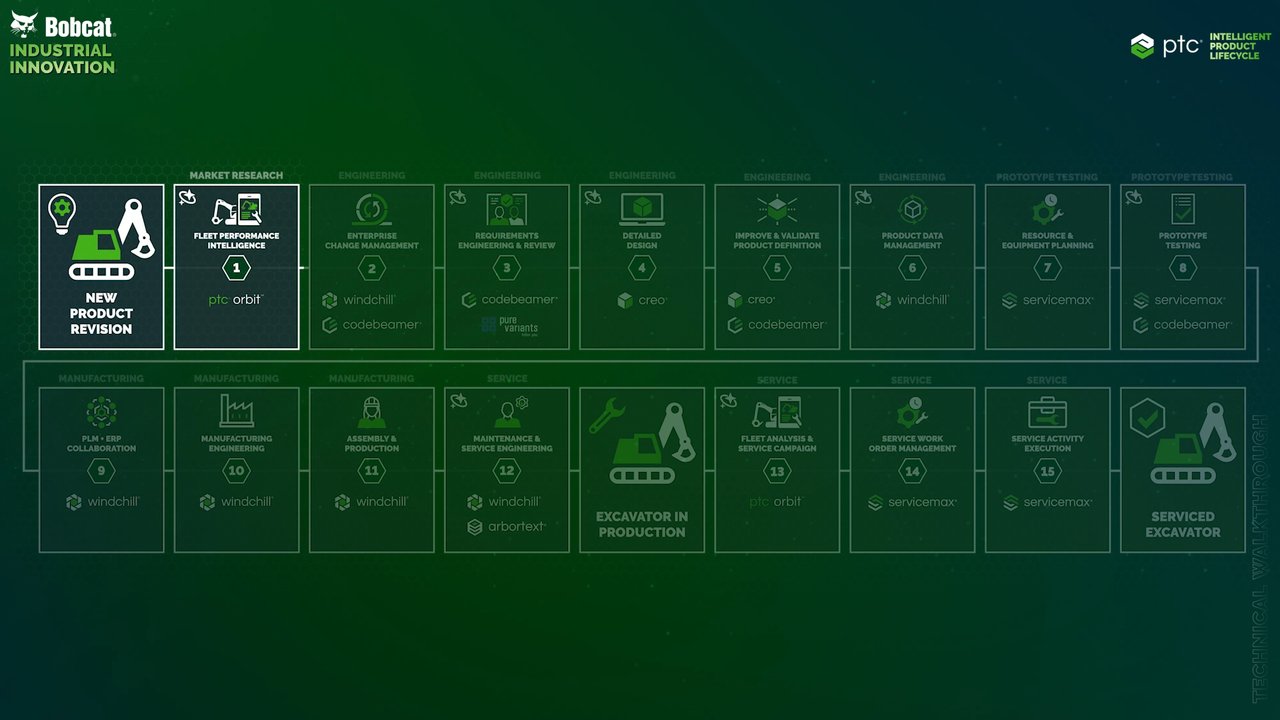
Bobcat Industrial Innovation - Engineering
00:00 So far in the Bobcat demo, we've explored market research where we used PTC Orbit to capture and analyze product usage insights for the Bobcat E17z. In engineering, we'll dive into the engineering change process, showing how cross-functional teams collaborate to update requirements, CAD designs, bill of materials, and other critical product data. Together, PTC Creo, Codebeamer, and Windchill provide a powerful engineering backbone for
00:30 machine builders, connecting requirements, design, and change to drive speed, traceability, and quality. Here, we'll take the perspective of a change administrator. Based on the product manager's research, an engineering change request has been created to reduce the mass of the boom swing frame in Windchill. The goal is to lower material cost and improve serviceability by simplifying replacement if the component is damaged. After we review and approve the engineering change request with the change review board,
01:01 we create a change notice. The change notice includes the change tasks that the different engineering teams must complete. The change notice also includes the implementation plan. We've already created multiple tasks across different disciplines to update the swing frame design and the BOM, perform new tests and simulations, and update the associated manufacturing and service information. We've also already created a new part in Windchill with a new part number for the
01:31 updated swing frame. The strength of the change process in Windchill is end-to-end traceability across all impacted engineering data and every product that includes the affected parts. To start the execution of the change process, we'll approve and submit the change notice. Windchill manages highly complex modular product structures that can be filtered based on option and variant definitions and rules. Parts affected by the active change process are clearly marked in the product structure
02:01 and linked to the newly created change notice. Once the change process is set up in Windchill, PTC's digital product traceability integration automatically creates the corresponding change notice in Codebeamer. This change notice is linked to the change notice in Windchill and includes the tasks needed to update the applicable swing frame design requirements. After the change administrator reviews and approves the automatically created change
02:31 notice, they'll move it to the in implementation state to begin execution. The change tasks are assigned to a requirements engineer who reviews the task description and begins the update. From the associated swing frame design requirement, users can also access the linked Windchill part information, including full engineering data such as CAD. The Codebeamer Windchill integration delivers end-to-end digital thread traceability by automatically syncing changes and linking requirements directly to product parts and
03:02 engineering data, reducing manual handoffs, errors, and rework. Now, we'll update the requirement text to reflect the requested changes. After updating the swing frame design requirements, we'll validate the revised requirement text using the Codebeamer AI requirements assistant. Codebeamer AI validates the requirement against the INCOSE standard and customer-defined rules, then presents a list of issues for us to review. It can also automatically rewrite the text to apply the same rules and standards, improving
03:34 the quality of the requirement and reducing errors across engineering teams. The Codebeamer test coverage report provides a clear, real-time view of how thoroughly requirements are covered by tests and also displays their results, quickly highlighting gaps and areas of risk. Here, we see that the swing frame requirement doesn't yet have an associated test case. To close the gap and ensure full test coverage, the engineer uses the Codebeamer AI test case generator, which creates a test case definition from the requirement text and
04:06 manual selections like test type and level of breakdown. Once the AI generates the test case details, the test case is automatically created and linked to the swing frame requirement as a downstream item in Codebeamer. The traceability report in Codebeamer provides an instant end-to-end view of coverage and impact by showing how requirements link to downstream items such as design, tests, and
04:39 changes, making gaps and compliance status easy to identify. Codebeamer trackers can also be linked across projects, for example, to ISO standards and other regulatory requirements, as shown in the traceability report. Bobcat, like many heavy equipment and machine builder companies, offers a wide variety of product options and variants that differ by country and market. Pure variants integrates natively with Codebeamer to manage this product complexity, starting at the requirements level.
05:09 Pure variants supports complex variant models, including parameters and rules that define valid configurations. These variant configurations can be translated into Codebeamer streams, enabling requirement documents to be filtered to a specific product configuration based on the variant features linked to the relevant Codebeamer trackers.
05:41 Streams also support merging, so teams can bring changes from one variant stream into another or into a shared mainline and automatically reconcile differences while preserving full traceability of what changed and why. Once the requirements engineer completes the work, they mark the change task as complete and move its state to verify for review and final approval. We'll now switch perspectives to the mechanical design engineer and begin by reviewing the change task assigned to us in Windchill.
06:19 Creo's integrated web browser allows us to seamlessly navigate between Windchill and Codebeamer without ever leaving Creo, so we can also verify the updated design requirements in Codebeamer that were revised by the requirements engineer. Here, the Codebeamer requirement is linked to the Windchill change request. After confirming the requirements, we'll load the model in Creo and open Creo Generative Design. Creo's generative design capabilities allow us to efficiently optimize the swing frame design
06:50 for the specified load cases. Creo Generative Design helps engineers explore and automatically generate optimized design alternatives based on functional requirements such as loads, constraints, materials, and manufacturing considerations. By quickly evaluating multiple concepts and performance trade-offs, teams can reduce weight, improve stiffness, and shorten iteration cycles before refining the final geometry for detailed engineering and downstream validation. Model-based definition, MBD, in Creo is associative, so annotations automatically
07:25 update when the geometry changes. This maintains traceability and helps ensure downstream teams, like manufacturing, always work from the latest, most accurate product definition. Creo's GD&T Advisor guides engineers in applying correct geometric dimensioning and tolerancing by recommending appropriate datums, controls, and feature definitions based on standards and best practices. It helps ensure annotations are complete and consistent, reduces interpretation risk for manufacturing and inspection, and supports downstream use of model-based definition for
07:59 metrology and quality processes. Once we've finished redesigning the swing frame, we'll use Creo's 3D PDF Export to publish a lightweight representation of the 3D model and its MBD annotations in a standard PDF format that we easily can share with other business units and suppliers. This interactive document allows stakeholders to view, rotate, and interrogate the model to support design reviews, manufacturing planning, and supplier collaboration, helping teams
08:29 communicate the latest product definition without sending native CAD files. This 3D PDF gives manufacturing a clear and consumable definition of the new swing frame design. Building on that preparation, we'll move on to a material removal simulation to validate the machining process virtually. Using the same target model, stock removal is simulated to check for potential issues such as gouges, remaining material, or tool collisions. This early validation helps confirm manufacturability, reduces downstream shop
09:01 floor rework, and ensures the finished part meets design intent before NC output and production. Validating the machining process virtually through material removal simulation gives us the confidence that the swing frame can be manufactured as intended. With the updated swing frame design finalized and the required manufacturing information complete and shared, we'll mark our assigned change task as complete, notifying the cross-functional team that the work is ready for review and downstream execution.
09:32 Next, we'll switch perspectives to a simulation engineer to show how simulation software helps improve and validate the product definition early in the design process. During requirements engineering, the requirements engineer defined a simulation test case to validate the structural integrity of the updated swing frame under specific load conditions. The test is designed to confirm that the new optimized part maintains the current structural end load requirements. Creo Simulation Live supports a simulation-driven design approach by enabling
10:05 fast, real-time structural analysis directly within the CAD environment. As engineers iterate on geometry, they can immediately evaluate stress, displacement, and factor of safety without leaving the design context. By applying loads and constraints early and comparing results against requirements, teams can identify weak areas sooner, make informed design decisions faster, and reduce late-stage rework before moving on to more detailed simulation and validation.
10:35 As simulation becomes part of the design process in Creo Simulation Live, the results aren't just visual feedback, they're captured and reused downstream. Simulation results are stored as a test run in Codebeamer and linked directly to the associated test case and design requirements, providing end-to-end traceability for the engineering team. This makes it easy to confirm requirement coverage, understand the impact of design changes, and capture auditable evidence to support reviews and compliance.
11:05 Next, we'll also make an improvement on the excavator arm. To do so, we'll use Creo Simulation Live to perform real-time structural analysis directly in the CAD environment. As loads and constraints are applied, stress, displacement, and factor of safety update instantly, allowing us to evaluate performance right as we iterate on the arm's geometry. To support a simulation-driven design approach, Creo AI provides more guidance during this process. Creo Advise focuses on guidance, helping engineers understand how to perform tasks in
11:39 Creo, navigate capabilities, and follow best practices without directly acting on the model itself. Creo Assist goes a step further. It's design aware, which means it can interact with the model itself and help us explore design changes, apply relevant Creo capabilities, and act directly within Creo to support faster iteration and informed decision-making. Here, AI lets us preview the suggested model changes and decide if we want to apply them to
12:11 the model Together, Creo Simulation Live and Creo AI help engineers evaluate structural performance earlier, make better design decisions with confidence, and reduce the need for late-stage rework before moving on to downstream validation. Now that the design changes are completed and verified with Creo Simulation Live, we'll switch perspectives to an engineering manager for the next task in the change implementation plan. The change task to update the engineering bill of materials, or EBOM, includes BOM redlining.
12:46 BOM redlining clearly defines the replacement of the old swing frame with a new one by using a new part number. Now, we can simply revise the affected sub-assembly to automatically apply the replacement to the bill of materials. Next, we'll open the BOM compare feature.
13:16 Here, we can see that the BOM and CAD structure are out of sync after the update. But with full BOM to CAD associativity, we can easily bring the CAD structure back in sync with just a few clicks. Now, the CAD assembly includes the redesigned swing frame. At this point, we can also complete our change task to update the engineering bill of materials. Before moving to manufacturing, we'll conduct a final product optimization and design review,
13:50 then close out the engineering change process. With the updated swing frame design released to the product structure, the engineering team uses Windchill AI part rationalization to identify duplicate and similar parts. Windchill AI part rationalization analyzes part attributes, classifications, and geometry to reveal duplicate, similar, or reusable parts. When a potential duplicate is found, we can compare their attributes and inspect geometry in detail with Creo View.
14:25 From the part comparison interface, we can initiate a new change notice to supersede one of the duplicate screws with the preferred standardized part. By recommending consolidation opportunities and preferred parts, Windchill AI part rationalization reduces part proliferation, improves BOM accuracy, and can lower cost and lead time through greater standardization and reuse. At this point, the new swing frame is captured in the engineering bill of materials, and the product structure has been optimized to reduce duplicate parts.
15:00 Bobcat uses a modular product structure in Windchill. Modular BOMs let teams define a reusable one hundred and fifty percent structure that combines common modules with optional content, then filter down a valid one hundred percent configuration for a specific product, market, or customer order. Options and variant management applies feature definitions and rule logic to filter the product structure, selecting the correct parts, quantities, and alternates while maintaining
15:30 traceability back to the master BOM. This approach reduces part proliferation, simplifies engineering change across product families, and improves downstream accuracy for manufacturing, sourcing, and service. With the new Creo View web experience, anyone can open and interact with lightweight three-D product data directly in the browser without installing a desktop client. This means engineering, purchasing, manufacturing, service teams, and suppliers
16:00 can all review the same part or assembly and context right from Windchill or a shared link with consistent access control and the latest released configuration. In just a few clicks, users can rotate, zoom, section, explode, and interrogate components to understand fit, clearances, and what's changing, supporting faster collaboration and better decision-making. And because the application is web-based, it's ideal for quick design reviews and cross-functional alignment, helping teams reduce back and forth, avoid misinterpretation,
16:33 and keep the intelligent product life cycle moving forward. An exciting new feature in Windchill is its direct integration with NVIDIA Omniverse. This integration enables teams to visualize and interact with up-to-date product design data in a shared, immersive, and photorealistic environment. By leveraging OpenUSD and Omniverse RTX libraries, Windchill users can access high-fidelity three-D simulations directly within their PLM environment.
17:03 Windchill's connection to Omniverse streamlines design reviews, simulation, and cross-functional collaboration, helping organizations innovate faster and reduce development risk. With access to the latest GPU technologies hosted in the cloud, we can now view full fidelity products in the browser with physically accurate materials to ensure realism and product data to set context. Here, we can also bring in multiple products or different versions of the same product to view and compare.
17:34 The OpenUSD representation is generated on demand within Windchill, ensuring we can always see the correct version of the product. As an engineering manager, we can leverage the powerful real-time physics-based rendering capabilities of Omniverse directly within the Windchill product structure, helping us conduct final product reviews and share early design visuals with the marketing team. In this section, we've concluded the engineering change process for the new swing frame on the Bobcat E17Z excavator and seen how a connected change process links multiple
18:09 engineering disciplines and delivers end-to-end traceability across key product artifacts, from requirements to CAD design and the product structure, helping us accelerate product innovation throughout the life cycle, efficiently manage product complexity, and streamline product development.