The challenge
The Mathcad Community Challenge for November and December 2025 was based around the kids’ game Battleship:
Recently, I was in the position of trying to explain to a 6- and 8- year old how to play the board game Battleship. (Kids from my generation had commercials that seemed to explain the basics of the game fairly well.) While trying to explain the concept of the grid to them and search algorithms, I couldn’t help but wonder, “How could this be done in Mathcad Prime?”
This month’s challenge, should you choose to accept it, is fairly open-ended: simulate various aspects of the Battleship game in Mathcad. Here are some suggestions:
- Write a program that will place the ships on the ocean grid. The ships must be placed horizontally or vertically; no diagonals. Ships can’t overlap one another. Do you place the ships randomly or according to some kind of optimized algorithm?
- Alternatively, can you use Advanced Input Controls to allow the user to place the ships on the ocean grid?
- Display the placement of the ships using the plotting capability.
- Write an algorithm for hunting the ships. Do you use something like a random walk? A standard grid search? Your own preferred algorithm from when you were a kid?
- Alternatively, use Advanced Input Controls to let the user enter their own coordinates. Use these same controls to provide feedback to the user on hit or miss.
- Display the hits and misses on a plot or chart.
- Can you program Mathcad Prime to run through a number of iterations of placing and hunting ships, and then evaluate statistics on number of shots needed to sink the fleet?
The submissions
Two of our loyal participants contributed worksheets to the challenge: Alan Stevens and Werner E.
Alan’s worksheets
Alan was the first, and his submissions are always interesting because he uses the Express version of Mathcad Prime.
Alan’s first worksheet sets up a 10 x 10 matrix filled with zeroes. Player A replaces various elements of the matrix with the number one to represent the placement of ships. An XY Plot then displays the placement using dots and filled boxes. A second 10x10 matrix represents the shots taken by Player B. A collapsed area contains the logic for registering hits and misses. I like the use of double summations throughout, especially for tracking the total shots and hits. A second XY Plot depicts the hits and misses for Player B with red and black squares. It’s an extremely clean and concise use of matrices, operators, and plots.
Alan’s second worksheet adds the traditional letters and numbers notation for the Battleship grid. Player A locates the ships with grid notation and Player B enters their shots in one of five matrices, in traditional grid notation. This is a great incremental improvement to match the feel of the board game.
In version 3, the “computer” (Mathcad) places the ships for you, using an ingenious vector of “if” functions with random numbers. This helps you avoid the inherent problem of “playing chess against yourself.”
Version 4 reverses the scenario, with the user placing the ships and the “computer” (Mathcad) taking random shots to locate the fleet. I like how the worksheet tracks the total number of shots needed and the incorporation of orange dots in the XY Plot to represent locations that were not attacked.
While looking at the total number of shots in version 4 (84), I wondered how many shots it would take a computer on average to sink the fleet. Thankfully, Alan answered this in version 5 with a Monte Carlo simulation of 10,000 trials. The mean is a staggering 95.4!
Even without the full functionality of Mathcad Prime, this is an exceptionally fun progression of worksheets. It makes me want to test my hunting abilities against the computer.
Watch David Newman on the Mathcad YouTube channel showcase versions 3 and 4 of Alan’s worksheets as he hunts the computers’ ships:
Werner’s worksheets
As always, Werner delivered top-notch worksheets that will amaze you.
The first is an elegant one-pager, thanks to collapsed areas and information hidden in draft mode. Speaking of which, I am intrigued by this “cheat mode.” Werner makes extensive use of advanced input controls functionality available in Mathcad Prime 11, including sliders, buttons, and text boxes.
I almost didn’t want to peek at the code. It’s sort of like when you see a great movie, and you’re having so much fun that you never want to see any of the behind-the-scenes or director’s commentary. You don’t want to destroy the magic. I did peek though, and it involves quite a few programs with the requisite “for” and “if” constructs. The biggest text box had quite a bit of JScript as well.
The second worksheet has an additional button for verbose mode. I liked the sound of that. This one told you which ship was hit. There’s also a cool box that each ship’s number of hits. When you sink one, it outlines both the feedback text box and the outline of the ship on the play grid. The game play feedback is addictive, like a phone app. This is and always will be my new all-time favorite work distraction.
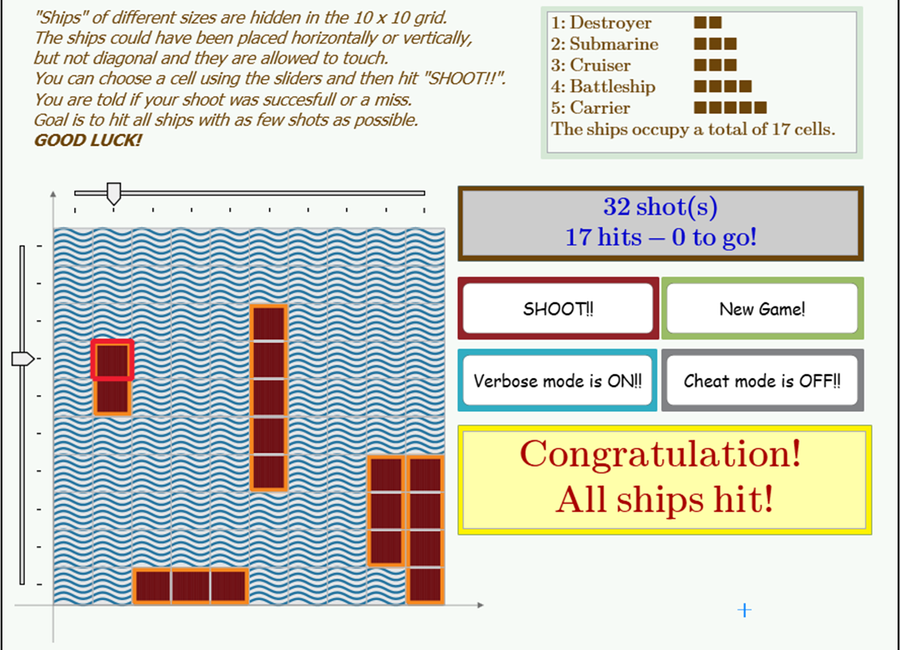
Dave Martin's very lucky 32-hit best score playing on Werner's second worksheet (verbose mode on).
David Newman also produced a video for the Mathcad YouTube channel showcasing Werner’s verbose mode:
What can we learn from Battleship in Mathcad Prime?
There is a surprising level of complexity to so-called “kids’ games.” We teach these games to kids not just to occupy them so we can get stuff done, or even for character-building reasons like patience, taking turns, and fair play. Whether we adults are cognizant of the benefits, game theory has lots of applications in real life, like business decisions, negotiations, and conflict resolution.
Before the challenge, David Newman and I discussed whether it would be possible to simulate game play like a board game in Mathcad Prime. Once again, the community came through and expanded our beliefs on what is possible in this tool for engineering calculations.
You definitely want to download the worksheets and play for yourself. If you don’t have Mathcad Prime, you can watch the videos above to get a feel for the experience, but you can also download the 30-day trial here.
Join us in 2026 where our first challenge is inspired by international intrigue from a caper in the City of Lights!
Up Next
Stay up-to-date with the Mathcad Minute!
Subscribe to Mathcad’s newsletter to learn when new Community Challenges go live, plus much more!
Subscribe Now