Article - CS243906
Windchill Workgroup Manager 11.0 cannot be brought back online if it is previously shutdown while in an offline state due to a network or server issue.
Modified: 10-Jun-2017
Applies To
- Windchill PDMLink 11.0 F000 to M010-CPS02
- Windchill ProjectLink 11.0 F000 to M010-CPS02
- Pro/INTRALINK 8.x + 11.0 F000 to M010-CPS02
- Windchill Workgroup Manager
Description
- When a network disruption occurs, the client prompts to switch to offline mode with the following message:
Attention - Connection to server is unavailable!
The server is currently unavailable. Do you want to switch to offline mode?
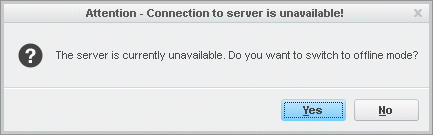
The server is currently unavailable. Do you want to switch to offline mode?
- Selecting Yes to go offline and shutting down Windchill Workgroup Manager prevents the client from going back online with the following message repeatedly displayed:
Folder cannot be displayed.
The contents of this folder are not available.

The contents of this folder are not available.
- Debug client logs may report messages like the following:
DetailActionInfo: Action_i ReadFolderAction finished: FAILED
IndexLogging: Ver-0.1 811606023471109$<ActionState>finished: FAILED</ActionState>
DetailActionInfo: Workspace: Type=uwgmdb::WorkspaceX26 ObjId=OR:wt.epm.workspaces.EPMWorkspace:#### , Name="<workspace name>", UpdateId=59
...
DetailActionInfo: Warning: Action cannot executed in offline workspace
IndexLogging: Ver-0.1 811606023471109$<Conflict_i> Severity: Warning Message: Action cannot executed in offline workspace Not resolvable</Conflict_i>
ServerCache: switching to OFFLINE. result=OFFLINE
..
ServerCache: UwgmServerCache_i::compareClientRegisteredAuthAppsWithServer : Server Cache is NOT ONLINE so skipping comparing client Registered AuthApps with cached AuthApps
IndexLogging: Ver-0.1 811606023471109$<ActionState>finished: FAILED</ActionState>
DetailActionInfo: Workspace: Type=uwgmdb::WorkspaceX26 ObjId=OR:wt.epm.workspaces.EPMWorkspace:#### , Name="<workspace name>", UpdateId=59
...
DetailActionInfo: Warning: Action cannot executed in offline workspace
IndexLogging: Ver-0.1 811606023471109$<Conflict_i> Severity: Warning Message: Action cannot executed in offline workspace Not resolvable</Conflict_i>
ServerCache: switching to OFFLINE. result=OFFLINE
..
ServerCache: UwgmServerCache_i::compareClientRegisteredAuthAppsWithServer : Server Cache is NOT ONLINE so skipping comparing client Registered AuthApps with cached AuthApps
This is a printer-friendly version of Article 243906 and may be out of date. For the latest version click CS243906