Article - CS231266
PTC Windchill Workgroup Manager 11.0 Installation Assistant authoring application selection defaults
Modified: 11-Aug-2022
Applies To
- Windchill PDMLink 11.0 to 12.1
- Windchill ProjectLink 11.0 to 12.1
- Windchill PDM Essentials 11.0 to 12.0
- Pro/INTRALINK 8.x + 11.0 to 12.1
- Windchill Workgroup Manager
Description
- During install of the Windchill Workgroup Manager, selecting ECAD Applications, MCAD Applications or Other Applications suggests that ECAD/MCAD/Other application support is selected for installation:
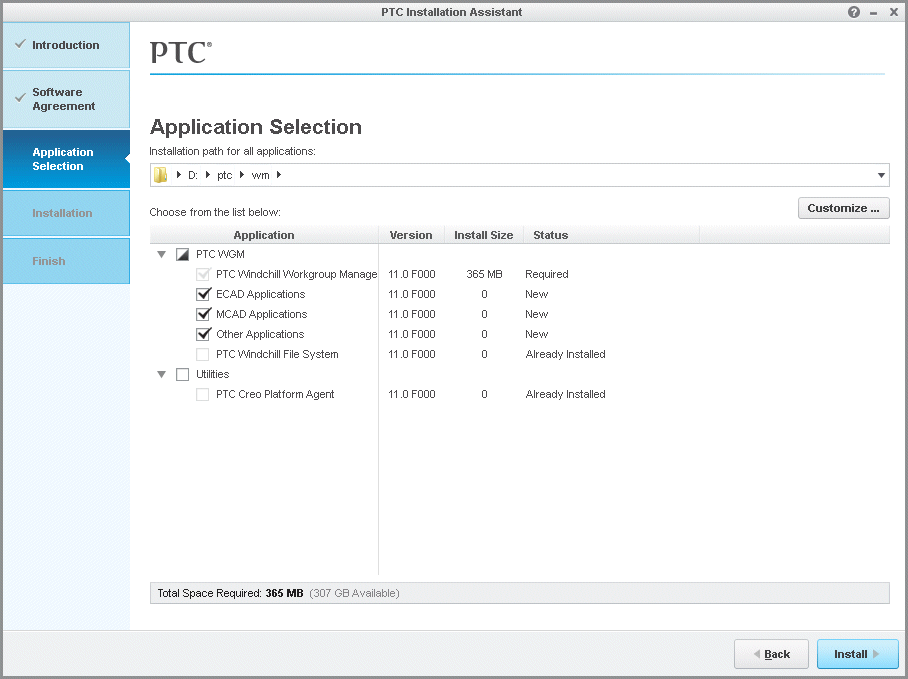
- Once installed, CAD applications are not available to register, even though the applications check boxes were selected during installation
- Immediately after install of Windchill Workgroup Manager 11.0, selecting Register New Application does not launch a window of available options for registration
- When installing the Windchill Workgroup Manager client, one is required to select Customize... to select the desired ECAD/MCAD/Other adapters for install
This is a printer-friendly version of Article 231266 and may be out of date. For the latest version click CS231266