Article - CS380928
Every time the Open in SolidWorks operation is used to open a SolidWorks CAD model from a Windchill Workgroup Manager workspace, there is a SolidWorks prompt and unable to open the CAD model until this prompt is >OK'ed to continue
Modified: 14-Nov-2023
Applies To
- Windchill PDMLink 11.0 to 13.0
- Windchill Workgroup Manager
- Dassault Systemes SolidWorks
Description
- Every time the Open in SolidWorks operation is used to open a SolidWorks CAD model from a Windchill Workgroup Manager workspace, there is a SolidWorks waning prompt and unable to open the CAD model until this prompt is >OK'ed to continue
SOLIDWORKS
A journal file could not be created. Auto recover will not work. Another session of SolidWorks may already be running on this machine
A journal file could not be created. Auto recover will not work. Another session of SolidWorks may already be running on this machine
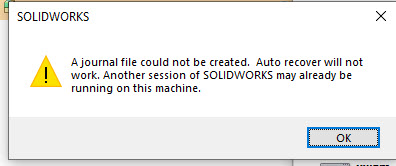
- There is always a SolidWorks warning when using Windchill Workgroup Manager to open a SolidWorks file directly from the workspace using the Open in SolidWorks icon

- This prompt needs to be OK'ed to continue opening the CAD file
- This prompt is related to the SolidWorks journal file which gets created solely by SolidWorks
- Steps to replicate
- Launch SolidWorks first while registered in Windchill Workgroup Manager, this operation will start WGM client as well
- Once both are started, from within Windchill Workgroup Manager choose to open any SolidWorks files directly from the workspace using the Open in SolidWorks icon
- Notice the SolidWorks prompt stating to >Ok the next action
This is a printer-friendly version of Article 380928 and may be out of date. For the latest version click CS380928