Article - CS349681
How to rename Additional files published via WVS Publish Rules in the Representation of EPM Document to add suffix based on version in Windchill PDMLink
Modified: 13-Apr-2026
Applies To
- Windchill PDMLink 11.0 to 13.1
Description
- This is an example of the WVS Afterloader hook method that can start as a post-publish job after WVS completes publishing of a new representation
- After the EDRLoader successfully creates a new representation, a custom method can be called to perform additional work
- For example, setting ad hoc permissions on the new representation. Refer to the publish.afterloadermethod property definition in the wvs.properties.xconf file in your Windchill installation for more details
- This article provides sample code for this hook that will enable you to rename Additional files published via WVS Publish Rules to add the source Windchill Revision or Version number
- Two key elements to know about this implementation before deploying in your system:
- This article is intended to rename only additional files and NOT the primary viewable file. See CS333616 to understand the importance of this instruction
- The sample code in this article is designed to work with EPM Document only
- Sample implementation with screenshots
- The AfterEDRloader hook method will rename Additional files published via WVS Publish Rules to add source Windchill Revision or Version number
- The output file names will be:
- Source CAD file name + Windchill Revision + Lifecycle State. (e.g. MYCADNAME_Rev A_Released.stp) or
- Source CAD file name + Windchill Version number. (e.g. MYCADNAME_A.1.stp) or
- If Additional File type is zip:
-
Source CAD file name + Windchill Revision or Version number + Source File extension. (e.g. MYCADNAME_Rev A_Released_dwg.zip or MYCADNAME_A.1_dwg.zip)
-
-
For Example
+ Windchill Version number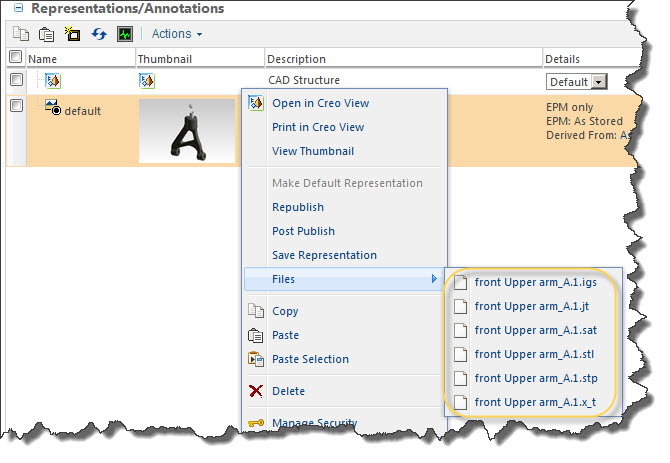
+ Windchill Revision + Lifecycle State
- Requirement to dynamically rename the primary PDF file generated by the CAD Worker using Windchill EPMDocument attributes such as Version and lifecycle state
- How to rename the primary PDF published by the CAD Worker using attribute values in Windchill PDMLink
This is a printer-friendly version of Article 349681 and may be out of date. For the latest version click CS349681