Article - CS34575
How to set default value of "Components Allowed to be Referenced" (Creo Elements/Pro, Creo Parametric)
Modified: 09-Jul-2024
Applies To
- Pro/ENGINEER and Creo Elements/Pro Wildfire to Wildfire 5.0
- Creo Parametric 1.0 to 11.0
- Creo+
Description
- How to set default value in Tools > Assembly Settings > Reference Contol > Components Allowed to be Referenced in Pro/Engineer?
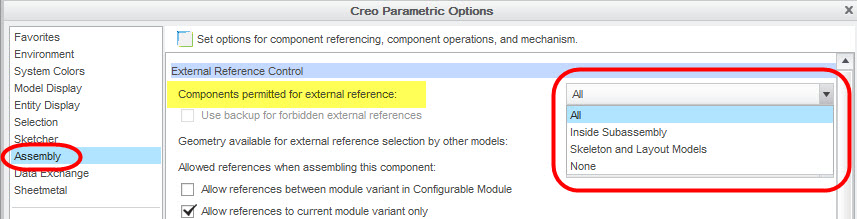
- How to set default value in File > Options > Assembly > External Reference Contol > Components Allowed to be Referenced in Creo Parametric?
- What are the differences among all, Inside Subassembly, skeleton and Lyout Models, and none?
- In the config.pro file, after adding the configuration option default_ext_ref_scope to subassemblies, modify the model and enter sketching or activate a part to sketch, the model color will turn gray, but it will not change if click a part and sketch directly. Turns gray; the option default_ext_ref_scope is all, or delete this option and perform the same operation, the model will not turn gray
- How to control the reference scope
This is a printer-friendly version of Article 34575 and may be out of date. For the latest version click CS34575