Article - CS319811
Cascading Attributes on New Multiple Parts Wizard does not follow rules with out of the box "Required View" in Windchill PDMLink
Modified: 22-Jan-2020
Applies To
- Windchill PDMLink 11.1
Description
- Cascading Attributes on New Multiple Parts Wizard does not follow rules with out of the box "Required View"
- When adding Cascading Attributes on the out of the box Parent Type, with the constraint "Required", the default OOTB View "Required" on the new multiple parts wizard does not honor Cascading Attribute conditions
Steps to Reproduce
- Create Two Global String Attributes on your Part Type
- Add to each a global enumeration value list to both, and a required constraint
- Set up some rule that would be "IF A, then B, IF C, then D. As an example"
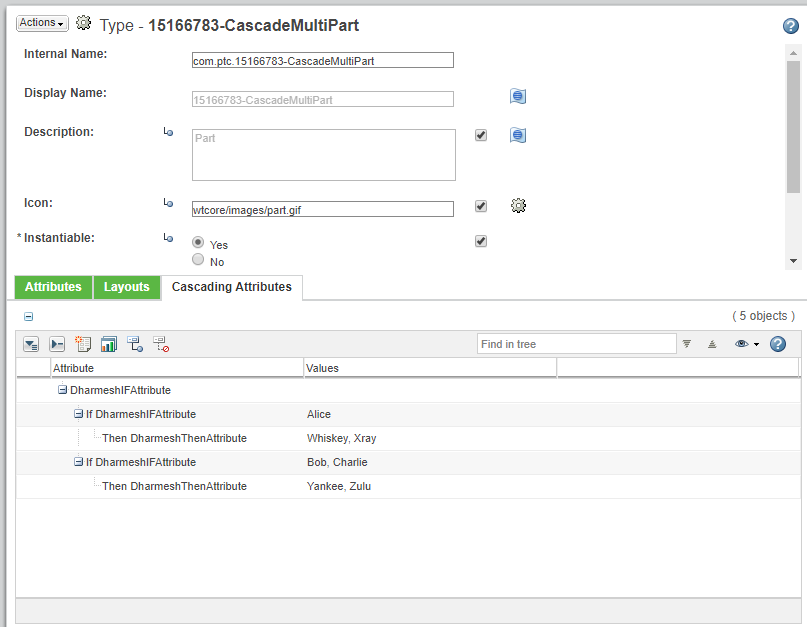
- Create a new part of this type using the regular new part wizard, notice that the rules work correctly
- Create a new part using the new multiple parts wizard, Leave the ootb "Required" view for the wizard, notice that the rules no longer work
Please note that this is affecting UI only, you still won't be able to create the part should it not meet the requirements
This is a printer-friendly version of Article 319811 and may be out of date. For the latest version click CS319811