Article - CS287712
Remote session using Axeda Desktop Viewer 6.9.215 gets disconnected if AutoAccept setting in Axeda Desktop Server is 30 seconds
Modified: 30-Jul-2018
Applies To
- Axeda - Connectivity 6.9.1
Description
- Remote session using Axeda Desktop Viewer 6.9.215 gets disconnected if AutoAccept setting in Axeda Desktop Server is 30 seconds
- Right click Axeda Desktop Server system tray icon on the asset and select Admin Properties
- Ensure that Query on incoming connection is enabled with a Timeout of 30 seconds
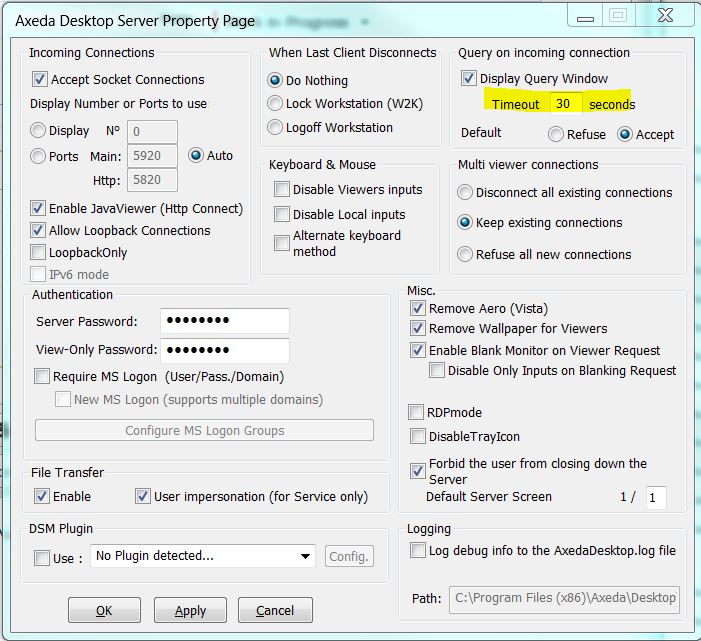
- Start a remote session using Axeda Desktop Viewer 6.9.215
- Query window is displayed with a 30 second countdown timer
- After 30 seconds the connection ends with the message:
Server closed connection
-The server running as application doesn't have permission to unlock screen.
-Manually closed
-Network disconnected
-Server refused connection
-The server running as application doesn't have permission to unlock screen.
-Manually closed
-Network disconnected
-Server refused connection
- Other viewer versions work as expected
- Timeout value of 10 seconds work fine even with Viewer 6.9.215
This is a printer-friendly version of Article 287712 and may be out of date. For the latest version click CS287712