Article - CS280506
Neither Mentor Graphics PADS Layout [PADS9.x/VX.1.x] nor Mentor Graphics Xpedition xDX Designer [PADS9.x] are available applications to be registered on a Windows 10 machine with Windchill Workgroup Manager 10.2 M030 CPS24
Modified: 27-Feb-2018
Applies To
- Windchill PDMLink 10.2 F000 to M030-CPS23
- Windchill PDM Essentials 10.2 F000 to M030-CPS23
- Windchill ProjectLink 10.2 F000 to M030-CPS23
- Windchill Workgroup Manager
- Mentor Graphics PADS Layout [PADS9.x/VX.1.x]
- Mentor Graphics Xpedition xDX Designer [PADS9.x]
Description
- Neither Mentor Graphics PADS Layout [PADS9.x/VX.1.x] nor Mentor Graphics Xpedition xDX Designer [PADS9.x] are available applications to be registered on a Windows 10 machine with Windchill Workgroup Manager 10.2 M030 CPS24
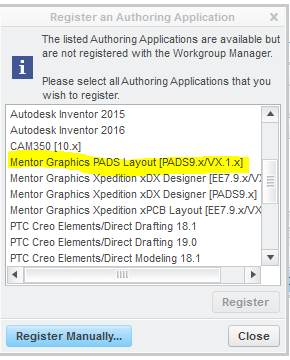
- When using a Windows 10 machine on which Windchill Workgroup Manager 10.2 M030 CPS24 is installed, there is no option to select Mentor Graphics PADS Layout [PADS9.x/VX.1.x] nor Mentor Graphics Xpedition xDX Designer [PADS9.x] in the Register an Authoring Application dialog box
- The options are available for the same but installed on a Windows 7 machine
- Dialog box and selection for a Windows 7 installation
- The options are available for the same but installed on a Windows 7 machine
- Dialog box and selection for a Windows 10 installation

This is a printer-friendly version of Article 280506 and may be out of date. For the latest version click CS280506