Article - CS279522
When edit Note object throws error Object "wt.epm.EPMDocument>XXXXX" is not persistent in Windchill PDMLink 10.2 M030 CPS01
Modified: 09-Feb-2018
Applies To
- Windchill PDMLink 10.2 M030-CPS01
Description
- When edit Note object throws error Object "wt.epm.EPMDocument>XXXXX" is not persistent in Windchill PDMLink 10.2 M030 CPS01
- MS reports following error:
ERROR com.ptc.mvc.controllers.ExceptionController wcadmin - message : You do not have access to this object or it does not exist.
error:-------------javax.servlet.ServletException: wt.util.WTException: You do not have access to this object or it does not exist.
javax.servlet.ServletException: wt.util.WTException: You do not have access to this object or it does not exist.
ERROR [ajp-bio-8010-exec-2] com.ptc.mvc.controllers.ExceptionController wcadmin - message : Object "wt.epm.EPMDocument>XXXXXX" is not persistent.
error:-------------wt.util.WTRuntimeException: Object "wt.epm.EPMDocument>XXXXXX" is not persistent. Nested exception is:
(wt.fc.fcResource/7) wt.fc.ObjectNoLongerExistsException: Object "wt.epm.EPMDocument>XXXXXX" is not persistent.
wt.util.WTRuntimeException: Object "wt.epm.EPMDocument>XXXXXX" is not persistent. Nested exception is:
(wt.fc.fcResource/7) wt.fc.ObjectNoLongerExistsException: Object "wt.epm.EPMDocument>XXXXXX" is not persistent.
at wt.vc.StandardVersionControlService.refresh(StandardVersionControlService.java:3145)
error:-------------javax.servlet.ServletException: wt.util.WTException: You do not have access to this object or it does not exist.
javax.servlet.ServletException: wt.util.WTException: You do not have access to this object or it does not exist.
ERROR [ajp-bio-8010-exec-2] com.ptc.mvc.controllers.ExceptionController wcadmin - message : Object "wt.epm.EPMDocument>XXXXXX" is not persistent.
error:-------------wt.util.WTRuntimeException: Object "wt.epm.EPMDocument>XXXXXX" is not persistent. Nested exception is:
(wt.fc.fcResource/7) wt.fc.ObjectNoLongerExistsException: Object "wt.epm.EPMDocument>XXXXXX" is not persistent.
wt.util.WTRuntimeException: Object "wt.epm.EPMDocument>XXXXXX" is not persistent. Nested exception is:
(wt.fc.fcResource/7) wt.fc.ObjectNoLongerExistsException: Object "wt.epm.EPMDocument>XXXXXX" is not persistent.
at wt.vc.StandardVersionControlService.refresh(StandardVersionControlService.java:3145)
- Steps to reproduce the issue:
- Create a Note Object.
- Once the object is created , Go to Actions > Click on Edit .
- Enter the description or any field and click on Check in.
- The object still shows checked out although Check-in operation is completed and the page also does not get refreshed
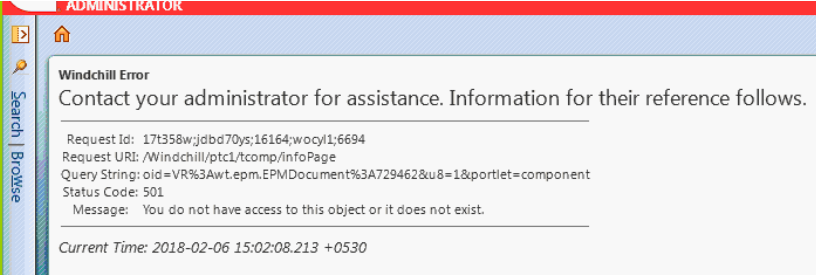
- Refresh the page manually ,browser reports following error as shown:
This is a printer-friendly version of Article 279522 and may be out of date. For the latest version click CS279522