Article - CS279094
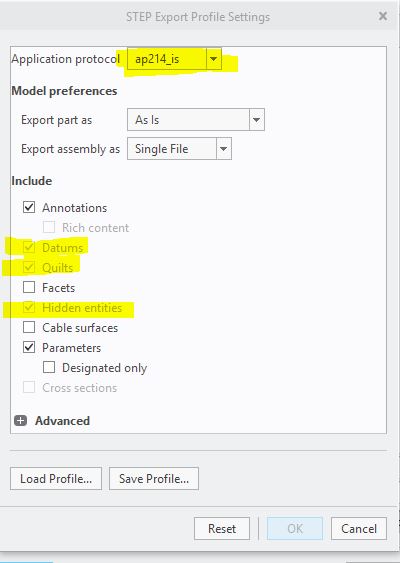
When selecting "Annotations" in export profile of STEP or JT format "Datums" and "Quilts" get activated but grayed out in Creo Parametric
Modified: 09-Jun-2025
Applies To
- Creo Parametric 4.0 to 9.0
- Creo+
Description
- When selecting Annotations in export profile of STEP or JT format Datums and Quilts get activated but grayed out
- Not possible to export Annotations without Datums or Quilts as format Step or JT
- Setting the config.pro option “step_export_format” to “ap214_is” or “ap242_e1”, The options "Datums", "Quilts" and "Hidden entities" are activated and grayed out while exporting a model to a STEP file
- During Save As > Step (*.stp) > Options using ap214_is or AP 242_e1 and Annotations the options Datums, Quilts and Hidden entities are activated and cannot be de-selected, because grayed out
- How to avoid export of Hidden entities and Quilts while exporting to STEP AP 242.Options are grayed out when including Annotations
- Quilts option is grayed out while exporting a model to STEP file when setting the config.pro option step_export_format to ap214_is or ap242_e1
- Some of the current stp protocols allow to export annotations, but also it selects hidden entities by default
This is a printer-friendly version of Article 279094 and may be out of date. For the latest version click CS279094