Article - CS267264
While creating document custom constraint valid range attribute shows inconsistent error message in Windchill PDMLink 10.2 M030
Modified: 30-Aug-2017
Applies To
- Windchill PDMLink 10.2 M030-CPS22
Description
- While creating document custom constraint valid range attribute shows inconsistent error message as shown below:
the value for <attribute_name> must be between -1.E100 to 1.E100, inclusive
- Steps to reproduce the issue:
- Create global attributes with float data type (Real Number with Units) .
- Create local attributes by using that global attribute and define custom valid range as shown:

- Create a document by entering out of valid custom range value 1.E101 as shown :

- Click on Next button and it shows inconsistent error messages as shown :
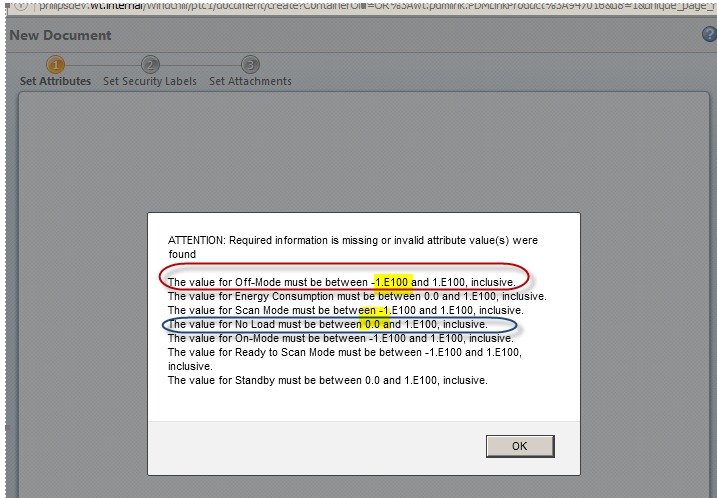
- Note that issue appears when enter the value out of range of OOTB valid range constraint (-1.E100 to 1.E100). If enter value (for example value as -1 ) for custom valid range that is 0.0 to 1.E100 it works fine and it gives correct error message:
the value for energy consumption must be between 0.0 to 1.e100, inclusive for all of the attributes
This is a printer-friendly version of Article 267264 and may be out of date. For the latest version click CS267264