Article - CS266724
Creo View Adapters 4.1 F000: Installation of Microsoft Visual Studio 2015 x86 runtime prerequisite fails on Microsoft Windows Server platforms
Modified: 19-Jul-2017
Applies To
- Windchill PDMLink 10.2 to 11.0 M030
- Creo View 4.1 F000
- Creo View Adapters 4.1 F000
- Windchill Visualization Services (WVS)
- Microsoft Windows - All releases
Description
- Standalone Creo View Adapters 4.1 F000 Installation of the prerequisite dependencies fails during Microsoft Visual C++ 2015 Redistributable installation on Microsoft Windows Server operating systems
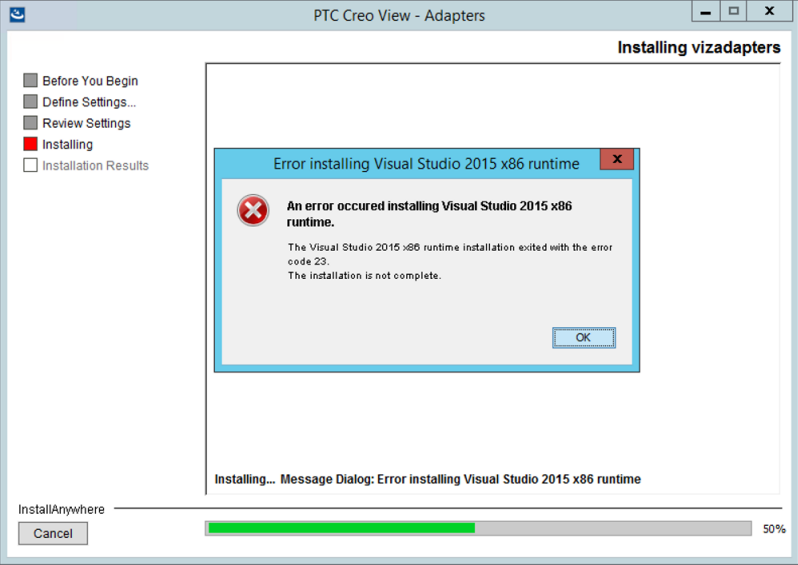
- An error dialog with the following error is displayed at installation time:
Error installing Visual Studio 2015 x86 runtime An error occured installing Visual Studio 2015 x86 runtime.
The Visual Studio 2015 runtime installation exited with the error code 23.
The installation is not complete - For example:
- Installing Creo View Adapters on a Windchill server using PSI is successful but server-side thumbnail generation then fails, with the following WVS Job Monitor errors:
Start Store Part Viewable Files
Retrieving Additional Files
No Thumbnail Created by Server
WARNING: Unable to generate server thumbnail
Uploading Files
End Store Part Viewable Files: 5 Files
Retrieving Additional Files
No Thumbnail Created by Server
WARNING: Unable to generate server thumbnail
Uploading Files
End Store Part Viewable Files: 5 Files
- The following error message dialog may be seen on the machine running the Thumbnail Generator with an incomplete VC2015 runtime installation:
pvsthumb.exe - System Error The program can't start because the api-ms-win-crt-runtime-l1-1-0.dll is missing from your computer. Try reinstalling the program to fix this problem. - For example:

This is a printer-friendly version of Article 266724 and may be out of date. For the latest version click CS266724