Article - CS250563
The Windchill Workgroup Manager Add-in remains in blocked state for Autodesk Inventor
Modified: 14-Aug-2025
Applies To
- Windchill PDMLink 11.0 M020 to 13.1
- Windchill ProjectLink 11.0 M020 to 12.1
- Windchill PDM Essentials 11.0 M020 to 12.0
- Windchill Workgroup Manager
- Autodesk Inventor 2017, 2018, 2022
Description
- After registering Autodesk Inventor in the Windchill Workgroup Manager and launching an Autodesk Inventor session for first time, the Windchill Workgroup Manager Add-in remains in blocked state and one is not able to access the PTC Windchill Tab
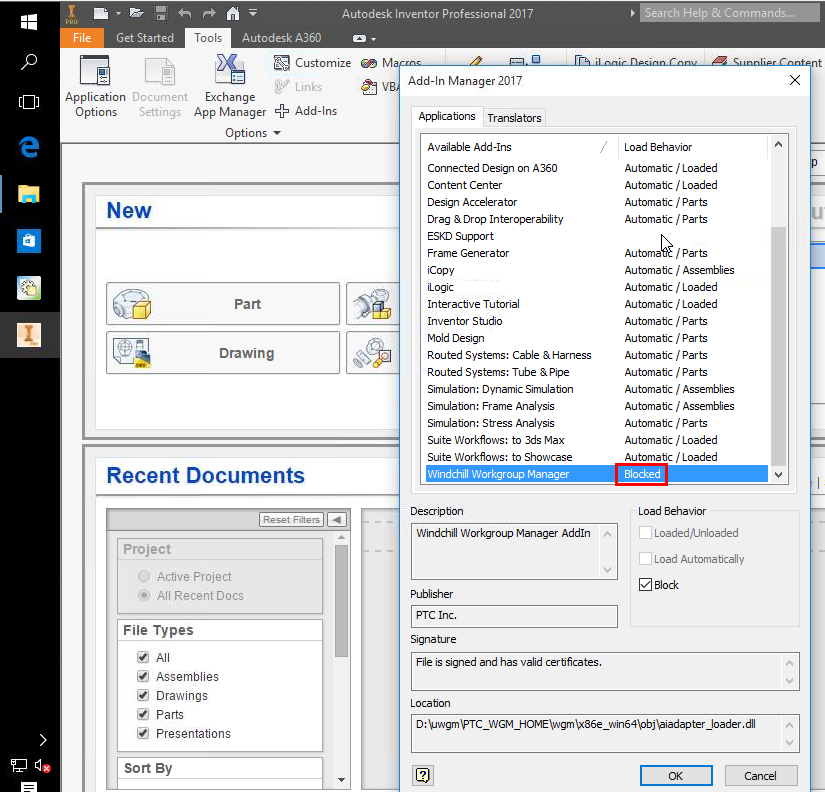

- This issue may cause some issues of publishing CAD document
- Error message is displayed in Workgroup Manager:
Failed to establish connection with Autodesk Inventor <Version>. Try launching Autodesk Inventor <version> manually for troubleshooting
This is a printer-friendly version of Article 250563 and may be out of date. For the latest version click CS250563