Article - CS245000
Unable to sign and complete a task electronically if the Active Directory user password is too long and includes special characters in Windchill PDMLink
Modified: 03-Dec-2025
Applies To
- Windchill PDMLink 9.1 to 13.0
Description
- Unable to sign and complete a task electronically if the Active Directory user password is too long and includes special characters
- How to increase the max length of the Change Activity task password
- How to increase the max length of eSignatureTextBoxSize property, com.ptc.windchill.enterprise.workitem.dataUtilities.eSignatureTextBoxSize
- Error from UI:
The number of characters in this attribute value can be no more than 20. The number of characters currently entered is xx.
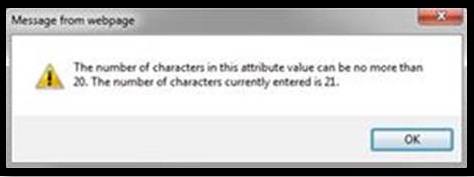
- Method Server log:
com.infoengine.exception.adapter.IEAdapterException; nested exception is: javax.naming.AuthenticationException: [LDAP: error code 49 - 80090308: LdapErr: DSID-0C0903A8, comment: AcceptSecurityContext error, data 52e, v1db1 . Caused by: javax.naming.AuthenticationException: [LDAP: error code 49 - 80090308: LdapErr: DSID-0C0903A8, comment: AcceptSecurityContext error, data 52e, v1db1 . 2016-08-25 09:48:02,395 ERROR [TP-Processor7] wt.org.electronicIdentity.engines.LDAPPasswordSignatureEngine Test01 - (wt.org.electronicIdentity.engines.EnginesRB/2) wt.org.electronicIdentity.SignatureInvalidException: Password for signature is invalid. - Error message appears during the document signature workflow when entering the password
- Password entry restricted to 20 characters
- The error occurs in the document signing process, preventing completion of the workflow
This is a printer-friendly version of Article 245000 and may be out of date. For the latest version click CS245000