Article - CS244069
PDF files failed to publish with error: "Failed to enable pdf commenting"
Modified: 26-Jan-2024
Applies To
- Windchill PDMLink 10.0 to 13.0
- Creo View Adapters 1.0 to 10.0
- Adobe LiveCycle Server All Releases
- Adobe Experience Manager (AEM)
- Windchill Visualization Services (wvs)
Description
- Publishing of PDF file fails with error:
doc2pv MONITOR:: Enabling PDF Commenting response: An unexpected exception was encountered : Caused by: com.adobe.livecycle.readerextensions.client.exceptions.ReaderExtensionsException: ALC-RES-001-019: The input document is not a valid document type for this operation. Caused by: com.adobe.livecycle.readerextensions.client.ProcessingException: ALC-RES-001-019: The input document is not a valid document type for this operation. Caused by: com.adobe.internal.pdftoolkit.core.exceptions.PDFCosParseException: Main XRefSubsection should start with object num0.; nested exception is: com.adobe.livecycle.readerextensions.client.exceptions.ReaderExtensionsException: ALC-RES-001-019: The input document is not a valid document type for this operation.
Error: Adobe Experience Manager server failed to process xxx.pdf with the following message: Client received SOAP Fault from server: java.lang.OutOfMemoryError: Java heap space;
Error: Adobe Experience Manager server failed to process xxx.pdf with the following message: Client received SOAP Fault from server: java.lang.OutOfMemoryError: Java heap space;
- Publishing of PDF fails with error:
- ALC-ASM-S00-002: Failed to execute the DDX - error messages provided. Please see the server log to find more detail regarding exact cause of the failure. Unexpected Exception has occurred
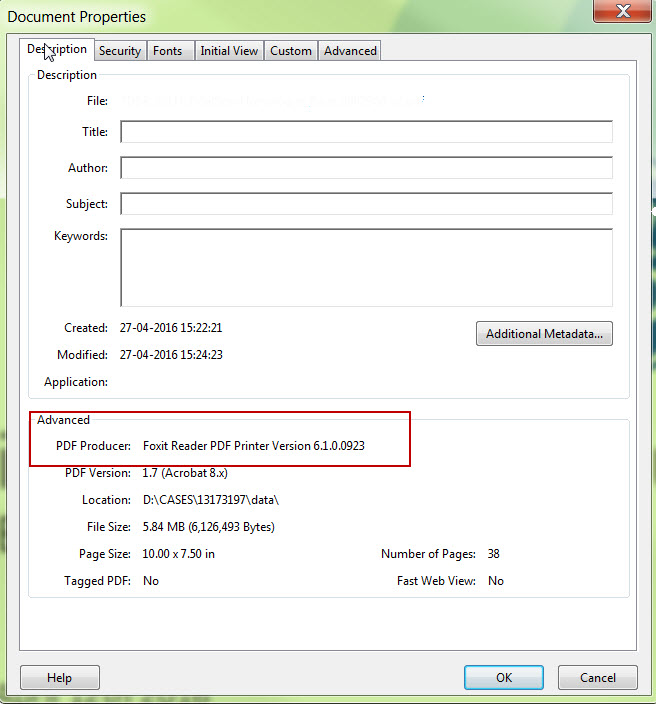
- How to view the source of the generated PDF?
- Open the PDF document in Adobe Reader/Acrobat > RMB on it > Document Properties
This is a printer-friendly version of Article 244069 and may be out of date. For the latest version click CS244069