Article - CS216926
Apache used for hosting Creo Elements/Direct Manager Software Distribution Server throws error "Symbolic link not allowed or link target not accessible: custom.xml"
Modified: 01-Sep-2015
Applies To
- Creo Elements/Direct Model Manager / Drawing Manager 19.00 F000 to 20.00
- Apache 2.2.8
Description
- Apache used for hosting Manager Software Distribution Server throws error Symbolic link not allowed or link target not accessible: <custom.xml>
- Above mentioned error is logged in error.log file located at <yourModelManagerServerHome>\Direct Manager Server 19.0\Apache\logs
- Apache's access rights are configured correctly with following configuration in httpd.conf file located at <yourModelManagerServerHomoe>\Direct Manager Server 19.0\Apache\conf
<Directory "<yourModelManagerServerHome>/Direct Manager Server 19.0/config">
Options Indexes MultiViews
AllowOverride None
Order allow,deny
Allow from all
</Directory>
Options Indexes MultiViews
AllowOverride None
Order allow,deny
Allow from all
</Directory>
- Following error is thrown on the Model Manager Debug Window:
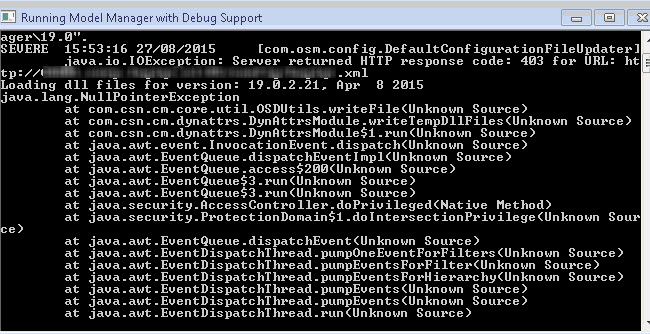
- Due to this error, users trying to download the Model Manager client from the Software Distribution Server do not receive the custom.xml file
- Therefore, a generic custom.xml file is created on the user's machine with all the Model Manager component e.g. database server, license server, file server, etc. are configured to localhost
- For e.g. see below :

- This leads to the failure in start of the Model Manager client with error : Error Failure in communication to Server

This is a printer-friendly version of Article 216926 and may be out of date. For the latest version click CS216926