Article - CS211686
Expanding the Navigator or Selecting "Browse" from the Navigator with Internet Explorer 9 and Microsoft Cumulative Security update KB3058515 can result in Internet Explorer, Creo Parametric or Windchill Workgroup Manager exit with Windchill PDMLink 10.1
Modified: 10-Sep-2015
Applies To
- Windchill PDMLink 10.1 M030 to M050
- Pro/ENGINEER and Creo Elements/Pro Wildfire 5.0
- Creo Parametric 1.0 to 3.0
- PTC Windchill Workgroup Manager
- Internet Explorer 9 after applying Microsoft Security Update KB3058515 later updates up to and including KB3082442
Description
- Installing Internet Explorer 9 with Microsoft Cumulative security update KB3058515 or later updates up to and including KB3082442 can cause a premature exit of Internet Explorer, Creo Parametric or Windchill Workgroup Manager with Windchill PDMLink 10.1
- Security update associated to Microsoft Security Bulletin MS15-56 (June 9, 2015) or later up to and including MS15-079 (August 11, 2015)
- After login to Windchill, clicking on the Navigator or "Browse" tab from Navigator can result in an exit or browser restart/reload and a message like the following:
Internet Explorer has stopped working
Windows can check online for a solution to the problem.
View problem details:
Windows can check online for a solution to the problem.
View problem details:
Problem signature:
Problem Event Name: APPCRASH
Application Name: iexplore.exe
Application Version: 9.0.8112.16659
Application Timestamp: 556a58b3
Fault Module Name: KERNELBASE.dll
Fault Module Version: 6.1.7601.18409
Fault Module Timestamp: 5315a05a
Exception Code: e06d7363
Problem Event Name: APPCRASH
Application Name: iexplore.exe
Application Version: 9.0.8112.16659
Application Timestamp: 556a58b3
Fault Module Name: KERNELBASE.dll
Fault Module Version: 6.1.7601.18409
Fault Module Timestamp: 5315a05a
Exception Code: e06d7363
A problem has been encountered with the browser. Please restart application to access the browser again.
Microsoft Visual C++ Runtime Library: This application has requested the Runtime to terminate it in an unusual way. Please contact the application's support team for more informations.
View problem details:
Microsoft Visual C++ Runtime Library: This application has requested the Runtime to terminate it in an unusual way. Please contact the application's support team for more informations.
View problem details:
Problem signature:
Problem Event Name: APPCRASH
Application Name: iexplore.exe
Application Version: 9.0.8112.16659
Application Timestamp: 556a58b3
Fault Module Name: MSHTML.dll
Fault Module Version: 9.0.8112.16659
Fault Module Timestamp: 556a5c29
Exception Code: c00000fd
Problem Event Name: APPCRASH
Application Name: iexplore.exe
Application Version: 9.0.8112.16659
Application Timestamp: 556a58b3
Fault Module Name: MSHTML.dll
Fault Module Version: 9.0.8112.16659
Fault Module Timestamp: 556a5c29
Exception Code: c00000fd
View problem details:
Problem signature:
Problem Event Name: APPCRASH
Application Name: iexplore.exe
Application Version: 9.0.8112.16659
Application Timestamp: 556a4c5e
Fault Module Name: msvcrt.dll
Fault Module Version: 7.0.7601.17744
Fault Module Timestamp: 4eeaf722
Exception Code: 40000015
Exception Offset: 0005620a
Problem Event Name: APPCRASH
Application Name: iexplore.exe
Application Version: 9.0.8112.16659
Application Timestamp: 556a4c5e
Fault Module Name: msvcrt.dll
Fault Module Version: 7.0.7601.17744
Fault Module Timestamp: 4eeaf722
Exception Code: 40000015
Exception Offset: 0005620a
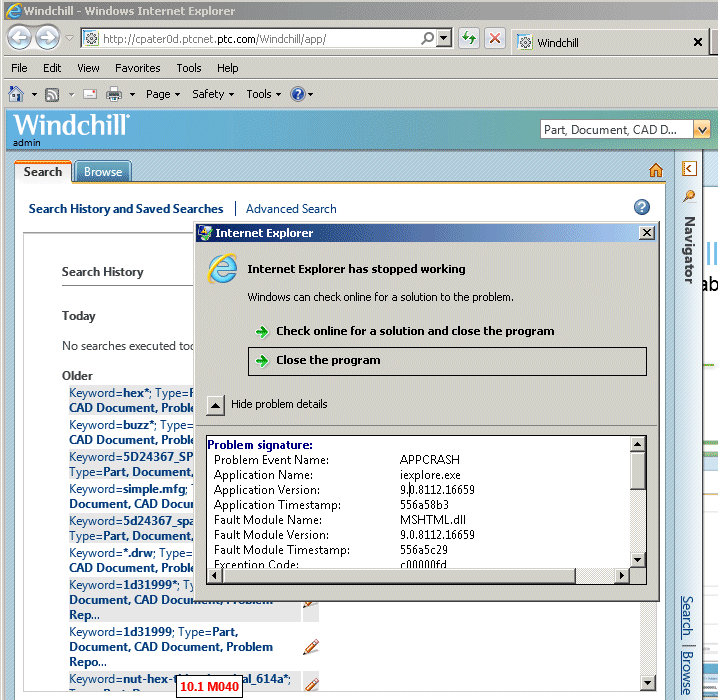

Internet Explorer has stopped working
Windows is checking for a solution to the problem...

Creo 2.0 from PTC has stopped working
Windows is collecting more information about the problem. This might take several minutes...
Do you want to send more information about the problem?
Additional details about what went wrong can help Microsoft create a solution.

Message: A problem has been encounted with the browser. Please restart application to access the browser again.

Windchill Workgroup Manager has stopped working
A problem caused the program to stop working correctly. Windows will close the program and notify you if a solution is available.

This is a printer-friendly version of Article 211686 and may be out of date. For the latest version click CS211686