Article - CS195775
Creo View 3.0 : Dimension are not seen for AutoCAD Drawings (DWG) with background mask on dimensions
Modified: 20-Jun-2016
Applies To
- Creo View 3.0 M020
- AutoCAD -All releases
Description
- Dimension are not seen for AutoCAD Drawings (DWG) with background mask on dimensions
- Same affects the printing and print shows black box instead of dimension
- AutoCAD drawing containing dimensions with Fill color properties set to background (which is black in AutoCAD) is unreadable in Creo View
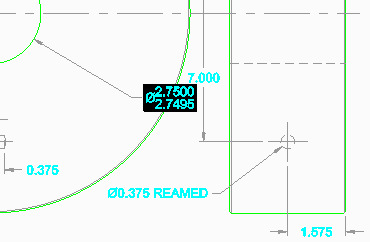
- Dimension with mask background gets displayed in Creo View as a Black Box

- The dimension with background color defined in AutoCAD retains this information separately and Creo View does not update it accordingly at view time
- Open a *.dwg file in Creo View, it shows a black box surrounding one dimension as shown below:
This is a printer-friendly version of Article 195775 and may be out of date. For the latest version click CS195775