Article - CS18933
"Error Code: 1379030884 FOURCC : R2Wd" when checking in an AI file to a Product Image Page in FlexPLM
Modified: 22-Mar-2017
Applies To
- FlexPLM 9.2 to 11.0
Description
- FlexClient Error when uploading an Ai (Adobe Illustrator) file using Adobe Illustrator CS5
- STEPS TO REPRODUCE through AI Plugin:
- Open attached AI file in Adobe Illustrator
- Update/Attach to Existing FlexPLM Product
- Fill in Attributes
- Select image content
- Create a cell for all of drawing
- Save and Check In to FlexPLM Product Image Page
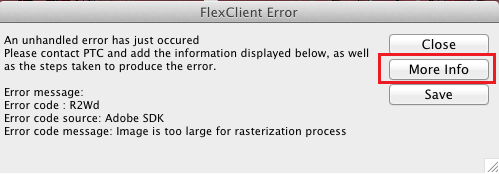 Image is too large for rasterization process error occurs when trying to check in an AI file to a Product Image Page:
- Exception severity level : Error
Error message:
Error code : R2Wd
Error code source: Adobe SDK
Error code message: Image is too large for rasterization process
- Exception severity level : Error
This is a printer-friendly version of Article 18933 and may be out of date. For the latest version click CS18933