Article - CS151213
Saving a Solidworks drawing when the drawing and related assembly or part are modified in session causes the related assembly or part to go Out Of Sync in the Workspace
Modified: 25-May-2017
Applies To
- Windchill PDMLink 8.0 F000 to 11.0 M030
- Pro/INTRALINK 8.x + 8.0 F000 to 11.0 M030
- Windchill ProjectLink 8.0 F000 to 11.0 M030
- Windchill PDM Essentials 10.1 M030 to 11.0 M030
Description
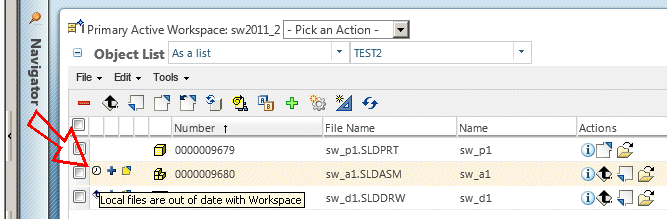
- Saving a drawing where a drawing and related drawing model (part or assembly) are modified in session results in the drawing model becoming Out of Sync in the Workspace
Local files are out of date with Workspace
-
Use Case #1
- Add drawing to Workspace
- Open drawing and drawing model in session
- Make a change to the drawing model
- Save the drawing
- The drawing model shows out of sync / out of date in the Workspace
-
Use Case #2
- User has a SWX Assembly along with its drawing checked in into Windchill
- User opens assembly along with its drawing and modifies the assembly as well as its drawing
- From Commonspace user renames one of its component
- User performs Workspace synchronization
- A dialog is presented to "Close and update for the child and save and update for the assembly drawing and the assembly", select OK
- A dialog is presented that "Component documents must be saved", select Save All
- A dialog is presented to "Check out for assembly drawing", select OK.
- Observe that the drawing file closes and reopens but is not able to relocate the renamed child. The SWX dialog "Unable to locate the dependant <part name> . Do you want to find it ...." is shown
- The assembly does not reopen at all and goes Out of Sync in Workspace later
-
Use Case #3
- Open a drawing of assembly
- Open assembly
- Modify assembly
- Switch to drawing window. This will modify the drawing
- Now do ‘Save’ from active drawing of assembly
- A dialog is presented to "Checkout for Drawing only and save the Drawing and Assembly". The drawing is selected for check out.
- The assembly shows out of sync in the Workspace
This is a printer-friendly version of Article 151213 and may be out of date. For the latest version click CS151213