Article - CS142095
Recent versions of Java 7 and 8 JRE present multiple security warnings and may prevent applets from launching in Windchill
Modified: 17-Sep-2018
Applies To
- Windchill PDMLink 9.1 to 11.0
- Windchill PDM Essentials 10.1 to 11.0
- Oracle Java JRE 1.7.0_25 +
- Oracle Java JRE 1.8.0 +
Description
- Recent and future versions of Java 7 and 8 JRE will present multiple security warnings and may prevent applets from launching in Windchill
- Applets include
File Upload/Download
File Vault Administrator
Product Structure Explorer
Manufacturing Product Structure Explorer
Calendar Management
Workflow Template Administration
Advanced Assembly Table Editor
Life Cycle Template Administration
Classification Management
Import/Export Management
Report Management query builder
Global Attribute Manager
Measurement System Administration
Quantity of Measure Administration
Relationship Constraint Manager
Policy Administration
Team Administration
Gantt Explorer
Live charting on Server Status page
Edit Attachments
Software Download (for Windchill Workgroup Manager)
File Vault Administrator
Product Structure Explorer
Manufacturing Product Structure Explorer
Calendar Management
Workflow Template Administration
Advanced Assembly Table Editor
Life Cycle Template Administration
Classification Management
Import/Export Management
Report Management query builder
Global Attribute Manager
Measurement System Administration
Quantity of Measure Administration
Relationship Constraint Manager
Policy Administration
Team Administration
Gantt Explorer
Live charting on Server Status page
Edit Attachments
Software Download (for Windchill Workgroup Manager)
- Specific warnings and behaviors will vary depending on the specific release of JRE and its configuration
- Current Releases vs Older Releases
- Exact behavior of the JRE will depend on whether it is currently the most recent security release
- Older releases will display additional warnings once a newer security release is available
- Not every JRE update is a security release
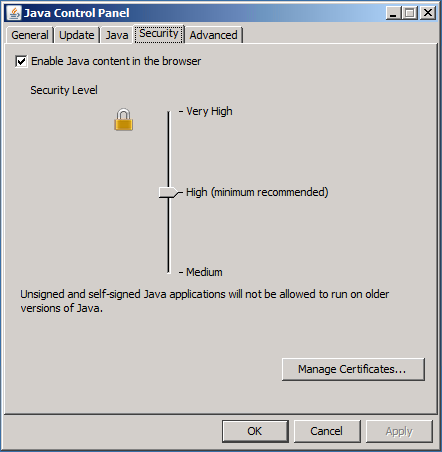
- Security Level
- JRE has multiple security levels that can be configured (Medium, High, Very High)
- Later version of JRE have added restrictions on applets at higher security levels
- To review the Security settings, Launch the Java Control Panel and select the Security tab
- Exception Site Lists
- Starting with Java 7 Update_51, a new feature, Exception Site Lists, was added
- Exception Site Lists allow applets to run with warnings at higher security levels
- Deployment Rule Sets
- Deployment Rule Sets are an additional option for JRE deployments to allow the JRE to run Applets without additional warnings
- Note: The exact behavior of current and previous JRE releases is subject to change by Oracle at any time
- PTC cannot guarantee that Oracle will provide any advanced notice for these changes
- Browser Warnings
- In addition to warnings from the JRE, some browsers will also popup warnings when an outdated JRE is detected
Java 7 Before Update _51
- Users are prompted that a Java Update is needed
- Users can choose to continue and be reminded later
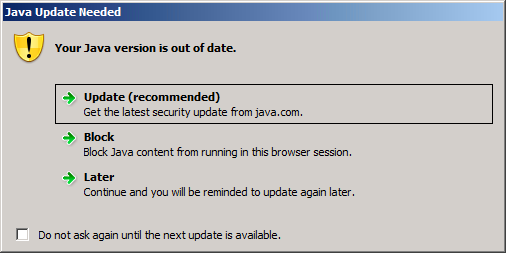
- If Later is selected, the behavior will depend on the Java Security Level
- Very High / High
- The Applet is blocked from running with the message "Application Blocked by Security Settings"
This is a printer-friendly version of Article 142095 and may be out of date. For the latest version click CS142095