Article - CS141295
A space is added incorrectly between diameter symbol and value on Basic dimensions in drawing mode for legacy drawings in Creo Parametric
Modified: 04-Apr-2024
Applies To
- Pro/ENGINEER and Creo Elements/Pro Wildfire 4.0 M100 to Wildfire 5.0
- Creo Parametric 1.0 to 10.0
Description
- When converting a nominal radial dimension to Basic, a space is added between "R" symbol and the value
- When converting a nominal radial dimension to Basic, a space is added between letter "R" and dimension value
- R 1 instead of R1
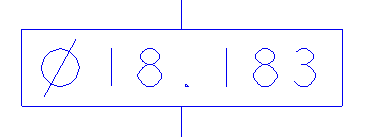
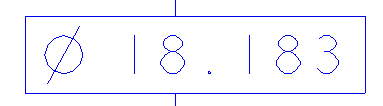
- A space is added incorrectly between a diameter symbol and value on Basic dimensions in drawing mode for legacy drawings
- A space is added incorrectly between a diameter symbol and value on Basic dimensions in drawing mode for legacy drawings created before Pro/ENGINEER Wildfire 4.0 M100
- Correct display:
- Incorrect display:
- Correct display:
This is a printer-friendly version of Article 141295 and may be out of date. For the latest version click CS141295