Article - CS137102
Information regarding the "Build Status" column and "Build Selected Parts" icon displayed in the Workspace Check In dialog in Windchill PDMLink
Modified: 26-Jun-2024
Applies To
- Windchill PDMLink 10.0 to 13.0
- Creo Parametric 4.0 to 10.0
- Windchill Workgroup Manager
Description
- Additional information regarding the Build Status column and on icon for Build Selected Parts displayed in Check In dialogs
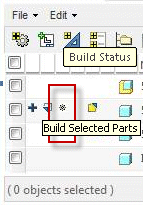
- Is it possible to change the Build Status setting on-the-fly during check-in (similar to the way how Set for Check In works)?
- What does the icon Build associated Part only and Build all associated Parts in structure displayed in Build Status column mean in Windchill 11.0?
- How to avoid rebuilding of WTPart structure upon checkin of associated CAD document, hence prevent automatic synchronization between CAD and Part BOM Structures
- What is the meaning of Set for Single-Level Build and Set for Multilevel Build during checkin?
This is a printer-friendly version of Article 137102 and may be out of date. For the latest version click CS137102