Article - CS235004
Creo View fails to load PDF viewable with error: "You need a supported installation of Adobe Acrobat to use this installer" or "Failed to load the file. Refer to "Verifying Adobe Versions"..."
Modified: 27-Apr-2026
Applies To
- Windchill PDMLink 10.0 F000 to 13.1
- Creo View 3.1 to 13.0
- Adobe Reader and Adobe Acrobat
Description
- Unable to open PDF file in Creo view
- Creo View might prematurely exit when upon opening a PDF whilst trying to install the Creo View for Acrobat Plugin on-the-fly
- The following error dialog is displayed:
You need a supported installation of Adobe Acrobat to use this installer
- Workstation previously had Adobe Acrobat installed
- Workstation currently has only Adobe Reader installed
- The version of Adobe Reader installed is supported according to the Creo View Clients & Toolkits Software Matrices
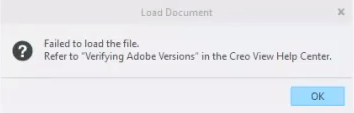
- Error message is shown when trying to open PDF file in Creo View:
Failed to load the file. Refer to verifying Adobe versions in the Creo view help center
This is a printer-friendly version of Article 235004 and may be out of date. For the latest version click CS235004