Where Creo and Creo+ Meet: A Roadmap
Download the slides here.
00:01 This presentation includes forward looking statements about ptc's anticipated product releases and integrations. The statements made are as of today, may 16th 2023 PTC does not assume any obligation to update any statements made. The timing of any product release or integration and the inclusion of any features or functionality may change at ptc's discretion.
01:22 Please welcome divisional Vice president and General manager of ptc's CAD segment at PTC, Brian Thompson. Thank you very much for the attention and it's great to be here. Look, it, as Jim said this morning, it's been a while since we've been together. And so obviously, the star of the show here is Creo 10 and Creo Plus and Paul Saga to be
01:57 honest. But what I'd like to do is I'd like to give you a little bit of an update on what's been guiding our investment and what the strategy has been for, how we got here since we've been here four years ago and, and actually how the market has been reacting to that. I think that's important context and then I promise we will jump right into Creo 10. I'll bring Paul out. It's going to be awesome, a very, very nice deep dive into 10 and plus coming up for you. So let me jump right into it. First of all, hopefully, you recognize and looking at what we've been doing with the product that everything we do is based around the concept of helping customers get to market more quickly
02:30 with higher quality products that are highly innovative. And it's hard for all of you that are our customers out there to balance those things. We realize that, but it is what we are focused on. Ok. So you could really tie a tie a string back to one of these three areas with everything we do in the product. But there are a lot of challenges and opportunities out there with trends in the market place. And this is if anything, this is the most important part of what I do leading the CAD segment of PTC with a lot of Paul's help. As we look at what's happening in the market
03:02 and try to determine the best path forward for the investment strategy for the product. We know customers are dealing with challenges with their workforce, either in engineering or manufacturing. You've heard a lot about sustainability initiatives today, you've heard a lot about and we actually see these challenges in the workforce driving a lot of investment in automation. And so we see these things, these things happening in the marketplace. And we say, boy, we've got a lot of work to do to help our customers get to market faster to deliver high quality products that are highly innovative. We got a lot of work to do. Right.
03:32 Well, the good news is there's actually a lot of new technology coming into the marketplace today that could potentially help. And I, you know, this isn't certainly all of new technologies coming into the marketplace, but I've sort of categorized them here into 44 areas and there are a lot of things happening that may or may not be interesting for the engineering workforce. And, you know, we're constantly looking at what we're doing with creo and assessing new technologies as they become available in the marketplace and thinking,
04:03 ah which of these might be interesting to help our customers get to market faster with high quality products that are innovative, right? Which ones might, which one might not? And you know, this certainly isn't a comprehensive list. But if you look carefully at what we've been up to with creo over the past several years, you're going to notice some threads through these items that I've highlighted in green. And, you know, we're certainly not going to go through all of these, but it's really, really important for us to make sure we bring new technologies to our customers, but in a very very specific way.
04:34 So new technologies are good, they're helpful. They're interesting. But I submit to you that most customers that investigate new technologies, they start out giving someone that's maybe a hot shot new engineer, a bit of new technology to go investigate. That engineer gets it on her desktop. She's working with it. She gets excited, maybe it's a piece of design for additive manufacturing technology because they're going down the added and manufacturing path. And maybe she gets all excited about using this new technology to really do something innovative with the customers products.
05:06 And engineering leadership gets really, really excited about it. And next thing you know, you've got a process based upon a broken digital thread because that bit of technology is completely separate and outside of the core creo environment. And this is where the trouble comes in in adopting, adopting new technology. This is really a challenge for our customers and frankly, I refuse to accept it. We will not allow for this. So my promise to you to all of our customers is new technologies will always be deeply integrated into,
05:38 into creo put at the fingertips of the Creo design engineer that is the only way to do it and really make use of it at scale across the entire product development process. It's got to be deeply embedded in the core of the product. I submit to you. The best example I can give you of recent times is the way we have integrated generative technologies into creo. There is no other place in the world where a generative solution is part of the regeneration loop inside Creo, it's, it's amazing. It's only there in Creo where you can do that.
06:10 This is our commitment. We want to put new technologies at the fingertips of design engineers. All the while continuing to invest in the very core of what makes creo powerful our ability to cover everything a custom might do from the very beginning of concept development all the way out into manufacturing and service. We will not forget about that. If you look at Rio's geometry kernel today, it is significantly advanced than what it was four years ago. We are still investing there, but we are also
06:40 investing in new technologies and you know what it's working, it really is working. You heard Jim talk about it at this morning's keynote, I'll flash a graphic for you. It's really great to hear the CEO talk about it. I can tell you all about it. What I think is really powerful is when somebody else who is looking at the industry, looking at us relative to our competitors, when they say it, it's really powerful. So this is a quote from Jay. This is a public report. You can go look this up.
07:10 We are growing faster than the market. It's resulting in really, really fantastic reinvestment in the product. It becomes very self fulfilling and that brings me to the point of our session. And that is what have we been doing recently with CREO 10 and CREO plus this kind of market performance as a result of, I think a really great strategy is driving a lot of product performance in the industry and it's driving reinvestment and it's creating a moment for us where you're going to see Creo 10 and Creo Plus together.
07:40 I think it's going to blow your mind. So without further ado, I'd like to bring out the VP of product management of Creo Paul Segar. Come on up, Paul, well deserved applause. So this is, this is hard for me, but this is where I hand over control of what's going on to Paul. Let's uh let's talk about Creo 10 and Creo Plus, shall we? Excellent. Thanks Brian and welcome everybody.
08:13 So I've got a huge amount of information I want to share with you today. Um But Creo Plus itself contains all of the capabilities and new enhancements that are in Creo 10 plus some additional cloud based services. So I think it probably makes sense to start with CREO 10. So when we take a look at Creo 10, as with all releases, we've done significant improvements to improve the overall usability of the product across the entire breadth of the portfolio, making every user more productive on
08:48 a day to day basis. We've continued to broaden our model based definition capabilities as more customers are looking to take advantage of the digital thread, we're seeing a greater focus on use of composites out there in the industry. More companies are investing and expanding around their electrification strategy and also have a need to better understand the human two machine interaction. So consequently, those are also three big themes of the release.
09:18 We've continued to broaden out our emerging technologies as well as disruptive technologies, expanding our generative design capabilities, as well as our simulation driven design capabilities. And finally, we've also continued to broaden out both our additive and our subtract manufacturing solutions. But let's start with some productivity improvements. So over the last few releases, we've been making improvements to the model tree, making it easier to understand, to understand your model and to document your
09:53 model behavior. Creo 10 is no exception here. We've added the ability now to be able to drag and drop items from the quilt body evolution tree into the design items tree and in the context of an assembly, we've also made it easier now for the user to understand during a drag and drop operation, whether they want to make a reorder or a restructure of their model. We also continue to expand and improve our project offset command inside sketcher,
10:24 adding new diagnostics capabilities, adding the ability to project as construction geometry as well as broadening this capability out to other trajectory based features. We've added the ability to add notes and parameters into simple holes aligning them with standard holes as well. And we've continued to expand out our patterning capability, focusing more on pattern of pattern behavior and giving greater control over pattern
10:54 increments. Now we're seeing more and more customers adopting the new model based sorry multi body design capabilities that we actually added back in CREO seven. And so consequently, we've continued to invest and expand that capability as well. Adding new tools to or a new quilt body um split sorry, adding a new split trim body feature command that is going to simplify that workflow and reduce the number of steps needed.
11:26 And finally, we also didn't forget about surfacing for style. We added the ability to add a new normal connection that will enforce G three continuity across curves enabling customers to build far smoother surfaces for freestyle. We added rotational symmetry commands allowing users to make highly organic, actually symmetric parts with and we didn't forget about warp either. Adding the ability now to tie your global shape modification capabilities back
11:58 to existing creo geometry building design intent into your model. I love a part says G three continuity. That's good stuff we're seeing, we're seeing more and more customers out there or more and more of our customers out there need to understand better understand how humans interact with their designs or need to actually conform to certain standards, certain government regulations. And so consequently, we've continued to build out our ergonomic design capability in creo as
12:29 well improving overall usability. So adding a new dimension dragger, while you're manipulating the mannequin, we've expanded our reach capability for reach analysis. Now we've added four new reach envelopes for each hand. So there's a reach envelope for the index finger, the middle finger, the thumb and the palm. We've updated the Mannequin library simplifying it by storing each mannequin now as an inseparable assembly simplifying the data management process of that library. Now, back in creo nine, we introduced new capability called visual field feature that
13:04 allows you to create a cone that represents the field of view from a point taken into account any eluding geometry. In 10, we've expanded that to now support a reflection option as well. So you can actually look from a point at a reflective surface and it will generate the cone of view for you again, critical in industries where you need to prove and validate and conform to certain government standards. Moving on to model based definition again, as more and more customers out there are looking
13:36 to transform their business and take advantage of the digital thread throughout their their business processes. We've continued to broaden this set of capabilities, adding the ability now to relate symbols and surface finishes to other annotations, inheriting the annotation plan, the combination state and other behavior of the parent annotation. We've continued to broaden out G D and T advisor capability as well, providing tools to guide, educate and validate your model appropriately,
14:11 simplifying and enhancing the look and the feel of the application tree inside G D and T advisor. In addition to that, we've also expanded the general profile tolerance. This is now stored as a G D and T annotation, which means all of the definition is captured as parameters inside the G D and T annotation feature. Any surfaces that are not applied or assigned to other annotations in your model will automatically be assigned as semantic
14:41 references to that general profile tolerance. And then finally, we continue to work and, and expand our support for both as me and ISO standards out there. Fair to say that pretty much every meeting we have here with a customer. We're talking M B D. Yes, it's happening. Absolutely. Now, more and more customers out there are starting to understand, appreciate and take advantage of the opportunities that additive
15:11 manufacturing can provide to them. So consequently, it's critical to our strategy to continue to build out this capability, being able to build highly complex free geometry that can support light weighting of your designs. Consequently, in creo 10, we've added three new beam based lattice cells that are actually certified for use within the medical industry. And then we've added two new acetic cells as well. Arctic acetic cells. Yes. So we've got to explain this.
15:41 These are the cells that create a negative point sciences ratio. How's that as an explanation is that good? So what that means is when you push down the sides go in instead of instead of going out, it's wild, you can actually simulate this in creo you push down, it's crazy good for like energy absorption use cases. Right. Absolutely. And this is just another example of where of additive manufacturing, providing customers with a way to rethink the way they design and engineer their products, whether it be using a
16:15 ox acetic geometry to be able to build energy absorption directly into their products, or the use of gyro geometry to build new optimal heat exchanges. All of this is only possible due to the unique characteristics of additive manufacturing and it's only possible due to the breadth of capability that we have built into creo to be able to build this type of geometry. But we also didn't forget about subtract manufacturing either over the last number of releases. We've been focusing on introducing more and
16:48 more high speed machining capabilities into Korea as more customers are looking to reduce the machining time to be able to deliver their products quicker, but also at the same time improving overall surface quality of their products. Creo 10 is no exception here. We've added two new high speed machining tool paths, one for wall finishing, one for floor finishing. Both of which take advantage of new barrel tools. Barrel tools allow you to machine to the same level of surface quality but with fewer passes,
17:19 simplifying and reducing the time taken to actually machine the part itself. For more information on our our additive and subtract strategy. I would urge you to attend uh Jose Coronado session tomorrow at 10 15 OK, I need to change my glasses. So composite materials are no longer really only found in aerospace or Motorsport,
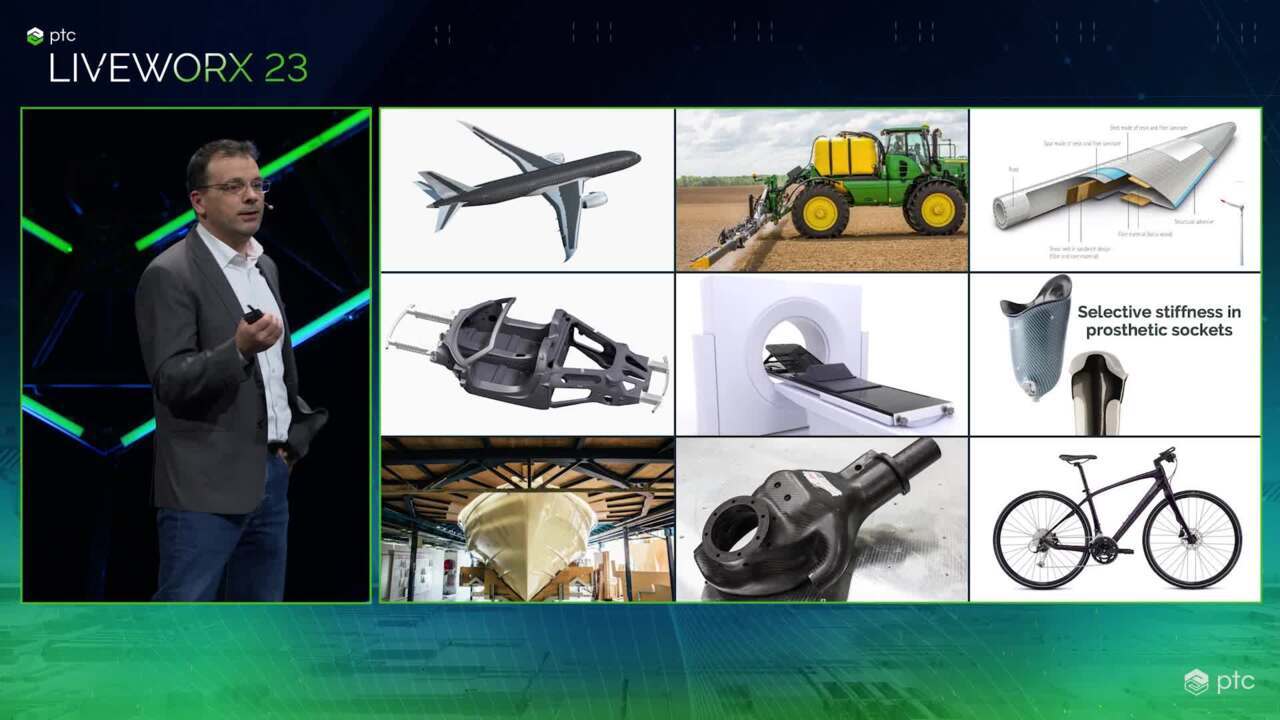
17:49 whether you're in industrial equipment, wind energy, medical yacht design, and many, many other industries, we're seeing a growing use of composite materials. The ability to add strength stiffness, impact absorption at key locations in your design enables you to build the optimal lightest weight part possible. Consequently, we're seeing more and more customers starting to take advantage of this process. As a result in CREO 10, we've introduced a
18:21 whole new composite design environment, enabling customers to design to simulate and to manufacture composite parts without needing to leave creo starting with the ability to add individual plies, the ability to define transitions between those plies to be able to add core material tools, to be able to quickly easily visualize that ply structure, edit that ply structure and fundamentally as a result,
18:52 be able to build a solid part representing. So you might, you might say that we made it a priority, let's say to make sure we get really accurate representations of the full geometry, correct mass properties. The whole deal should be no surprise to all of you that we took that very seriously. Given, given our heritage, right? Sure, we got a long way to go, but I love what we've started with this new extension. I think customers so far in the beta program have really loved it as well. Absolutely, the feedback we're getting is very, very positive.
19:22 We understand every single ply that is in there, we understand the material, the orientation, the characteristics of every single single ply that we are adding. Consequently, that means we're also able to simulate it with creo simulate, not only can we simulate the final shape, but we can also simulate each individual ply as you're draping that fabric over your mold, we can simulate how much strain there is in that fabric material. And then we also provide you with tools to be
19:53 able to splice or dart the fabric accordingly to compensate for that. Once you're finished with your design, we obviously provide you the ability to take all of those plies, flatten them out, document them as needed and export those flat shapes for final manufacturing purposes. So a complete comprehensive set of capabilities to really define to validate and fundamentally manufacture composite products for a far deeper dive into this new set of capabilities as well as a look into the future direction we'll be
20:25 taking with it. I'd urge you to attend Arnold Van Der session which is also tomorrow, but at 1 55. OK. Now, more and more customers are obviously aware of environmental impact and sustainability is becoming greater importance to them. Consequently, we're seeing more and more customers investing and expanding their electrification strategy as such. We've continued to build out our cabling and ECAD capabilities and solutions inside Korea.
20:59 We've added the ability now to split a harness as harnesses are getting much, much bigger, more complex, the ability to take a harness and split it really addresses two primary use cases. Firstly, the use case of collaboration by taking my harness, splitting it up into 234 different parts allows me to distribute that workload amongst multiple different engineers. When each engineer has finished doing that work, you can then use the merge harness command to
21:29 bring those individual pieces back together for manufacturing purposes. The second use case is one around reuse. So I've got an existing harness. There's maybe a portion of that harness. I want to reuse or a subsystem in that harness. And I want to be able to reuse it in my new design. Shortening the overall development time, the development cycle that is needed. So the ability to take that portion, split it off, make it independent, take all of the connectivity information, the logical information,
22:02 the connectors with that portion transfer it into a new harness, merge it back in completely shortens that overall development cycle and fosters greater reuse within the design. We also didn't forget about ECAD. So back in CREO nine, we added the ability to import solders, silk screens and solder masks. In CREO 10, we've expanded that to pace masks as well. Again, giving the mechanical engineer greater awareness of what's going on on the ECAD board itself.
22:34 We also enhance the ECAD whole tool. So adding the ability now to add ECAD specific parameters into the ECAD whole tool. Again, streamlining the interface, reducing the number of steps that a user needs to go through. You know, Paul, I had a meeting today with a customer and the defense industry that was specifically concerned about how big and complex their harnesses were getting. And I said, look, let's let's get creo 10 in your hands and let's see if we can see if we can make some improvements here. So that's good timing. Absolutely. It was nice to be able to say that in the meeting come to the session later, you'll learn all about it.
23:09 So, more and more of our customers are looking into simulation driven design, right? The ability to do simulation earlier on in the design process do it often more often helps to shrink that overall design process as well as increases confidence in the final design choice that you make. Consequently, we've continued to broaden out our, our set of capabilities here and expand our partnership with ANIS in CREO 10. We're adding new capabilities and new cryo anis
23:40 simulation, advanced suite of capabilities that focus on more advanced physics, use cases, the ability to do non linear contact, being able to simulate snap fix type use cases. And whether you take into account friction or not is going to give you those accurate results that you've all come to expect from, from anti we also have introduced non linear materials, whether you're looking to simulate rubber defamation with a neo hook and material model
24:11 or full bilinear plasticity for full plastic defamation use cases. And then finally, as more and more of our customers here are building solutions that they need to understand the thermal impact on their design. We've also introduced multi physics capability as well. So you can perform your structural simulation while taking into account the thermal aspects and simulate thermal expansion use cases. You know, Paul, I feel like in many ways we're just getting started with an,
24:43 we've actually come a long way. We're starting to introduce nonlinear capabilities, really, really extending the use cases that we can handle. But tomorrow marks and I who Mark Kbo is sort of my counterpart and anti you could say he is a business leader and for engineering simulation, we're going to cover what's coming next. And so what's amazing about having anti as a partner is they're all in on investing in simulation for the design engineer. And it's going to be exciting to see what they're going to bring to the market and what
25:14 we will therefore be able to bring to the market. It's going to be really cool. OK. So let's transition over to CREO plus. So what is CREO plus? Well, creo plus in essence is all the power breadth proven functionality that you are all used to using today with CREO, but with additional cloud based services that are going to, that's going to help foster greater collaboration that's going to simplify the administration process and automatically deploy the software to the end users now because it's
25:49 built on creo, it means there's no data translation that's needed to be done. Everything is fully upward compatible from on Prem creo into CREO plus because it's SAS, it means it's always going to be up to date. So every user out there is always going to be able to take advantage of the latest and greatest innovation in the technology. Now as an administrator, my task or I'm going to be provided with an admin portal where I can go in, I can add users into the system.
26:20 I can define entitlements for each of those users. I can set up groups and define configurations for those different groups as a user. Once I've been added into the system, I'll automatically get an email notification with a link to take me to my own personal user portal in there. I'll get access to getting started guides. What's new content as well as the ability to download and install a little utility called P T C control center, P T C control center is the brains behind CREO Plus.
26:54 It understands who I am. It talks to ptc's Atlas platform and it understands what my entitlements are and it will then silently download and install the appropriate software for me on my machine. If my entitlement changes or if a new version of the software is released PTC control center behind the scenes in the background will automatically download those updates and silently upgrade to the latest version. So as a user,
27:24 every time I start up creo I'm always working on the latest and greatest. Now. In addition to those benefits around deployment, etcetera, I also mentioned collaboration C plus is going to give you a new environment for seamlessly collaborating in real time on a single design for multiple engineers. At the same time, streamlining the design process, reducing the overall development time,
27:54 fostering greater collaboration, but also enable you to go and do design branches. I want to collaborate with people. But there are also times when I want to try out different ideas, I want to work in isolation. I want to be able to close that office door and not have everybody else burdened by what I'm doing. Design branching allows me to do that. And then when I'm happy with those design changes, I can merge them back into the main branch and have everybody in real time get updated to that.
28:24 So I think the best thing to do here is actually to, yeah, let's show them, we only gave them like two minutes of goodness. So this morning, let's let's expand that. Let's show them something cool. This is, this is gonna be wild. OK. So in this scenario, I've got four engineers that are working globally on the new hill helicopter design to begin with the lead engineer here is going to open up the helicopter design. He's going to start and to find some context. But he wants to invite a series of his colleagues to work on the design.
28:54 He's going to invite a junior engineer, a composites engineer and a simulation engineer as well. Now the junior engineer is going to start to do some design work on the feet of the gearbox. The composite engineer is gonna start and do build some composites out for the gearbox cowing. Now, the simulation engineer has access to technology as part of the collaboration environment, they fully expect to actually make some design changes as a result of the simulation task that they're going to do. So what they're going to do is branch,
29:27 they're going to branch the design so they can run some simulations and make some changes to accommodate the simulation results they're seeing without impacting what everybody else sees exactly the scenario that Paul talked about earlier. So while this is happening, the lead engineer is gonna start and make some design changes, right? He he wants to lightweight the design so he's going to replace or modify the design from two mounts to one. Now, while this is happening, the junior engineer starts to do some design work but he notices that gearbox casing is locked. This is happens automatically.
29:59 Now the junior engineer can continue to start to evolve his design. He's going to build out the feet to make the necessary design changes. While this is happening, the lead engineer is gonna use flexible modeling to make those design changes. Once those design changes are done, that lock is automatically removed, allowing other people in the organization to continue to do their design work. Now, all of these changes that are happening get captured in this collaboration graph giving you clear visibility of the history of all the operations that have done.
30:32 Now. At the same time, the composites engineer is going to start to build out his composite design. He's going to set up the infrastructure for it. He's going to set up his plies. He's going to lay down some composite plies as well. You're probably noticing that the simulation engineer did in fact have to make some changes, had to change some rounds around that boss and the lower part of the casing and change the thickness of the rib in order to accommodate the stress results that they saw in the simulation results. Moving back to the lead engineer, the lead engineer has continued to evolve the design. He's actually replaced the two struts with a new generative designed single strut.
31:06 While this is happening, everything everybody on the main branch is constantly being synchronized. So they're all looking at the latest and greatest data. The junior engineer is now going to start to add some fasteners to that new strut bracket. And at the same time, the composite engineer has gone and finished his overall design and completed that process. So now what you're seeing here is finally, everything is coming together in one assembly context, the design, the simulation engineers changes are in fact being re meg with everybody
31:39 else. And you know, at this point in time, there's there's an opportunity to recheck the entire assembly, right. So we got to not only check form and fit, but now you're seeing, you know, with the power of technology, a full simulation of the entire gearbox housing and casing right there inside Creo like and that's by the way, that's creo simulation live and it takes just a few seconds, which is pretty awesome. So, really awesome demo. I hope you like that. I want, I want to point out we're collaborating on a helicopter, helicopter like the whole thing like it's really mind blowing.
32:10 So Paul, we've got a lot accomplished here in Creo 10 and Creole Plus. What's next? Glad you asked. So obviously, we've released the first iteration of Creo Plus, right? With all of that new rich, exciting collaboration capability, the benefits to the administrator, etcetera. But we're not taking our foot off the gas at all. We're going to continue to expand over the next 12 months. We want to work on things such as configuration management, making it easier for administrators to manage different configurations for different groups and different users.
32:41 We want to enhance the telemetry, not only capture more telemetry but also provide administrators with better tools to be able to interrogate and make informed decisions based upon that telemetry. But probably the biggest thing we're going to add is streaming capability. Yeah. So streaming, streaming is the opportunity to run the full power, not a cut down version, but the full power of creo through a compliant browser in your operating system. So imagine working first few days of the week in the office running all the compute locally on your high end workstation.
33:13 But going home or working from home on Thursday and Friday on a Macbook just gotta have a compliant browser. This will be possible with streaming sometime in 2024. Stay tuned. Remember the forward looking statement point we made earlier though the point here is to give the users the flexibility right? They will be able to choose to run if you like a thick client locally on their machine or to run it through a web browser and actually choose on a daily basis what they want to do now beyond 2024 as we look into 2025 beyond,
33:43 we also want a plan to add support for government cloud or cloud certified environments as well as uh expand our customization management capabilities. OK? So this is an important point. Creo plus does support your customizations of creo as long as you're using the modern toolkit. But what will be the difference in 2025? Yeah. So um as of right now, everybody out there, who has customizations that you've built in with, with CREO toolkit applications, those are fully supported out of the gate with CREO plus,
34:16 right? I just want to make that very, very clear to everybody. However, it is your responsibility to manage them, to maintain them, to test them and to deploy them. As we move forward into 2025 we want to take some of that burden off you. So we want to, for example, be able to deploy them automatically for you. We want to be able to manage them for you and potentially even provide some form of test infrastructure so that we can automate the testing process of those customizations as well.
34:46 OK. So it's time to wrap up. I want to thank you all for being here with us and I want to also recognize Paul, this has been a phenomenal year. I don't know how the guy has got any dark hair left on his head. It has been a massive massive accomplishment. Paul, congratulations job. Well done. Great year for you. Thank you everybody and hope to see the rest live. Thank you.