Article - CS210220
Why third party CAD file formats supported by Creo Unite are not found on local disk in Creo View/Creo Illustrate
Modified: 03-Feb-2026
Applies To
- Creo Illustrate 3.0 M030 to 9.1
- Creo Parametric 3.0 M020 to 12.4
- Creo View 3.0 M030 to 12.1
- Creo Elements/Direct Modeling 19.00 to 20.1
- Creo Elements/Direct Drafting 18.00 to 20.1
- Siemens PLM NX (formerly Unigraphics or UG-NX)
- Dassault SolidWorks
- Dassault CATIA V4 & CATIA V5
Description
- Creo View File > Open and Creo Illustrate File > Import cannot locate 3rd Party CAD Application files on disk for Creo Elements/Direct Modeling, Creo Elements/Direct Drafting, CATIA V4, CATIA V5, SolidWorks and NX, when selecting Type: Creo Unite (*.prt,*.sldasm,*.sldprt,*.model,*.CATPart,*.CATProduct,*.cgr,*.sdac,*.sdpc,*.iam,*.ipt)
- Why does Creo View not show the CAD files with the 3rd party CAD formats extensions now listed as supported for Creo Unite in the Type pulldown:
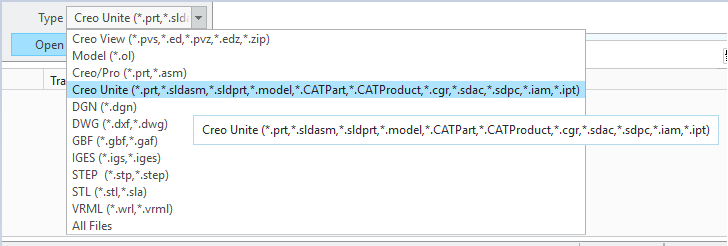
- Why does Creo Illustrate not show the NX files with format extensions now listed as supported for Creo Unite in the Type pulldown
- Dragging and dropping NX, CATIA, SolidWorks files on Creo View window results in error
This file is not supported by PTC Creo View. For supported file types and versions, see PTC Creo View Clients and Toolkit Software Matrix on the Reference Documents page of PTC.com

This is a printer-friendly version of Article 210220 and may be out of date. For the latest version click CS210220