기술 문서 - CS242260
Creo View Agent가 Windchill에 연결하지 못하고 동일한 Windchill 계정으로 인증한 후 시작하지 못함, 오류 "주의: Windchill과 통신하는 중 오류가 발생했습니다..."
수정한 날짜: 28-Mar-2025
적용 대상
- Windchill PDMLink 11.0 M010 to 12.0
- Creo View 3.1 M010 to 7.1
- Creo Illustrate 7.1
- Visualization Services (WVS)
- Public Key Infrastructure (CAC/PKI) Authentication
- Single Sign-on (SSO) Authentication
설명
- Creo View 클라이언트가 다음 오류 메시지와 함께 연결을 시작하지 못합니다.
Windchill 요청 오류
주의: Windchill과 통신하는 중 오류가 발생했습니다. 도움이 필요하면 Windchill 관리자에게 문의하세요.
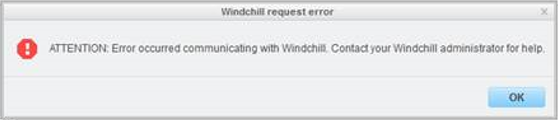
주의: Windchill과 통신하는 중 오류가 발생했습니다. 도움이 필요하면 Windchill 관리자에게 문의하세요.
- 이는 다음을 클릭하여 게시된 표현을 보기 위해 Creo View를 시작할 때 발생합니다.
- Creo View에서 열기 작업
- Windchill 정보 페이지 > 세부 정보 탭의 축소판 이미지
- Windchill에서 Creo View를 시작할 때 SSL 클라이언트 인증서를 사용하도록 설정하려면 어떻게 해야 하나요?
- Creo View가 Windchill에서 표현을 열지 못했습니다.
이는 기술 문서 242260의 PDF 버전이며, 구 버전일 수 있습니다. 최신 버전 CS242260