アーティクル - CS280506
Mentor Graphics PADS Layout [PADS9.x/VX.1.x] も Mentor Graphics Xpedition xDX Designer [PADS9.x] も、Windchill Workgroup Manager 10.2 M030 CPS24 を使用して Windows 10 マシンに登録できるアプリケーションではありません。
修正日: 06-Jan-2023
適用対象
- Windchill PDMLink 10.2 F000 to M030-CPS23
- Windchill PDM Essentials 10.2 F000 to M030-CPS23
- Windchill ProjectLink 10.2 F000 to M030-CPS23
- Windchill Workgroup Manager
- Mentor Graphics PADS Layout [PADS9.x/VX.1.x]
- Mentor Graphics Xpedition xDX Designer [PADS9.x]
説明
- Mentor Graphics PADS Layout [PADS9.x/VX.1.x]もMentor Graphics Xpedition xDX Designer [PADS9.x]も、Windchill Workgroup Manager 10.2 M030 CPS24 を使用して Windows 10 マシンに登録できるアプリケーションではありません。
- Windchill Workgroup Manager 10.2 M030 CPS24 がインストールされている Windows 10 マシンを使用している場合、 Mentor Graphics PADS Layout [PADS9.x/VX.1.x]またはMentor Graphics Xpedition xDX Designer [PADS9.x]を選択するオプションがありません。 [オーサリング アプリケーションの登録] ダイアログ ボックス
- オプションは同じもので使用できますが、Windows 7 マシンにインストールされています
- Windows 7インストールのダイアログ ボックスと選択
- オプションは同じもので使用できますが、Windows 7 マシンにインストールされています
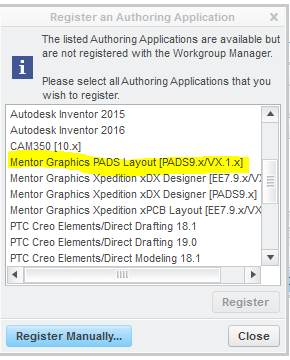
- Windows 10インストールのダイアログ ボックスと選択
な
最新バージョンはこちらを参照ください CS280506