Article - CS94057
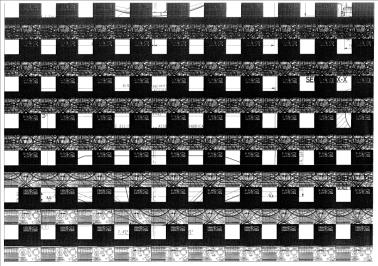
Creo View: Attempting to print from machines that have Intel on-board graphics adapters results in black and white checker-board output
Modified: 28-Nov-2025
Applies To
- ProductView and Creo Elements/View 9.1 to 10.0
- Creo Illustrate 1.0 to 4.1
- Creo View 1.0 to 12.0
Description
- Viewer background shown as black
- Printing generates black output, whether printing to PDF of XPS formats
- Printing results in unreadable drawing, with repeated black checkerboard / grid effect
- Print out of drawing shows black and white color scheme
- Printing a document viewable produces a blank black page
- PDF's printed from Creo View are messed-up
- For example:
- The corrupted printed output varies somewhat depending on the drawing being printed but it is generally a variation on the following:
- Intel on-board chipset configurations known to be affected:
- Dell D630 laptop with Intel Graphics Media Accelerator Driver for Mobile Report graphics card
- DELL Latitude E6320 with Intel HD Graphics 3000 card
- Intel HD 1000 with embedded i3 2120 processor
- Intel(R) Q45/Q43 Express Chipset
- Lenovo M81 with Intel on-board graphics adapter
This is a printer-friendly version of Article 94057 and may be out of date. For the latest version click CS94057