Article - CS148735
Attempting to browse the Commonspace via File > Open intermittently fails with "Attention:Connection to server is unavailable" and "Attention:Connection to server is available" messages and the client may go offline
Modified: 04-Nov-2021
Applies To
- Pro/INTRALINK 8.x + 10.2 F000 to F000-CPS01
- Windchill PDM Essentials 10.2 F000 to F000-CPS01
- Windchill PDMLink 10.2 F000 to F000-CPS01
- Windchill ProjectLink 10.2 F000 to F000-CPS01
- Windchill ProjectLink 10.1 M040
- Pro/INTRALINK 8.x + 10.1 M040
- Windchill PDMLink 10.1 M040
- Windchill PDM Essentials 10.1 M040
- PTC Windchill Workgroup Manager
Description
- Attempting to browse the Commonspace via the File > Open action in a Windchill Workgroup Manager linked CAD application may intermittently fail:
Attention:Connection to server is unavailable
You may continue to work with the workspace, but be aware objects that have not been downloaded to this machine will not be retrievalbe.
Please check for conflicts and synchronize workspace data when server becomes available.
You may continue to work with the workspace, but be aware objects that have not been downloaded to this machine will not be retrievalbe.
Please check for conflicts and synchronize workspace data when server becomes available.
Attention:Connection to server is available
The server to which this Workspace belongs is now available.
Please check for conflicts and out of date workspace data.
Checking for server complement of cached workspaces.
The server to which this Workspace belongs is now available.
Please check for conflicts and out of date workspace data.
Checking for server complement of cached workspaces.
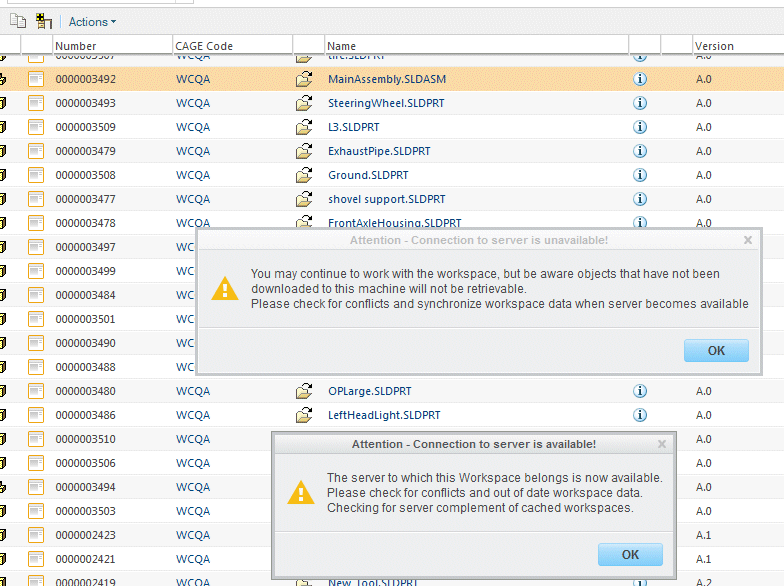
- The client may go offline
- The client uwgm.log reports messages like the following:
uwgm.session0.215: ServerCache: UwgmServerCache_i::execute: Cip Exception: 'Object type mismatch'
uwgm.session0.215: ServerCache: UwgmServerCache_i::signalTransactionError (error='Object type mismatch', connected=1, contacted=1)
uwgm.session0.act#468380185198619.srvtxn#17: prowtConnectionListener_i::onConnectionFailed for http://<server>/Windchill
uwgm.session0.act#468380185198619.srvtxn#17: prowtConnectionListener_i::onConnectionFailed : in secondary thread, pushing a BG task
uwgm.session0.215: ServerCache: UwgmServerCache_i::signalTransactionError (retry=0)
uwgm.session0.215: UwgmServerCache_i::execute finished
uwgm.session0.act#468380185198619.srvtxn#17: Server Transaction finished
uwgm.session0.act#468380185198619.214: Communication: UwgmException caught: Object type mismatch
uwgm.session0.act#468380185198619.228: UwgmClientConnectorAction_i::logConflicts started
uwgm.session0.act#468380185198619.228: Communication: Operation failed: not connected to server
uwgm.session0.act#468380185198619.228: UwgmClientConnectorAction_i::logConflicts finished
uwgm.session0.act#468380185198619.214: Communication: UwgmRequestAction::processOwnerAppContextNotFoundConflict : Number of conflicts are 0
- The Methodserver reports errors like the following:
ERROR [ajp-bio-10860-exec-5] com.ptc.windchill.uwgm.soap.impl.uwgm.BinaryRequestHandler demo - Falied to serialize response C:\ptc\vhd\VHD102_M010_10\Windchill\logs\reqresp\[email protected]_2013-10-09T10_35_49.790 05_30\response_9.bin
ClientAbortException: java.net.SocketException: Software caused connection abort: socket write error
...
Caused by: java.net.SocketException: Software caused connection abort: socket write error
ClientAbortException: java.net.SocketException: Software caused connection abort: socket write error
...
Caused by: java.net.SocketException: Software caused connection abort: socket write error
This is a printer-friendly version of Article 148735 and may be out of date. For the latest version click CS148735