Creo Elements/DirectとCreo Simulateの連携について
Creo Elements/DirectとCreo Simulateは以前から連携機能が実現されている。
今(本記事は2019年7月)から10年ほど前に、PTCと旧CoCreateが合併後、他のアプリケーションに先駆けて、この連携が実現した。
その当時の製品名はCoCreate ModelingとPro/MECHANICAであった。
Creo Elements/Directユーザで、意外にこのことをご存じでない顧客は他社の解析ツールを導入した話を聞くことがあるので、改めてお伝えする。
Creo Elements/Directユーザの解析(構造、熱伝導)の課題は、この連携によって解決できることが沢山ある。
どの様なことが出来るのか。連携によって実現する機能を解説する。
起動、データ転送
Creo Elements/Directのメニューで、モデルを選択して実行ボタンを押すだけで、Creo Simulateの起動からモデルデータの転送までを自動的に行うので、データファイルをエクスポート/インポートするような手間が発生しない。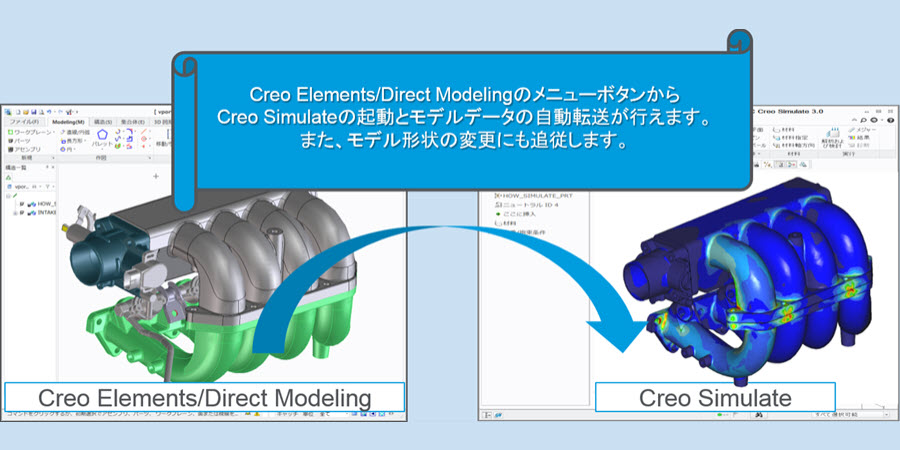
境界条件、解析計算
Creo SimulateのユーザフレンドリーなUIメニューを使って、境界条件を設定し解析計算を実行する。
Creo Simulateはp法アダプティブ計算を行うので、解析に詳しくないユーザでも収束した計算結果を得られる。
解析結果の表示
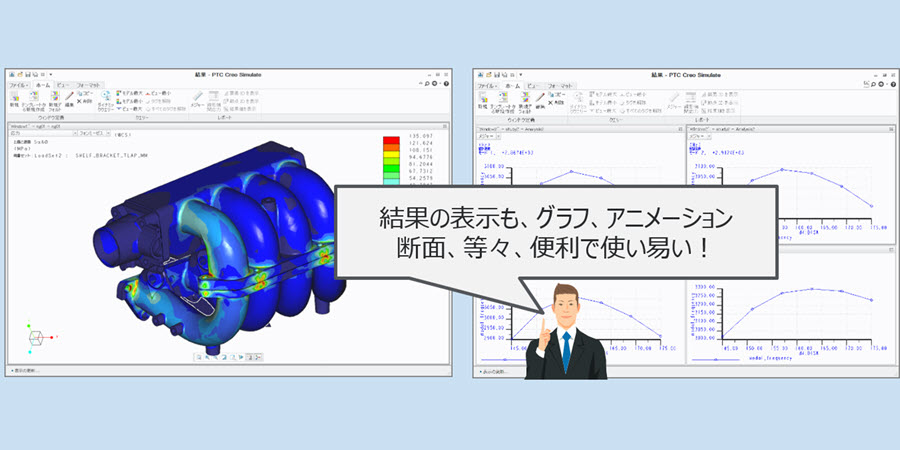
一般的なコンター表示に加え、グラフ、アニメーション、断面など多彩な結果表示に対応可能である。
更新
Creo Elements/Directでモデルデータを更新した場合は、ボタンを一つクリックするだけでCreo Simulateに差分データを転送する。Creo Simulateで付加した境界条件は維持されているので、すぐに解析計算を再実行することができる。Creo Elements/Directユーザで、これから解析の導入を計画していたり、他社の解析ツールを導入したが課題を抱えている場合は、Creo Simulateとの連携機能に注目して導入の検討を願いたい。