技术文章 - CS315692
使用 Windchill PDMLink 通过第三方 CAD 工作程序发布时,出现 WWGM 错误:“找不到工作区”或“在指定位置找不到服务器”。
已修改: 23-Jul-2026
适用于
- Creo View Adapters 4.0 to 13.0
- Windchill PDMLink 10.0 to 13.1
- Windchill Workgroup Manager
- SOLIDWORKS
- NX
- CATIA
- AUTODESK INVENTOR
说明
- 发明家工人“启动失败”
- 启动Windchill Workgroup Manager时, NX 工作进程尝试发布时抛出错误,并显示相应的错误消息:
"Error from UWGM - Registration with server failed : The workspace couldn't be found” Windchill File System failed to initialize. NX2212 will not be connected with Windchill Workgroup Manager.
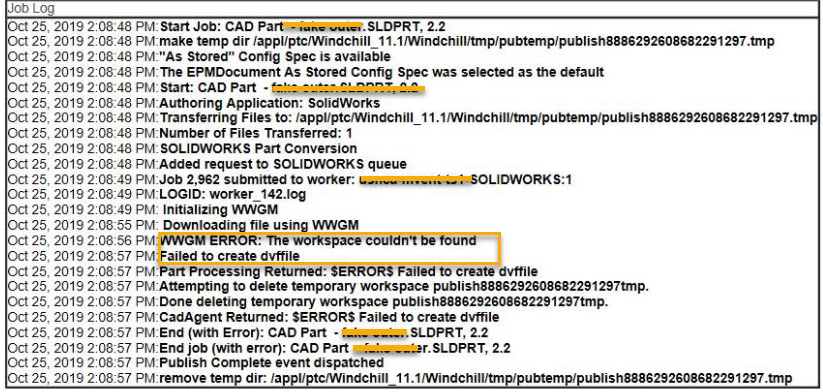
- NX 作业发布失败, WVS 作业监控日志中出现以下错误:
WWGM ERROR: Error from UWGM Registration with server failed. The workspace couldn't be found.
- 在 WWGM(Windchill Workgroup Manager)相关工作进程中发布 CAD 文档失败, worker.log中记录了错误:
- ug2pv Error:13032: WWGM worker failed to sync file ** ugadapter_app::Worker_sync_model: Error from UWGM - Registration with server failed : The workspace couldn't be found”
- WWGM ERROR: Error from UWGM-Registration with server failed: The server couldn't be found at the given location
- Windchill重启后, NX、SOLIDWORKS、CATIA或Autodesk Inventor工作者无法发布任何作业,并出现以下错误:
- ugadapter_app::Worker_sync_model: Error from UWGM - Registration with server failed : The workspace couldn't be found
Downloading file using WWGM : inventor2pv Error:13032: WWGM worker failed to sync file "xxx.ipt" WWGM ERROR: The server couldn't be found at the given location
- 发送给特定工作人员的所有CATIA发布作业均失败,作业详情中显示以下错误:
WWGM ERROR: Server registration error: The workspace couldn't be found. Input File Not Found Part Processing Returned:$ERROR$ Input File Not Found
- 作业监控日志显示以下错误
- 无法在工作机器上的独立浏览器中访问 Windchill,并且在WorkerDaemon.exe的命令行窗口中观察到以下错误:
HTTP error connecting to https://<windchill host>/Windchill:503/Service Unavailable shutdownClient
- 所有 CATIA 作业均因错误“服务器注册错误:找不到工作区”而失败。
- 通过工作进程发起的 WGM 在工作机器上显示为“无服务器”。
- 但是,在WGM中手动注册服务器会触发以下错误:
Browser Service is unavailable. Verify the integrity of your installation and try again.
这是文章 315692 的 PDF 版本,可能已过期。最新版本 CS315692