技术文章 - CS287712
如果 Axeda Desktop Server 中的 AutoAccept 设置为30秒,则使用 Axeda Desktop Viewer 6.9.215 的远程会话将会断开连接
已修改: 30-Jul-2018
适用于
- Axeda - Connectivity 6.9.1
说明
- 使用 Axeda Desktop Viewer 6.9.215 的远程会话在未连接时断开 AutoAccept Axeda Desktop Server 中的设置为30秒
- 右键单击资产上的 Axeda Desktop Server system 托盘图标,然后选择Admin Properties
- 确保 已 Query on incoming connection 启用,且具有 Timeout为30秒
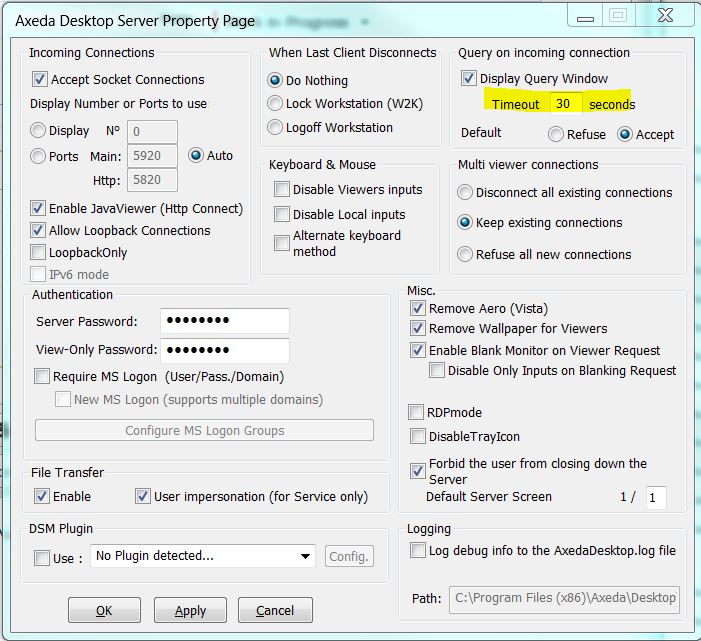
- 使用 Axeda Desktop Viewer 6.9.215 启动远程会话
- 查询窗口以30秒倒计时计时器显示
- 30秒后,连接以消息结尾:
服务器关闭的连接
-作为应用程序运行的服务器没有解锁屏幕的权限。
-手动封闭
-网络断开连接
-服务器拒绝连接
-作为应用程序运行的服务器没有解锁屏幕的权限。
-手动封闭
-网络断开连接
-服务器拒绝连接
- 其他查看器版本按预期工作
- 即使使用 Viewer 6.9.215,10秒的超时值也能正常工作
这是文章 287712 的 PDF 版本,可能已过期。最新版本 CS287712