技术文章 - CS210220
为什么 Creo Unite 支持的第三方 CAD 文件格式在 Creo View/Creo Illustrate 中无法在本地磁盘上找到?
已修改: 04-Feb-2026
适用于
- Creo Illustrate 3.0 M030 to 9.1
- Creo Parametric 3.0 M020 to 12.4
- Creo View 3.0 M030 to 12.1
- Creo Elements/Direct Modeling 19.00 to 20.1
- Creo Elements/Direct Drafting 18.00 to 20.1
- Siemens PLM NX (formerly Unigraphics or UG-NX)
- Dassault SolidWorks
- Dassault CATIA V4 & CATIA V5
说明
- Creo View文件 >打开和 Creo Illustrate文件 > 导入无法找到第三方 CAD 应用程序 磁盘上的文件 对于 Creo Elements/Direct Modeling、Creo Elements/Direct Drafting、CATIA V4、CATIA V5、SolidWorks 和 NX,选择类型: Creo Unite (*.prt,*.sldasm,*.sldprt,*.model,*.CATPart,*.CATProduct,*.cgr,*.sdac,*.sdpc,*.iam,*.ipt)
- 为什么 Creo View 在“类型”下拉菜单中不显示Creo Unite现在支持的第三方 CAD 格式扩展名的 CAD 文件?
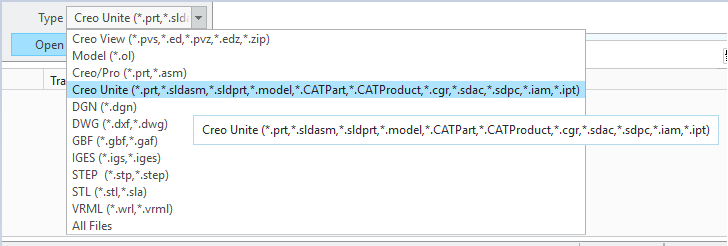
- 为什么 Creo Illustrate 的“类型”下拉菜单中不显示Creo Unite现在支持的格式扩展名的 NX 文件
- 在 Creo View 窗口中拖放 NX、CATIA、SolidWorks 文件会导致错误
PTC Creo View 不支持此文件。有关支持的文件类型和版本,请参阅 PTC.com 网站“参考文档”页面上的“PTC Creo View 客户端和工具包软件矩阵”。

这是文章 210220 的 PDF 版本,可能已过期。最新版本 CS210220