技术文章 - CS149077
无法删除 WTPart 和 CAD 文件操作之间的关联,Windchill PDMLink 10.1 M010 抛出错误 "不能将多个使用关系链接到已完成或要构建的子部件"
已修改: 10-Aug-2015
适用于
- Windchill Solutions 10.1 M040 and earlier
- Windchill Solutions 10.2 M010 and earlier
说明
- 试图移除 WTPart 与 CAD 文件之间的关联失败,错误为:
不能具有已完成或要构建具体值的同一子部件的多个使用关系链接
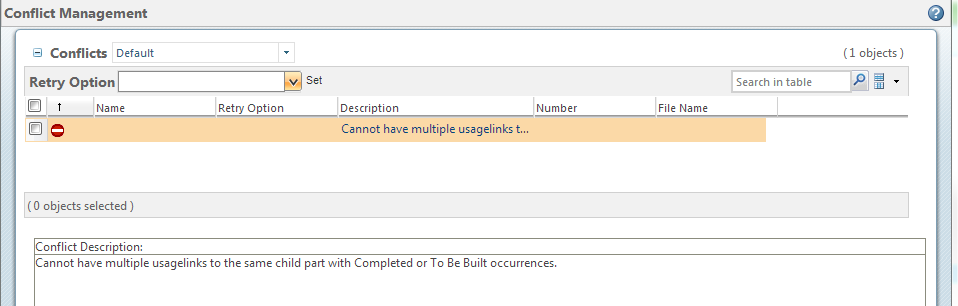
方法服务器报告:
方法服务器报告:
2013-10-29 15:43:40734错误 [ajp-bio-8010-exec-4] .com windchill uwgm. proesrv. StandardRequestDispatcher user-StandardRequestDispatcher. dispatchRequest::意外失败(s)
windchill uwgm。 UwgmErrorException:(wt.properties. partResource/265) wt.properties. 工具:不能将多个 WTException 与已完成的子部件或要构建的具体值相匹配。
嵌套异常为:(wt.properties. partResource/265) wt.properties 工具. WTException:不能将多个使用关系链接与已完成的子部件或要构建的具体值进行匹配。
在 wt.properties。 StandardWTPartBuildService processPreModifyOccurrences (StandardWTPartBuildService:1145)
位于 wt.properties 的 StandardWTPartBuildService 访问 $ 300 (StandardWTPartBuildService .java:80)
在 wt.properties。 StandardWTPartBuildService $2 notifyVetoableMultiObjectEvent (StandardWTPartBuildService java:128)
在 wt.properties StandardKeyedEventBranch intDispatchEvent (StandardKeyedEventBranch:298)
...
在 wt.properties ServiceFactory $ ServerInvocationHandler 调用(ServiceFactory .java:399)
在 wt.properties ServiceFactory $ ServerInvocationHandler 调用(ServiceFactory .java:399)
在 $Proxy 189 saveUsesOccurrenceAndData (未知源)
在 wt.properties BuildServiceUtility markAsNonBuilt (BuildServiceUtility:472)
在 wt.properties. EPMBuildRuleDeleteEventDelegate processEvent (EPMBuildRuleDeleteEventDelegate:142)
在 wt.properties StandardBuildService processBuildRuleEvents (StandardBuildService:3047)
在 wt.properties. StandardBuildService 访问 $ 000 (StandardBuildService .java:237)
在 wt.properties StandardBuildService notifyVetoableMultiObjectEvent (StandardBuildService:2525)
在 wt.properties StandardKeyedEventBranch intDispatchEvent (StandardKeyedEventBranch:298)
- 要重现的步骤:
1. 创建 CAD 装配的组件 CAD 文档,如下所示:
顶部 .asm
|
|-P1 .prt
|-P2 .prt
|-P3 .prt
2. 执行 "编辑关联" 以将多个组件 CAD 文档关联到具有所有者、提供映像或图像关联的相同 WTPart (仅可创建一个所有者和一个提供映像,以便您必须将映像用于其他人),如下所示:
Top .asm [部件 1 WTPart 作为所有者关联]
|
|-P1 .prt [部件 2 WTPart 作为所有者关联]
|-P2 .prt [部件 2 WTPart 作为提供图像关联]
|-P3 .prt [部件 2 WTPart 作为图像关联]
3. 使用自动关联检入 CAD 装配及其依存对象
4. 检查与 CAD 装配关联的 WTPart 是否已构建,以及步骤中子 WTPart 的多个使用关系链接 #2
5. 执行 CAD 装配的编辑关联,并尝试移除与 CAD 装配关联的 WTPart 的关联
这是文章 149077 的 PDF 版本,可能已过期。最新版本 CS149077