Article - CS145075
When creating a multiple report parameter cell in a drawing table, empty lines appear for empty report parameters in Creo Parametric 2.0
Modified: 20-Jan-2014
Applies To
- Creo Parametric 2.0 all datecodes
- Exclusively new drawings created in Creo Parametric 2.0 from older or new models.
Description
- When creating a multiple report parameter cell in a new drawing table, empty lines appear for empty report parameters.
- Automatic height adjustment for drawing tables doesn't work like in previous releases.
- Creo creates an empty carriage return for empty parameters in a multiple parameter cell.
- In the example below, the report parameter &mbr.test_param01 is NULL. It leaves the table with an empty line.
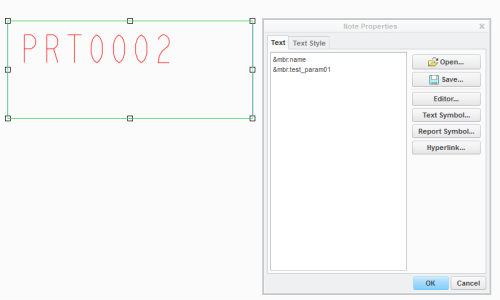
- When a multiple report parameter cell is created, an empty line should not be displayed and the cell height should be adjusted instead.
- The usual behaviour in Creo Elements Pro all datecodes is to have the cell height fitting the gap of the empty report parameter. The same example as above in Creo Elements Pro:

This is a printer-friendly version of Article 145075 and may be out of date. For the latest version click CS145075