|
|
|
| Page 11 of 17 |
|
Installing Pro/ENGINEER WildfirePro/ENGINEER - Specify Options
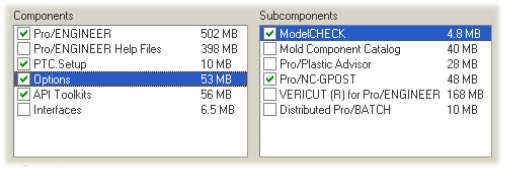
1. Select the Pro/E Wildfire installation directory by entering a full path, or choosing from the folder browser. 2. Select Platform and Language. 3. Select the desired components and sub-components required by your licenses.
4. Specify License Servers.
In the next step, you will define the commands to launch Pro/ENGINEER Wildfire...
|
|||