Tag Properties
Tag Properties — General
A tag represents addresses within the device with which the server communicates. The server allows both Dynamic tags and user-defined Static tags. Dynamic tags are created and stored in the client and specify device data addresses. User-defined Static tags are created and stored in the server. Static tags function as pointers to device data addresses and can be browsed from clients that support tag browsing.

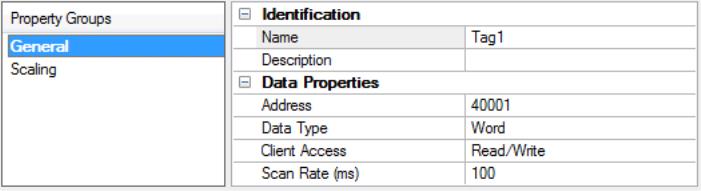
Name: Enter a string to represent this tag. The tag name can be up to 256 characters in length. The tag name is part of the OPC browse data tag names must be unique within a given device branch or tag group branch.For information on reserved characters, refer to How To... Properly Name a Channel, Device, Tag, and Tag Group.
 Tip: If the application is best suited for using blocks of tags with the same names, use tag groups to separate the tags. For more information, refer to Tag Group Properties.
Description: Add context to the tag. A string of up to 255 characters can be entered for the description. When using an OPC client that supports Data Access 2.0 tag properties, the description property is accessible from the tag's item Description properties.
Address: Enter the target tag's driver address. The address's format is based on the driver protocol.
Tip: For hints about how an address should be entered, click the browse (...) button. If the driver accepts the address as entered, no messages are displayed. A popup informs of any errors. Some errors are related to the data type selection and not the address string.Data Type: Specify the format of this tag's data as it is found in the physical device. In most cases, this is also the format of the data as it returned to the client. The data type setting is an important part of how a communication driver reads and writes data to a device. For many drivers, the data type of a particular piece of data is rigidly fixed and the driver knows what format needs to be used when reading the device's data. In some cases, however, the interpretation of device data is largely in the user's hands. An example would be a device that uses 16-bit data registers. Normally this would indicate that the data is either a Short or Word. Many register-based devices also support values that span two registers. In these cases, the double register values could be a Long, DWord or 32-bit Float. When the driver being used supports this level of flexibility, users must tell it how to read data for this tag. By selecting the appropriate data type, the driver is being directed to request one or more registers.
• Default - Uses the driver default data type
• Boolean - Binary value of true or false
• Char - Signed 8-bit integer data
• Byte - Unsigned 8-bit integer data
• Short - Signed 16-bit integer data
• Word - Unsigned 16-bit integer data
• Long - Signed 32-bit integer data
• DWord - Unsigned 32-bit integer data
• LLong - Signed 64-bit integer data
• QWord - Unsigned 64-bit integer data
• Float - 32-bit real value IEEE-754 standard definition
• Double - 64-bit real value IEEE-754 standard definition
• String - Null-terminated Unicode string
• BCD - Two byte-packed BCD value range is 0-9999
• LBCD - Four byte-packed BCD value range is 0-99999999
Client Access: Specify whether the tag is Read Only or Read / Write. By selecting Read Only, users can prevent client applications from changing the data contained in this tag. By selecting Read / Write, users allow client applications to change this tag's value as needed. The Client Access selection also affects how the tag appears in the browse space of an OPC UA client. Many client applications allow filtering tags based on attributes. Changing the access method of this tag may change how and when the tag appears in the browse space of the client.
Scan Rate: Specify the update interval for this tag when using the Scan Mode option of Respect Tag-Specified Scan Rate within Device Properties. OPC clients can control the rate at which data is scanned by using the update rate that is part of all OPC groups. Normally non-OPC clients don't have that option. The server specifies an update rate on a tag per tag basis. Using the scan rate, users can tailor the bandwidth requirements of the server to suit the needs of the application. For example, data that changes infrequently does not need to be scanned very often. Using the scan rate this tag can be forced to read at a slower rate reducing the demand on the communications channel. The valid range is 10 to 99999990 milliseconds (ms), with a 10 ms increment. The default is 100 milliseconds.
With the server's online full-time operation, these properties can be changed at any time. Changes made to tag properties take effect immediately; however, client applications that have already connected to this tag are not affected until they release and attempt to reacquire it. Utilize the User Manager to restrict access rights to server features and prevent operators from changing the properties.